Managing Permissions in Video Conferencing Apps: 3 Access Models#
Everyone benchmarks video conferencing on the things you can see: resolution, latency, how many people fit in a grid. But the failures that actually hurt in production are rarely about a dropped frame — they're about the wrong person joining a room they shouldn't be in, or a private recording ending up somewhere public. Permissions are the invisible half of a video app, and they're the half most teams underestimate until something goes wrong.
Here's the uncomfortable part. At the media layer that low-level WebRTC SDKs expose, the only permissions you get are "can this token publish audio, video or screen." There's no notion of who a person is, whether they belong in the room at all, or who's allowed to watch the recording afterwards. That's a media grant, not an access-control system. You either build the missing layer yourself or embed a product that already has it.
This post lays out the three access models the industry keeps converging on — anonymous role links, identified guests and users — with concrete trade-offs and "use this when…" triggers. Then it shows how OpenVidu maps onto them: build-your-own on OpenVidu Platform, or the batteries-included model that OpenVidu Meet formalized in its 3.8.0 release.
The two layers of permissions: media control vs access control#
Before comparing models, you need to separate two things that get lumped together as "permissions."
- Media / publishing permissions. Can I turn on my camera? My microphone? Share my screen? Send data? This is what a raw WebRTC token carries, and it's genuinely low-level — it's about tracks, not people.
- Access permissions. Is this person allowed into the room in the first place? Who can end the meeting, kick participants, or promote someone to moderator? Who can list, play or delete the recording after everyone's gone home?
Low-level SDKs give you the first layer and stop there. In OpenVidu Platform (as in any LiveKit-based stack), you mint a token on your server with a set of video grants:
const at = new AccessToken(LIVEKIT_API_KEY, LIVEKIT_API_SECRET, {
    identity: participantName // just a label you choose
});
at.addGrant({
    roomJoin: true,
    room: roomName,
    canPublish: true,
    canSubscribe: true
});
Notice what's missing. There's no user, no account, no role, no ownership. The identity is just a string you invented. The grant says what tracks this token may publish — nothing about whether this human should have been handed the token at all. That decision lives in your application, and the SDK can't make it for you.
The access layer is where identity, roles, resource ownership and audit trails live. If you own the real-time logic, that layer is yours to design.
The vocabulary we'll use#
Every product names these ideas a little differently. Throughout this post we'll use the terms OpenVidu adopted in OpenVidu Meet, so it's worth pinning them down once:
- Participant. Anyone actually present in a meeting, whatever route they took to get there.
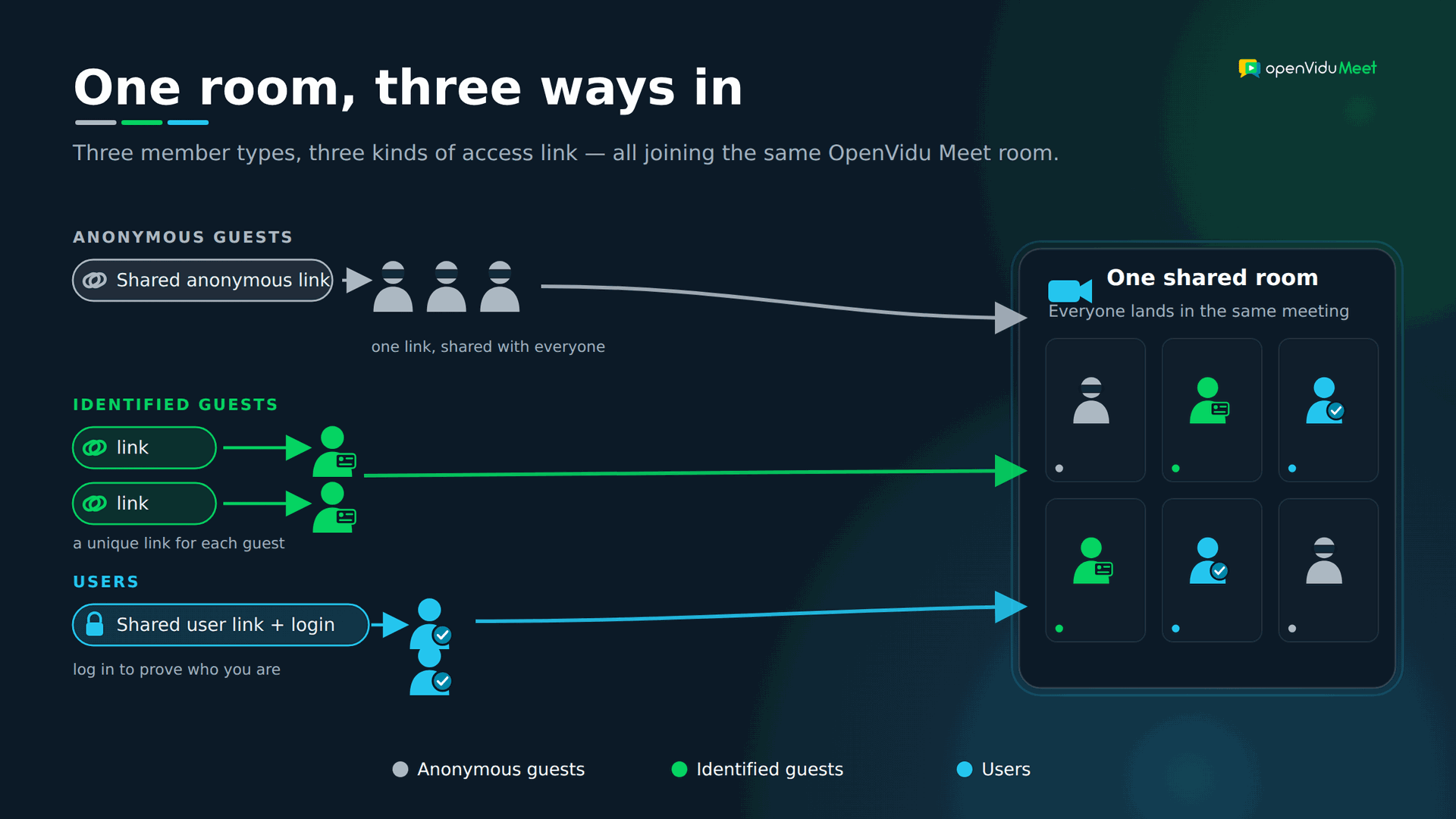
- Room member. Any individual granted access to a specific room. There are three kinds, distinguished by how they prove who they are.
 User. A room member with a registered account in the system. They log in to get in.
 Identified guest. A room member without an account, added ahead of time under a fixed name. They receive their own private link and never log in.
 Anonymous guest. Someone without an account who accesses through a shared link and just types a display name before joining.
- Role and permissions. A role (like Moderator or Speaker) is a named bundle of permissions — the individual capabilities that decide what someone can do once inside.
With that shared vocabulary in place, here are the three models. One thing to keep in mind up front: they aren't mutually exclusive — a single room can use all three at once, each person joining through their own kind of link. Most real apps end up mixing them rather than picking just one.
Model 1: Predefined roles + shared anonymous links#
The lowest-friction model there is. You define a fixed set of roles — say Moderator and Speaker — and generate one shareable link per role. Anyone who opens the link joins with that role's permissions, usually after typing a display name. No account, no setup.
Pros
- Zero friction. No sign-up, no per-person provisioning. Paste the link in a calendar invite and you're done.
- Trivial to distribute. One link reaches a hundred people as easily as one.
- Great for open or large audiences where you genuinely don't know who's coming.
Cons
- The link is a bearer token. Whoever holds it gets in. Forward it, screenshot it, leak it in a public channel — it still works.
- No per-person identity or audit. Everyone on a link is indistinguishable and equal.
- Revocation is all-or-nothing. You can't remove one person without rotating the link for everyone.
Use it when: webinars, open community calls, quick ad-hoc meetings, or any low-sensitivity "just click to join" experience.
How OpenVidu Meet implements it
Every room exposes two shared anonymous links — one per predefined role — and, new in 3.8.0, you can enable or disable each role's link per room (allow anonymous speakers, say, but require an identity to moderate). Each anonymous guest picks a name before joining.
- In the app: copy either link from the "Rooms" or "Room Details" page — or from inside a live meeting if you hold the
canShareAccessLinkspermission — and toggle each role's anonymous access in the room creation/edit wizard. - Over the REST API: the links come back on the room object from
GET /rooms/{roomId}, ataccess.anonymous.moderator.urlandaccess.anonymous.speaker.url; enable or disable each role withPUT /rooms/{roomId}/access.
See Room Access for the full picture.
Model 2: Identified guests + custom permissions#
A step up in control, without the weight of user accounts. Here you explicitly add each individual as a room member with a fixed name and a base role — and you can fine-tune their permissions. Each guest receives their own unique personal access link, delivered privately, with no login required.
The mental model shifts from "here's a link for the role" to "here's a link for this specific person."
Pros
- Per-person links mean per-person revocation. Remove one guest and only their link dies — everyone else is unaffected.
- A real (if lightweight) audit trail. You know Dr. Smith's link, not just "a moderator."
- No login friction. Perfect for external people who'll never create an account in your system.
- Per-person permission tuning. Invite a guest who can speak but not record, for example.
Cons
- Still a bearer token if forwarded — but, crucially, an individually revocable one.
- You must provision each guest ahead of time, which doesn't scale to open audiences.
Use it when: telehealth (invite one specific patient to one specific consultation), 1:1 interviews, onboarding an external client or partner — anywhere you invite named people who won't have accounts.
How OpenVidu Meet implements it
You add a member of type identified_guest with a display name and a base role (Moderator or Speaker), optionally overriding individual permissions. Meet generates a unique personal link for them; removing the member instantly invalidates it and expels them if they're mid-meeting.
- In the app: open the room's "Room Members" tab, click "Add Member", choose Identified guest, then grab their link later with the copy access link button in the member list.
- Over the REST API: create them with
POST /rooms/{roomId}/members— the response carries the personal link in the member'saccessUrl(also retrievable viaGET /rooms/{roomId}/members/{memberId}).
See Room Members.
Model 3: Users + custom permissions#
The strongest model, and the one built for recurring, higher-stakes use. Individuals have real accounts in your system. You add a user as a member of a room and assign a role and permissions — but here's the key difference: everyone accesses through the same shared user link and authenticates. The identity, not the link, determines what happens.
Log in as an admin and you get one set of permissions; log in as a regular member and you get another. The link carries no secret at all.
On top of per-room membership, this model unlocks organization-wide rules:
- Admins get full access to every room, always.
- Room owners always have full access to the rooms they create.
- A room can be marked accessible to all users, so any authenticated user can join even without being added explicitly.
Pros
- Access tied to an authenticated identity, not a forwardable link — the strongest guarantee of the three.
- Centralized user management and a real audit trail. Who did what is a first-class question you can answer.
- Org-wide policies (admin, owner, open rooms) instead of per-room bookkeeping.
- One link for everyone. No per-person link distribution to manage.
Cons
- You need an identity/auth system, and users pay a login step.
- Poor fit for one-off external guests who shouldn't have to register.
- Heavier to operate than dropping a link in a chat.
Use it when: internal tools, enterprise apps, e-learning platforms with enrolled students, or anything with a known, recurring user base and compliance requirements.
How OpenVidu Meet implements it
Meet ships a built-in user system with three account roles — admin (full control), room_manager (manages their own rooms) and room_member (accesses rooms they belong to). Everyone joins through the same shared user access link, which renders a login form and carries no secret, so your app never handles passwords. Admins and room owners are implicit full-access members, and a room can be opened to all users (who then join as Speaker).
- In the app: create accounts on the "Users" page ("Create User", admins only), then add one to a room from its "Room Members" tab → "Add Member" → User. Copy the shared link from that member's row in the member list (all users share one link — they log in to prove who they are).
- Over the REST API: create accounts with
POST /users, add a user as a member withPOST /rooms/{roomId}/members, and read the shared link ataccess.user.urlon the room object fromGET /rooms/{roomId}.
See Users.
That completes the three models. Here they are side by side — three member types, each entering through its own kind of access link, all landing in the same room:
Beyond access: fine-grained, per-person permissions#
Notice that all three models answer "how do you get in." A separate question is "what can you do once you're in" — and that layer is orthogonal. You can attach the same fine-grained permission set to an anonymous guest, an identified guest, or a user.
Predefined roles cover maybe 80% of cases out of the box. Fine-grained permissions handle the exceptions: a speaker who's allowed to record this one session, or a moderator who can run the meeting but not delete recordings.
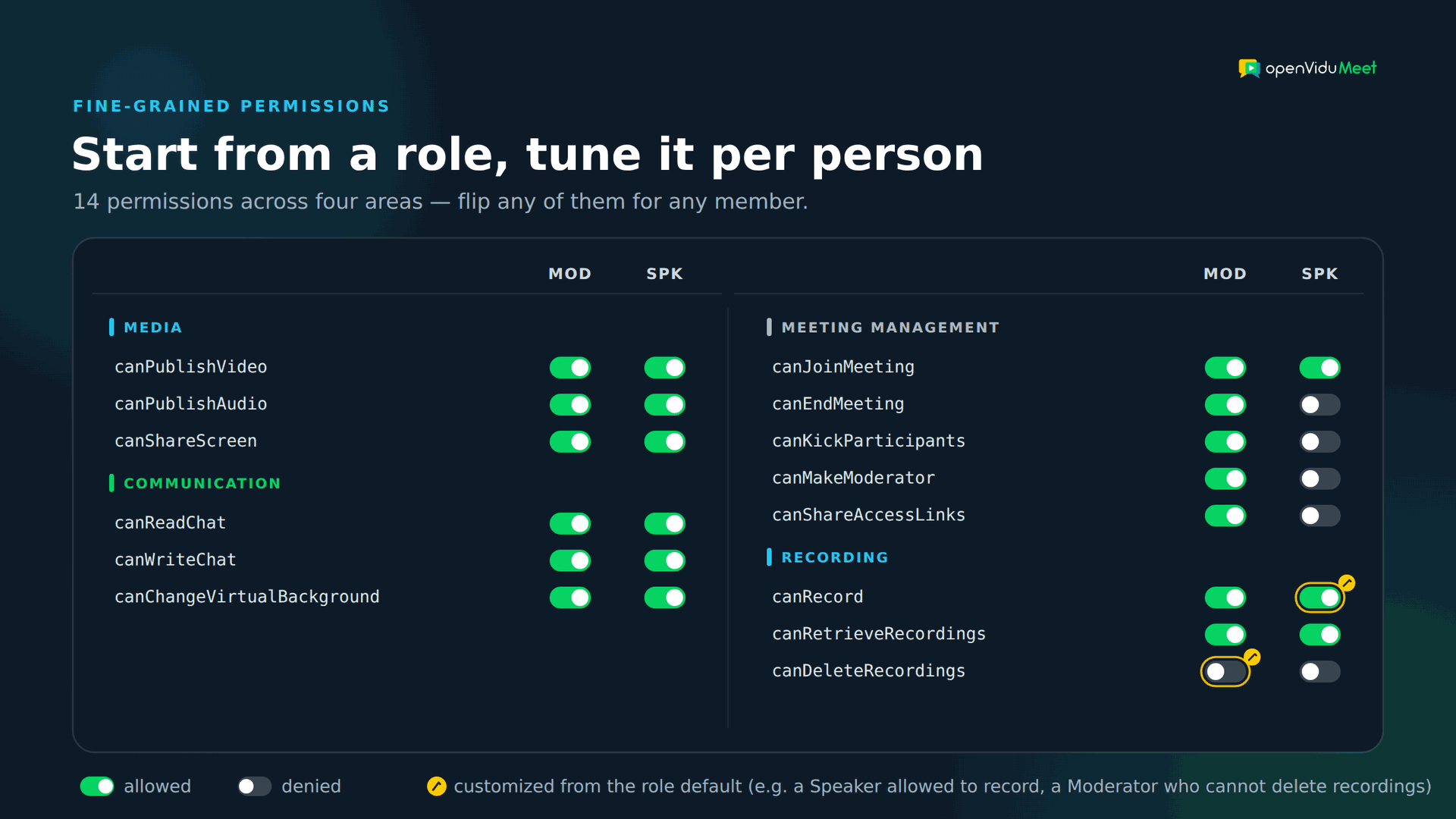
OpenVidu Meet 3.8.0 introduced 14 boolean permissions for exactly this. Grouped for readability:
- Media:
canPublishVideo,canPublishAudio,canShareScreen - Communication:
canReadChat,canWriteChat,canChangeVirtualBackground - Meeting management:
canJoinMeeting,canEndMeeting,canKickParticipants,canMakeModerator,canShareAccessLinks - Recording:
canRecord,canRetrieveRecordings,canDeleteRecordings
Renamed in 3.9.0
OpenVidu Meet 3.9.0 renamed these permissions to a consistent scheme, and the names above are now deprecated. They keep working until 3.12.0, and requests accept either name. The new names are recordingControl (canRecord), recordingList, recordingPlay and recordingDownload (together replacing canRetrieveRecordings), recordingDelete (canDeleteRecordings), meetingJoin (canJoinMeeting), meetingEnd (canEndMeeting), participantPromote (canMakeModerator), participantKick (canKickParticipants), mediaPublishAudio (canPublishAudio), mediaPublishVideo (canPublishVideo), mediaShareScreen (canShareScreen), mediaChangeVirtualBackground (canChangeVirtualBackground), chatRead (canReadChat), chatWrite (canWriteChat) and roomShareAccessLinks (canShareAccessLinks). See the OpenVidu Meet release notes.
Each role — Moderator and Speaker — ships with sensible defaults, and you can flip any individual permission for any member. The highlighted cells below show two such overrides: a Speaker granted canRecord, and a Moderator whose canDeleteRecordings was turned off.
A member's effective permissions start from their base role and get overridden individually:
{
    "baseRole": "speaker",
    "customPermissions": {
        "canPublishVideo": true,
        "canPublishAudio": true,
        "canShareScreen": false,
        "canRecord": true,
        "canRetrieveRecordings": true,
        "canDeleteRecordings": false
    }
}
Permissions aren't even fixed for the duration of a meeting. A participant with canMakeModerator can promote another participant on the fly — a change that's temporary and scoped to that meeting only, reverting when they leave. It's the difference between a static config and a living session. See Role Management.
Compare this to the low-level SDK token from earlier: there, you'd only ever have the media subset, and you'd model everything else — chat rights, who can end the call, recording control — yourself.
Build it yourself, or embed a product that already has it#
You've now seen all three models. There's one more decision that cuts across every one of them: do you build this access layer yourself, or embed a product that already has it? Be honest about the cost of each path.
- Build your own. You get total control, but you're now on the hook for user accounts, link generation and expiry, role-to-grant mapping, per-person revocation, and recording ACLs. Every one of those is security-sensitive, and "we'll add real permissions later" is how leaks happen.
- Embed a product that already solved it. Instead of reinventing access control, you inherit a battle-tested model and drive it from your own app — provisioning members and generating links from your backend while the product enforces the permissions.
Which path you pick maps cleanly onto OpenVidu's two products.
How OpenVidu maps to these models: Platform vs Meet#
If you've followed along, the OpenVidu split falls out naturally.
- OpenVidu Platform is for when you own both the business logic and the real-time logic. Tokens carry media permissions only; there is no built-in user or member concept. The three access models above are yours to build on top. That's the right trade when you're constructing a specialized media experience and want total control — see the application server tutorials for how token grants work.
- OpenVidu Meet gives you all three models, the fine-grained permissions and recording ACLs out of the box. Its 3.8.0 release formalized this around three pillars — users, room members, and three distinct access-link types (anonymous, identified-guest, and user links). Those concepts exist precisely so you don't have to reinvent access control on top of raw media grants.
- OpenVidu Meet Embedded lets you pull that entire access layer into your own application, driven by a REST API and a Web Component. You provision members and generate links from your backend; Meet enforces the permissions. You get the control of "build your own" without actually building the security-critical parts.
That's the whole justification for the new concepts in one line: users, room members and typed access links are the vocabulary you need to answer "who gets in and what can they do" — and rebuilding that vocabulary yourself is rarely time well spent.
Which model should you choose?#
There's no single winner. Match the model to the situation — and most real applications end up mixing them:
- Open or large audience, low sensitivity? → Anonymous role links (Model 1).
- Named external people without accounts? → Identified guests (Model 2).
- Recurring, known user base with compliance needs? → Users (Model 3).
- A typical product? → A mix. Think authenticated hosts running a room that anonymous attendees join by link, with a few named external guests invited individually.
The good news is you don't have to commit to one for the whole app. A single room in OpenVidu Meet can accept authenticated users, identified guests and anonymous participants at the same time — each through their own link type, each with their own permissions.
Need more than this?#
If you're deciding how to architect permissions right now, the fastest way to feel the trade-offs is to try the model that removes the build-your-own burden:
👉 See it in action — spin up a permissioned room with OpenVidu Meet Embedded.
To go deeper on the concepts covered here:
- Users — accounts, roles and org-wide access rules.
- Room Members — identified guests vs users.
- Room Access — the three access-link types.
- Access tutorials for each model: anonymous access, identified guests, and users.
And if you need total control over the media pipeline instead, OpenVidu Platform gives you the low-level SDKs to build your own access layer from the ground up.