Deploy OpenVidu Meet on a single server#
This section contains the instructions to deploy a production-ready deployment of OpenVidu Meet in a single server.
Info
This guide shows a single-node installation in a Linux machine. To see other deployment options, such as deploying in cloud providers like AWS, Azure, Google Cloud, DigitalOcean or Oracle Cloud, or deploying in a multi-node architecture, check the Other deployment options section at the end of this page.
Prerequisites#
OS#
- Ubuntu 22.04 or newer.
- User with root permissions (via
sudo).
Recommended hardware#
- At least 4 GB RAM and 4 CPU cores.
- Generous disk space (100 GB recommended), especially if you plan to record your meetings.
Networking#
- A public IP, that doesn't change between restarts (a static IP).
- (Recommended) A domain name (FQDN) pointing to the public IP.
-
Port rules: these inbound ports must be open in your firewall and reachable from the internet.
Protocol Ports Source Requirement TCP 80 0.0.0.0/0, ::/0 Mandatory TCP 443 0.0.0.0/0, ::/0 Mandatory UDP 443 0.0.0.0/0, ::/0 Mandatory TCP 7881 0.0.0.0/0, ::/0 Optional, but recommended for optimal perfomance and media quality UDP 50000 - 60000 0.0.0.0/0, ::/0 Optional, but recommended for optimal perfomance and media quality
Installation#
Run this command in your server to start the installation wizard:
Follow the instructions of the installation wizard. They are self-explanatory, but here is a breakdown:
-
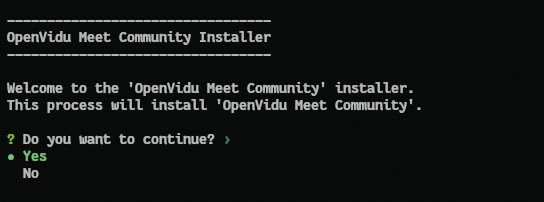
Select Yes to continue when prompted after the installation summary:
-
If you have a domain name, enter it when prompted. If you don't have one, just press Enter to continue and the public IP will be used as the domain name, with a Let's Encrypt certificate issued for it:

-
The installer will ask you to confirm if you want to proceed with the installation. Select Yes to start the installation.
The installation will begin, downloading the software and configuring your server. Once the installation is complete, you will see this message:
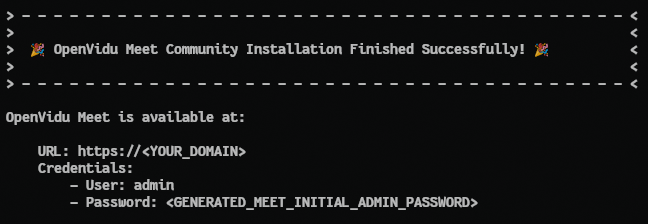
You can access OpenVidu Meet in your browser using the URL and credentials shown in the installation completion message.
Administration#
You can manage the OpenVidu Meet installation running simple commands on your server:
# Start OpenVidu Meet
sudo systemctl start openvidu

# Stop OpenVidu Meet
sudo systemctl stop openvidu

# Restart OpenVidu Meet
sudo systemctl restart openvidu
OpenVidu Meet is under the hood an OpenVidu Platform deployment, so you can refer to the OpenVidu Platform Single Node administration guide for more advanced management tasks, including:
- Check the status of services
- Check logs
- Upgrade OpenVidu Meet to a newer version
- Uninstall OpenVidu Meet
Other deployment options#
This guide has covered the manual installation of OpenVidu Meet as a single-node deployment in a Linux server. Under the hood OpenVidu Meet is an OpenVidu Platform deployment, so there are further deployment options available:
-
Non-interactive installation: you can run the installation wizard in a non-interactive way, providing all the required parameters in a single command. Check the Non-interactive installation guide for OpenVidu Platform.
-
If you prefer a cloud deployment, choose your provider and follow the corresponding guide:
- AWS: CloudFormation-based deployment using native AWS resources. AWS deployment
- Azure: ARM-based deployment using native Azure resources. Azure deployment
- GCP: Terraform-based deployment using native GCP resources. GCP deployment
- DigitalOcean: Terraform-based deployment using native DigitalOcean resources. DigitalOcean deployment
- OCI: Terraform-based deployment using native Oracle Cloud Infrastructure resources. OCI deployment
-
Deploy OpenVidu Meet in a multi-node architecture: there are multi-node deployment options available to make your OpenVidu Meet installation scalable and fault-tolerant. Check out the Advanced deployments section for more information.