Connectivity Resilience and Security in WebRTC Deployments: Key Considerations on TURN#

There's a clear gap between a WebRTC demo and something you can actually run in production, and it usually sits at the TURN layer. Your demo might work fine on a clean network, but once real users show up behind NATs, corporate firewalls, and mobile gateways, the calls simply die without it.
Why TURN Matters So Much#
To understand why TURN is important, a little context is necessary: WebRTC enables media transmission between two endpoints. These endpoints can be two users communicating directly (P2P), or a user connecting to a media server, which is the norm on platforms like OpenVidu, Google Meet, or Zoom, where the server receives video from each participant and redistributes it to the rest. In either case, most of these endpoints sit behind a router with NAT that hides their real IP, and that's where STUN and TURN come in. STUN allows an endpoint to discover its public IP address as seen from the outside, so the two endpoints can find each other and attempt a direct connection. TURN is the plan B when that direct connection isn't possible: an intermediate server that receives traffic from one endpoint and relays it to the other, acting as a bridge when NAT or firewall block the direct path. In reality, there are quite a few more nuances (ICE, which is the framework that orchestrates connection attempts; candidate types, SDP negotiation…), but this is enough to understand the rest of the post.
How many people end up needing that plan B? More than you'd think. A small study by Philipp Hancke shows that up to 17.7% of sessions go through a TURN relay. And that data is from 2017: with the rise of CGNAT (large-scale NAT used by mobile carriers to share a single public IP among thousands of users) in mobile networks and increasingly restrictive corporate firewalls, it's reasonable to think that today, in 2026, the figure is even higher.
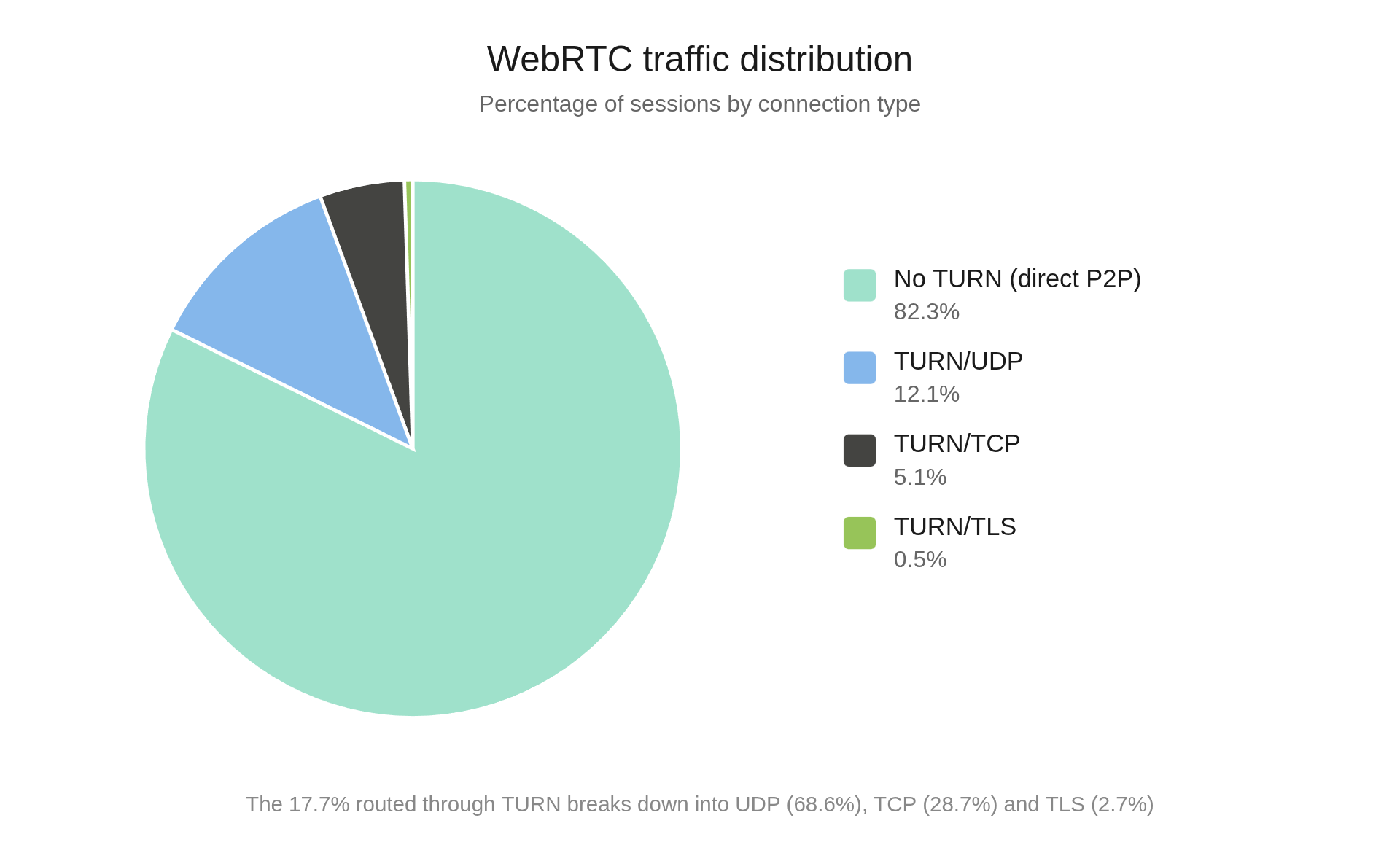
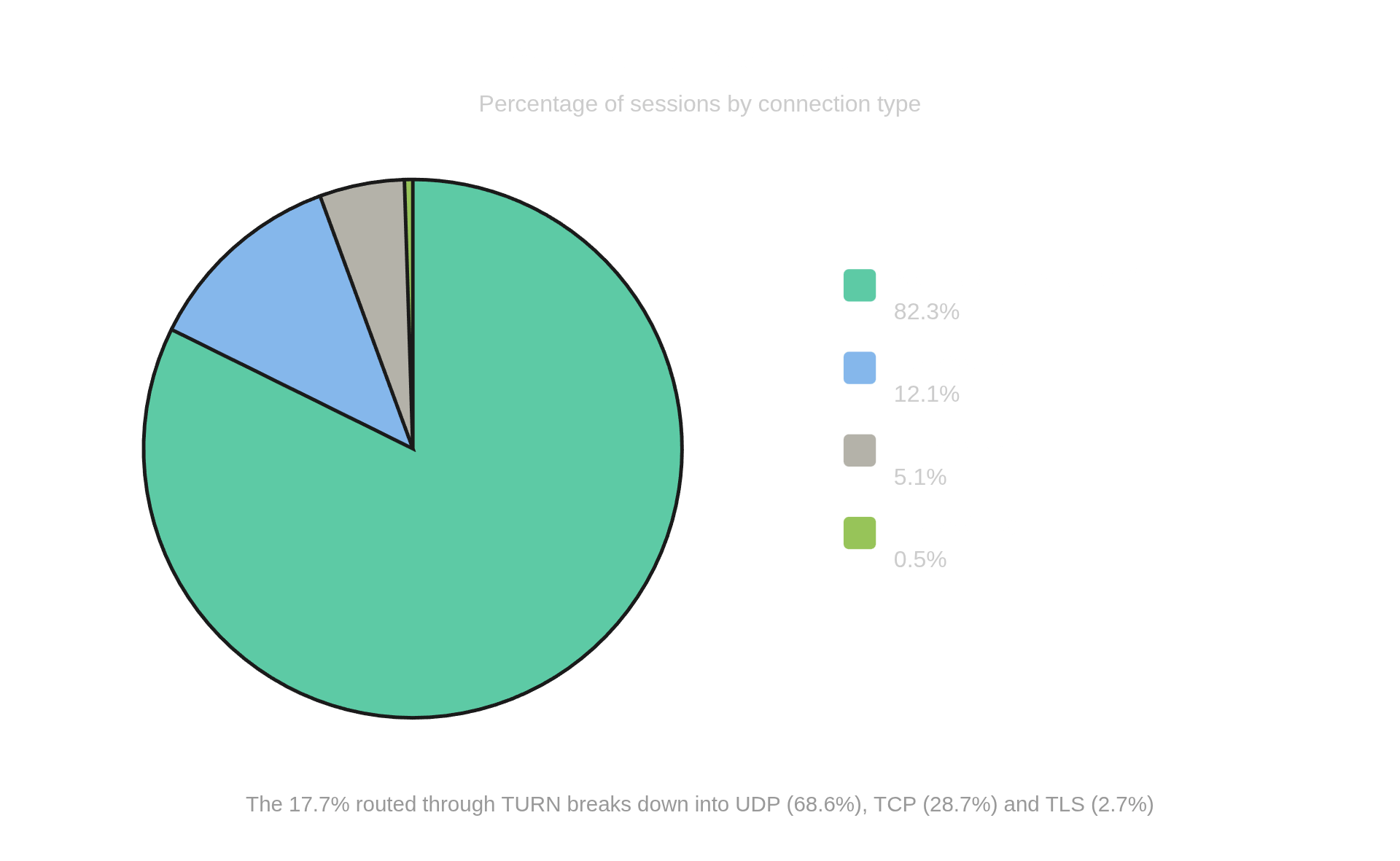
The TURN layer is one of those silent but essential pieces of WebRTC: it wrestles daily with firewall policies, is powerful enough to become an attack vector if misconfigured, and drags along so many operational decisions that it ends up being an infrastructure project with its own operations team. This post covers why TURN is inevitable, why operating it well costs more than it seems, and how OpenVidu turns it into part of the platform instead of that classic server no one touches and everyone says "That service is not my problem, mate!"
Running TURN Is Easy. Running TURN Right Is Not.#
Let's talk about how to deploy a simple TURN server, and then we'll see all the things that can go wrong with it.
The reference open-source TURN server, coturn , is an excellent community-maintained project and the project is very active and well-maintained. TURN is a complex protocol, it can be a double-edged sword and that's why it's easy to misconfigure it. It's not coturn's implementation faults that make it hard to operate, but the protocol itself.
Deploying a basic coturn instance is, in principle, fairly straightforward. You need a machine with Docker and Linux, a public IP, and an open relay port range. Following a simple standard deployment using the default port, your docker-compose with coturn could look like this:
services:
    coturn:
        container_name: coturn
        image: coturn/coturn:latest
        restart: always
        network_mode: host
        command:
            - --realm=myrealm
            - --fingerprint
            - --listening-ip=0.0.0.0
            - --external-ip=$$(detect-external-ip)
            - --listening-port=3478
            - --min-port=40000
            - --max-port=50000
            - --log-file=stdout
            - --verbose
            - --lt-cred-mech
            - --user=<USERNAME>:<PASSWORD>
You might think that's enough, that you've configured your TURN server and your clients should be able to use it with a username and password… Well, NOPE. Several things worth pointing out:
- The user is fixed. Credentials have to reach the client somehow, and if they're static, any user who captures those keys while loading your video conferencing web app can use them in the future to employ your TURN server as a proxy, and even attempt to reach internal services in your infrastructure.
- Port 3478 isn't always allowed. Although it's the default and recommended port, sometimes it's better to deploy TURN on port 443 TCP, which is the HTTPS port and, over UDP, the default QUIC port, because it's the port most likely to be open on any firewall.
- No TLS configuration. It can be configured, but then you need an additional system to manage certificates, configure them for coturn, and reload the service every time certificates renew, or use a reverse proxy to handle TLS termination and redirect traffic to coturn. That's already an additional non-trivial step. You could choose not to use TLS, but then that 0.5% of users on very restrictive networks who can only use TURN over TLS simply couldn't use your service.
- It doesn't scale. If your users are generally on very restrictive networks, scaling your media servers won't help if your TURN server doesn't scale at least enough to serve that 17–22% of users who need relay.
- Lacks security hardening. If you don't explicitly block peer connections to your internal network ranges, a user with valid credentials could try to use your TURN server as an open proxy to reach internal services, such as AWS's metadata service, or even management services exposed on localhost.
So, to solve all these problems, we would need:
- A system for generating ephemeral credentials, distributed through signaling and expiring with the session.
- Transport support on port 443, both TCP/TLS and UDP.
- A system for managing TLS certificates and configuring them for TURN, or a reverse proxy to handle TLS termination and redirect traffic to TURN.
- An auto-scaling system that adds TURN servers as media servers are added.
- Security hardening by default, with UDP-only relay to peers, an allow-list of peer IPs to Media Node IPs, and restricting the relay port range to the configured media port range. (This is only relevant when there are media servers. The other four points apply even when everything is strictly P2P.)
All of these are possible to implement with coturn, but none are trivial, and most teams run into them in production. The good news is that OpenVidu already has them implemented, and not only that: OpenVidu's architecture makes TURN stop being a separate service you have to configure, and instead becomes a property of each Media Node. Let's see how.
Forget About TURN with OpenVidu#
First, we should keep in mind that OpenVidu is a video conferencing platform, which provides the necessary abstractions so you don't have to worry about WebRTC, and of course not about TURN either. What does OpenVidu offer regarding TURN exactly?
OpenVidu v3 uses Pion TURN server embedded in each Media Node, so every Media Node includes a TURN relay. Let's go through each of the features we'd need for a robust TURN deployment, and how OpenVidu implements them.
1) A system for generating ephemeral credentials, distributed through signaling and expiring with the session.
OpenVidu generates a short-lived username/password pair for each participant when they join a room, and hands it to the client through signaling alongside the TURN server URLs. By default these credentials are valid for 5 minutes (a 300-second TTL).
2) Transport support on port 443, both TCP/TLS and UDP.
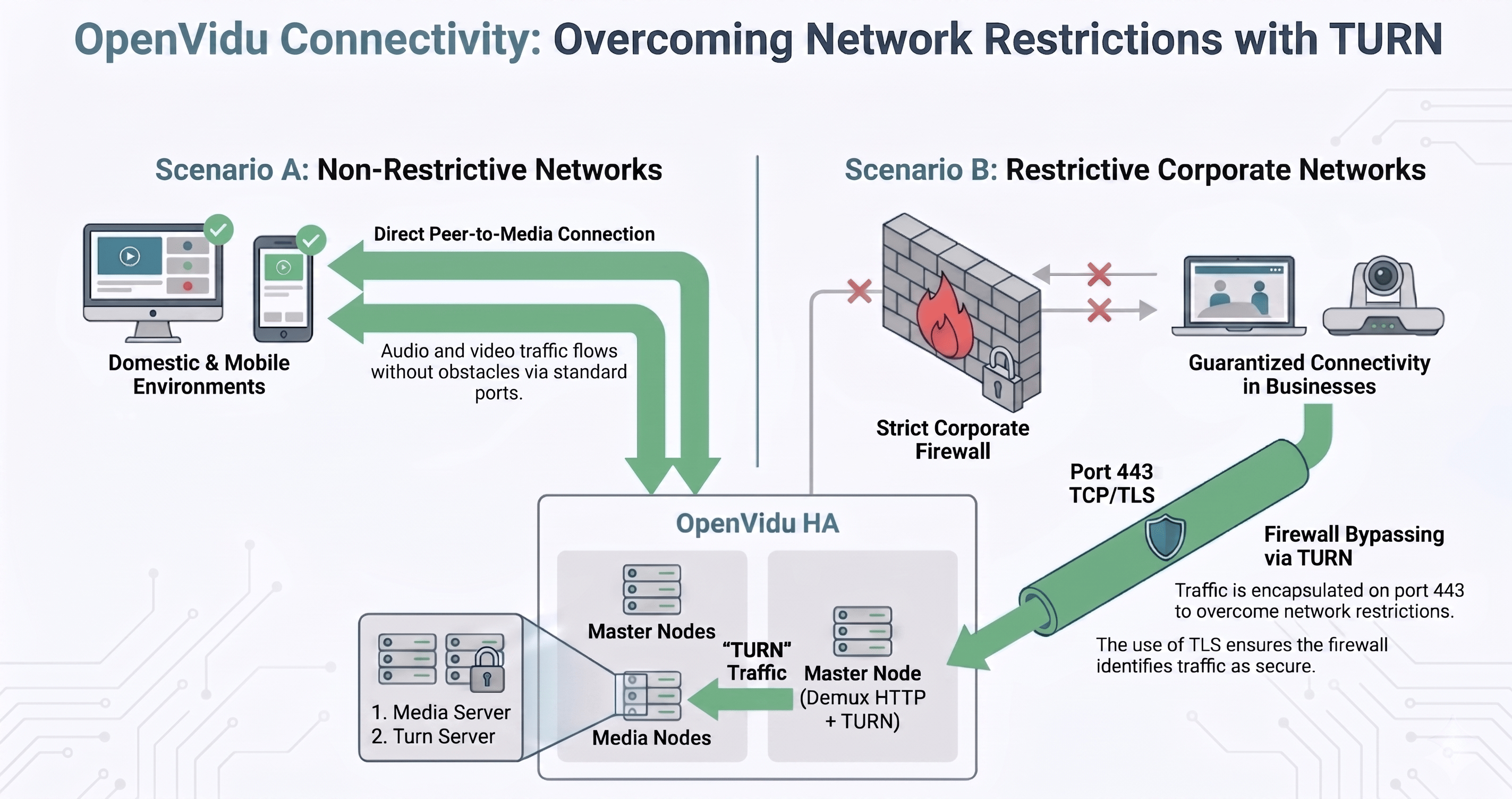
OpenVidu exposes TURN on both UDP 443 and TCP 443 with TLS, so every user will be able to connect even on very restrictive networks.
3) A system for managing TLS certificates and configuring them for TURN, or a reverse proxy to handle TLS termination and redirect traffic to TURN.
OpenVidu uses Caddy as a reverse proxy to handle TLS termination and redirect traffic to Pion TURN server. Caddy automatically manages TLS certificates via Let's Encrypt or custom certificates, so there's no need for manual configuration or reloading of the TURN server when certificates renew. Also, Caddy server configured in Master Nodes handles demultiplexing HTTPS signaling traffic from TURN-TLS traffic, allowing both to share the same domain without interference. This setup ensures that TURN over TLS is available for users on restrictive networks while maintaining a seamless experience for all users using the same domain for both signaling and TURN services.
4) An auto-scaling system that adds TURN servers as media servers are added.
OpenVidu automatically scales TURN along with its Media Nodes. Since each Media Node includes TURN, adding a Media Node adds a TURN relay in the same step. The only particular case where this doesn't hold is with TURN over TLS, since Master Nodes handle demultiplexing HTTPS signaling traffic from TURN-TLS traffic, but considering that TURN-TLS traffic accounts for 0.5% of connections, the impact is minimal.
5) Security hardening by default, with UDP-only relay to peers, an allow-list of peer IPs to master and Media Node IPs, and restricting the relay port range to the configured media port range.
At OpenVidu we've applied hardening recommendations while always keeping platform usability in mind. From Enable Security's recommendations , we've applied the following:
- Allow-list of IPs known by the cluster: peer connections can only be made to IPs known by the cluster. If nodes have public IPs and are directly reachable from the internet, TURN servers will only be able to make peer connections to IPs within the cluster. If nodes are behind NAT, peer traffic is restricted to the cluster's private IPs.
- To prevent the TCP-to-peer abuse vector, peer traffic is restricted to UDP-only relay: TCP allocations (RFC 6062 ) are disabled by default, though they can be enabled via configuration. By preventing the TURN server from establishing outgoing TCP connections to peers, the door is closed to an attacker using the relay as a TCP proxy toward internal services. This doesn't entirely prevent an attacker with valid credentials from abusing the infrastructure, but it drastically reduces the attack vector.
- Restricting the relay port range. In cases where OpenVidu is deployed in a NAT environment, the relay only forwards traffic to destination ports within the configured media port range, rather than the entire ephemeral space. This limits the attack vector to a specific port range, not all possible ports.
- Credentials are short-lived (see the TTL above) and generated using SHA-256 over a server-side secret, making them unpredictable and difficult to guess.
Conclusion#
TURN seems simple on paper and is complex in practice. The protocol is built with the express purpose of forwarding arbitrary packets to arbitrary destinations; scaling and operations are a problem, and achieving a good security level without breaking usability is complicated.
The right abstraction, and the one OpenVidu uses, is to treat TURN not as a complementary service but as another part of each node that handles media: co-located, auto-scaled, hardened by default, and driven by ephemeral credentials. OpenVidu's deployment topology implements exactly that abstraction across Single Node, Elastic, and HA modes. With OpenVidu Platform and OpenVidu Meet you're already solving:
- WebRTC abstraction and high-level API (like OpenVidu Meet) so you don't have to worry about signaling or media negotiation.
- Integrated, auto-scaled, hardened-by-default TURN, so you don't have to worry about your users' connectivity.