The Architecture of Scale: How to Scale Video Conferencing from a Single Server to a High-Availability System#
Introduction: The Success Trap#
Launch week often feels perfect. You ship an MVP, users join calls quickly, and early feedback is strong. Then growth arrives faster than expected.
One customer schedules a company-wide meeting. Hundreds of people join. Your best demo becomes your first major incident: CPU climbs, bandwidth saturates, audio breaks, video freezes. The product didn't fail because the team lacked talent. It failed because real-time media scales very differently from traditional web applications.
Stateless APIs can usually absorb demand with more replicas and a load balancer. Video conferencing can't. Each participant holds a long-lived, stateful connection, and every audio and video packet has to be encrypted and routed with very low latency. A database query can afford to wait 200 ms. A conversation can't — your users notice jitter, gaps, and packet loss the instant they happen.
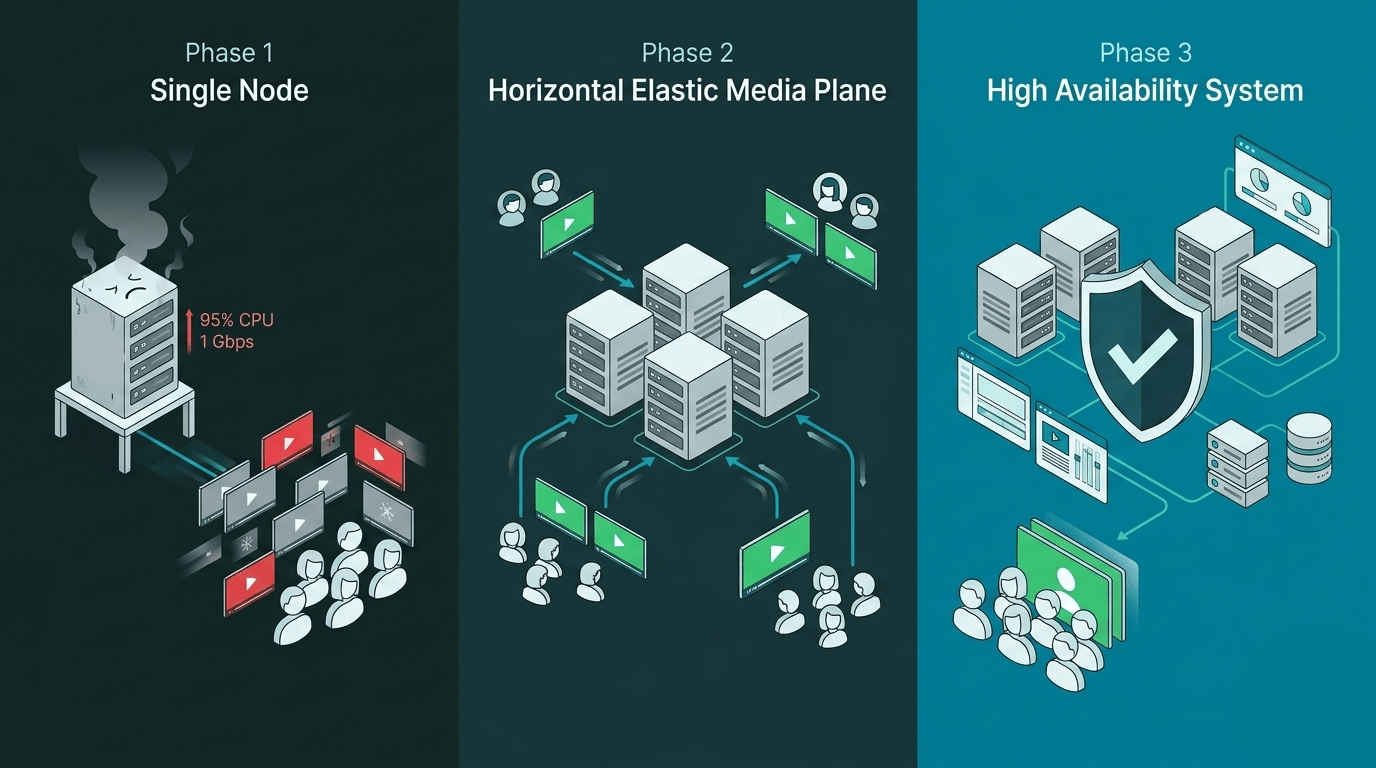
That's what makes scaling video a genuinely hard problem. It's not a hardware question you solve by adding RAM. You need an architecture that grows with you. This guide walks through a three-phase roadmap:
- Single Node — where almost every successful product starts.
- Horizontal Elastic Media Plane — how to scale the part of the system that actually processes calls.
- High-Availability Control Plane — how to stop a single failure from taking down the entire platform.
Along the way, you'll also learn how to build an autoscaling loop that reacts before saturation hits, and how admission rules can protect call quality even when traffic bursts unexpectedly.
Phase 1: The Single Node (The Monolith Stage)#
Most successful platforms start with a single machine. In a single-node deployment, one server runs signaling, media processing, persistence, and API logic together. For many teams, that's the right call — it maximizes speed of learning and minimizes operational overhead while you figure out whether the product has legs.


Why the Single Node Works Early#
Operational simplicity is genuinely valuable when you're still validating your product. A single-node setup gives you:
- Low operational complexity. One host, one deployment path, one failure domain.
- Fast debugging. Logs, metrics, and traces are all in one place. Correlation is trivial.
- No inter-service latency. Signaling, orchestration, and media coordination share the same environment.
- Lower cost floor. No idle cluster overhead while you're still testing demand.
At this stage, you're optimizing for product discovery, not maximum capacity. That's a good trade.
The Ceiling You Can't Ignore#
The single-node model always hits a hard ceiling, and the first thing to buckle is usually CPU. Every active stream forces the server to do real work:
- Setting up and tearing down encrypted sessions for each participant
- Continuously decrypting incoming packets and re-encrypting outgoing ones
- Routing media between participants in real time
- Running congestion control and adaptive bitrate algorithms
- Optionally recording or transcoding
As rooms grow, these operations stack. CPU climbs non-linearly during peak traffic — not gradually. Before you know it, a single large call is leaving nothing for everyone else.
Network throughput is the second wall. The NIC can saturate even when CPU looks healthy. And blast radius is the third: one machine hosts every session, so one failure means every customer is affected at once.
Mesh vs SFU: Why Topology Defines Your Limit#
Call topology has a bigger impact on your ceiling than most people expect.
In pure peer-to-peer mesh, each participant sends media directly to every other participant. The number of connections grows roughly as O(N^2) — fine for two or three people, completely impractical for ten. Upload bandwidth explodes on the client side, client CPUs get saturated, and the user experience falls apart before your server even flinches.
An SFU (Selective Forwarding Unit) centralizes that work on the server. Each client sends one upstream stream; the SFU forwards it selectively to the other participants. Clients stay lean, and the infrastructure stays in control of what gets sent where.
When Is One Node Not Enough?#
Don't wait for an incident to answer this question. Set objective thresholds before launch:
- CPU above 70% during peak windows
- Sustained outbound traffic approaching your NIC's practical ceiling
- Rising packet loss during join spikes
- Increasing session setup times under load
When these signals appear consistently, throwing a bigger machine at the problem only delays the real conversation. You need horizontal scale.
Phase 2: Horizontal Scalability and Elasticity (The Media Plane)#
At this point, larger machines cost more and help less. What you actually need is a role-based architecture where media execution and orchestration scale independently.


The split looks like this:
- Orchestrator / Support Cluster: handles load balancing at the entry point, global coordination, shared state, and database-backed metadata.
- Media Nodes: the machines where rooms actually live — where packets are routed, encrypted, and forwarded.
You'll sometimes see this described as a master-worker model. That's roughly accurate, but the distinction between roles matters more than the label.
Correct Role Separation: Orchestrator vs Media Node#
The orchestrator doesn't touch individual media packets. It decides where a new session should land, keeps global cluster state coherent, and handles platform-wide coordination. Think of it as the traffic controller, not the highway.
The media node, once assigned a room, becomes the authoritative runtime for that session. It routes packets, tracks participant media state, makes adaptation decisions, and handles room-level logic — all while the call is live.
In practice:
- The orchestrator owns admission, placement, and cross-cluster coordination.
- The media node owns the room: real-time media flow, local state, congestion response.
- Shared systems (Redis, databases, service discovery) maintain the global view that both planes read from.
The result is a much cleaner scaling unit: you grow media capacity by adding nodes, without touching orchestration logic.
What Horizontal Scale Actually Solves#
Adding media nodes does more than increase headroom:
- Capacity growth: more concurrent participants and rooms.
- Fault isolation: a single media node failure affects only the rooms on that node, not your entire platform — blast radius shrinks dramatically.
- Cost control: right-size your node pool for traffic patterns, and shrink it when demand drops.
- Performance locality: place workers close to the users they serve.
Traffic grows. Your control logic stays the same.
Elasticity: Add and Remove Nodes Dynamically#
Horizontal scale without elasticity is just a bigger fixed cluster — it still wastes money during quiet periods and still falls short during spikes. Real traffic is bursty. Your capacity needs to follow it.
Autoscaling works best when driven by signals that actually reflect media load, not just CPU percentages:
- Worker CPU usage
- Network throughput (inbound and outbound)
- Active publishers and subscribers
- Media packet processing queue pressure
- New room admission latency
A robust autoscaling loop looks something like this:
- Continuously collect worker health and load metrics.
- Compute per-node headroom and aggregate cluster capacity.
- Trigger scale-out before saturation hits, not in response to it.
- Register new workers in routing tables so they start receiving traffic immediately.
- Direct new rooms to the healthiest nodes with the most headroom.
The key insight on elasticity
React before you're full, not after. By the time your metrics show saturation, users are already experiencing degraded quality. Proactive scaling — triggered at 65–70% capacity — keeps you ahead of demand.
Admission Control Matters More Than Raw Node Count#
Here's something that often surprises teams: the number of nodes in your cluster matters less than how carefully you assign rooms to them.
Random placement creates hotspots. A node running at 75% CPU handling very large rooms is a worse assignment target than one at 55% handling smaller calls — even though neither is technically "full". If your placement logic doesn't account for actual load distribution, you'll hit quality problems long before you hit raw capacity limits.
Practical admission rules to put in place:
- Hard caps per node for publishers, subscribers, and total bitrate.
- Soft thresholds that leave headroom for burst without triggering scale-out for every spike.
- Region and latency affinity for room placement, so participants are routed to the geographically closest node.
The key insight on admission control
Node count protects you from running out of infrastructure. Admission rules protect call quality within the infrastructure you have. You need both.
The Hidden Hard Part: Scale-In#
Spinning up new media nodes is straightforward. Taking them down safely is the part most teams underestimate.
If you terminate a node while active rooms are running on it, users see dropped calls or renegotiation storms — a sudden re-establishment of all connections at once, which often fails partially. Scale-in can't be a kill command. It has to be a workflow.
A proper graceful scale-in strategy goes like this:
- Mark the node as draining.
- Stop assigning new rooms to it.
- Let existing rooms finish naturally, or migrate sessions explicitly if the drain timeout is exceeded.
- Terminate the node only after it reaches a safe empty state.
This requires orchestration logic, configurable timeouts, and explicit failure handling. It's often the gap between "elastic" written on a whiteboard and elastic that actually works at 3am. For a deeper dive into how to implement this well, read our dedicated post on graceful scale-in strategies.
With Phase 2 in place, you have elastic media capacity. But there's still one major vulnerability left: your control plane.
Phase 3: High Availability (The Control Plane)#
You can run 100 media nodes and still fail like a prototype if your orchestration layer is a single instance.
When orchestration goes down, new joins fail, placement stops, and recovery becomes a manual process. Phase 2 hardened the media plane. Phase 3 is about making sure the rest of the system can survive a failure too — because HA at this stage means hardening the support cluster, not adding more media nodes.


Remove Single Points of Failure#
Every critical service in your support cluster needs a replica. Go through the list:
- Signaling and control services — replicated cluster, not a single process.
- Redis (or equivalent state store) — HA topology with failover.
- Primary data stores — replication and automatic failover configured.
- Load balancers — distributed across availability zones.
- Service discovery — health-aware routing, not a single registry.
If even one of these runs as a single instance, that's your next outage waiting to happen.
Quorum: The Rule That Prevents Split-Brain#
Distributed control systems need a clear answer to one question: when there's a disagreement about who's in charge, who wins?
The answer is quorum: a majority of nodes must agree before any authoritative decision is made. Most consensus-based systems require N/2 + 1 nodes:
- 3 nodes → quorum is 2
- 4 nodes → quorum is 3
- 5 nodes → quorum is 3
This rule exists specifically to prevent split-brain — the scenario where a network partition causes two sides to both believe they're the leader and start making conflicting writes.
In a 4-node control cluster with a 2-2 network split, neither side has quorum. Neither can make authoritative decisions. That's uncomfortable, but it's the right behavior: the system protects consistency over availability, and prevents two leaders from diverging state.
Many teams land on 4 nodes as a practical balance across availability zones. Others prefer odd-sized clusters (3 or 5) for cleaner quorum arithmetic. The right choice depends on your consistency model and how your state store handles elections.
State Synchronization: Keep Session Truth Consistent#
Node count is only half the story. The other half is making sure your replicas actually agree on what's happening.
Your support cluster needs to synchronize:
- Room metadata
- Participant presence and role assignments
- Media node assignments for active rooms
- Token and authorization context
- Recording state and webhook delivery status
Not all of this needs to be equally consistent. Strong consistency matters for decisions that must be unique — room ownership, for example. Eventual consistency is fine for telemetry and analytics. Be explicit about which data type needs which guarantee.
One more thing worth building in from the start: idempotent operations. In distributed systems, retries are routine — failover, timeout, retry. If your operations aren't idempotent, you'll get duplicate side effects at the worst possible moment.
The Challenges of Real-Time Distribution#
By Phase 3, you're running a serious distributed real-time system. The hard question isn't "Can it run?" anymore. It's "Can it stay stable when traffic is unpredictable and nodes fail?"
Two things determine the answer: how smart your placement decisions are, and how well you can observe what's actually happening inside your media plane.
Smart Placement Beats Round Robin#
Round-robin load balancing assumes every session costs the same. In a video platform, that's almost never true.
A room with 50 participants and high-resolution video streams can consume 10x the CPU and bandwidth of a room with 5 participants on low-resolution. If your placement logic doesn't account for that, a handful of heavy rooms will saturate individual nodes while the rest of the cluster sits mostly idle.
Resource-aware placement looks at the signals that actually matter:
- Current CPU usage and its recent trend (is it climbing?)
- Current inbound and outbound bitrate
- Active publisher count per node
- Packet loss and jitter trends
- Geographic proximity to the joining participants
Done well, this keeps quality stable and avoids a whole category of incidents that aren't really capacity problems — they're placement problems.
Media Observability, Not Just Infrastructure Monitoring#
CPU and memory dashboards tell you whether your servers are healthy. They don't tell you whether your users are having a good call.
For that, you need media-layer signals:
- RTT (round-trip time) between clients and the media node
- Jitter on inbound and outbound streams
- Packet loss rates in both directions
- Retransmission rates (a proxy for congestion)
- Frame rate drops and resolution downgrades
- Audio continuity metrics
When you correlate these with signaling events and infrastructure telemetry, support tickets change character. Instead of "the audio broke at around 2pm," you can look at the timeline, find the retransmission spike, trace it to a specific node under load, and know exactly what happened — and why.
Conclusion: Scale by Design, Not by Accident#
Most video platform failures aren't engineering failures. They're architecture failures — the system was never designed to handle the load it eventually received.
The roadmap here is straightforward: start with a single node to move fast, add elastic media capacity when demand grows, and harden your control plane when availability becomes non-negotiable. Each phase introduces real distributed-systems complexity — placement, draining, quorum, state consistency, observability — but each phase also has a clear reason for existing and a clear moment when it becomes necessary.
You don't have to build all of this yourself.
At OpenVidu, we've been building elastic and resilient production-ready media platforms for years, and we've battle-tested our deployments with our open source load testing tool . OpenVidu gives you a production-ready path for every phase of this roadmap:
- Single Node to launch quickly.
- Elastic to scale media capacity dynamically.
- High Availability to meet strict enterprise resilience requirements.
You can deploy on-premises or on the major cloud providers — AWS, Azure, GCP, DigitalOcean, and OCI — with the same operational model across all of them.
If you're ready to move from MVP to production-grade infrastructure, the OpenVidu documentation is the place to start.
Start with Single Node, validate your traffic profile, and then move to Elastic and High Availability when the signals tell you it's time.
Your architecture should grow with you — not hold you back.