Low Latency Live Streaming: WebRTC vs. HLS and DASH (Part 1)#
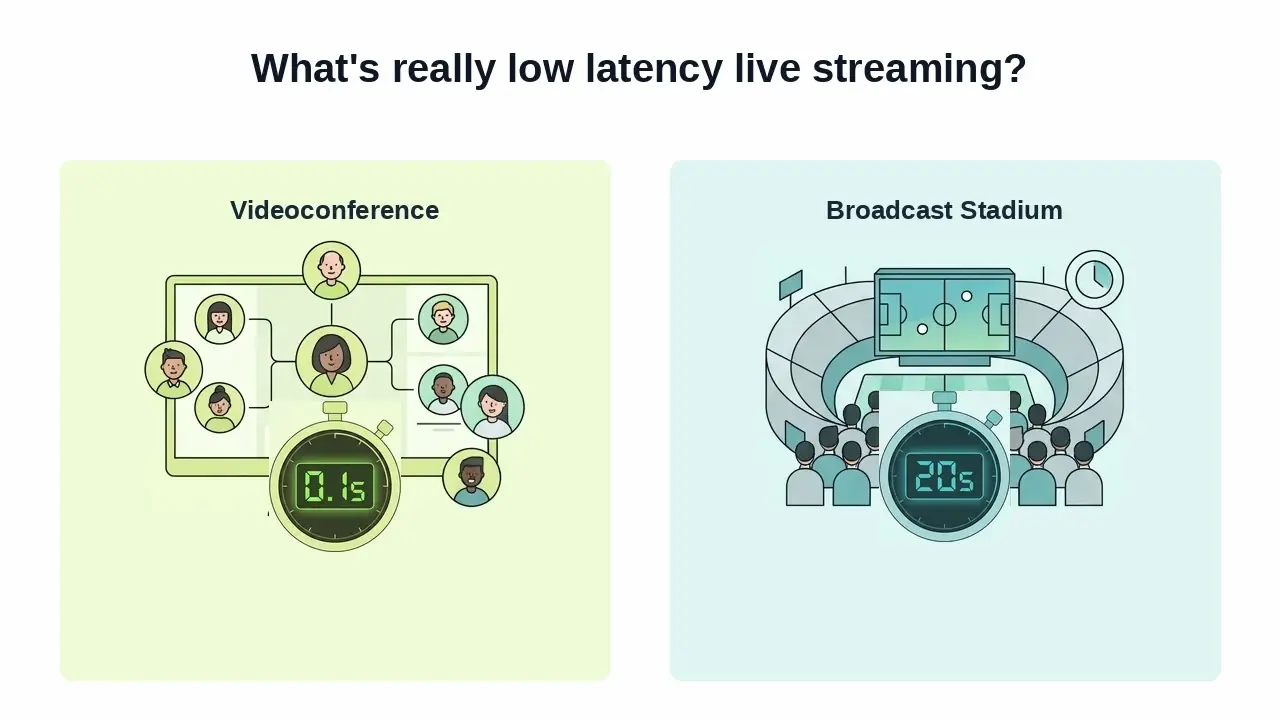
When Spain was playing the World Cup, we noticed something annoying. We celebrated each of Spain's scores by shouting "GOOOOOL", 15 seconds before our neighbors saw the goal on their TV. Obviously, we ruined their experience watching the game, so much that they asked us where we were watching it from to avoid the gap. Now picture that same 15-second gap on a live shopping stream where you're typing "does it come in blue?", or in a video call where you keep talking over the other person because their audio hasn't reached you yet. That's the difference between "live" and low latency live streaming.
What "low latency" actually means?#
Note
This is the first of a post series on streaming content through WebRTC and WHIP. This first post settles the fundamentals. A second post will go hands-on building an app to ingest video and audio from sources such as a browser and OBS to a WebRTC platform (we will be using OpenVidu). Finally, a third post will review existing tools that are able to generate WHIP.
If you have kids that play online video games, you can be sure they know what a bad latency means. I do have, and my 11-year-old blames the ping when he feels that his car should have hit the ball before his opponents when playing Rocket League. Indeed, he keeps an eye on the ping from time to time, while he plays, whenever he feels something is wrong with the timing.
So, what is the formal definition of latency? It is simply the time between a frame being captured at the source and being rendered on a viewer's screen. It is obvious that the lower the latency value, the better. But, what is really a low latency? For instance, a live sports broadcast and a video call are both "real-time," yet one tolerates 20 seconds of delay and the other falls apart after 150 milliseconds. More importantly, how much latency tolerates a given use case?
There's been much discussion about what low latency really means. It's one of those terms that we have been redefining from time to time as we were able to achieve lower latencies on newer networks (remember the promise of single digit latencies of 5G?). So you might find different numbers for what low latency is.
In the end, the industry roughly buckets latency into five tiers:
| Category | Latency | Typical use cases |
|---|---|---|
| High latency | > 45s | Legacy live streaming setups |
| Typical latency | 10–45s | Most live OTT (Over-the-top) streaming services, VoD (Video on demand) |
| Low latency | < 10s | Premium live sports, financial news, eSports |
| Ultra-low latency | < 1s | Interactive live streaming (live commentary, in-play betting) |
| Near-real-time | < 100ms | Videoconferencing, cloud gaming |
The low latency confusion
You can find many tools and use cases that claims low latency, and that's the problem: low latency is interchangeably used to mean from 10 seconds to a fraction of a second. So it is important to understand where each use case sits, and be explicit about actual requirements. Low latency is a thing, and ultra-low latency or near-real-time latency are completely different concepts built on different technologies.
The thing to remember here is that the number you actually need has nothing to do with whether the content is "important" or "high quality." It has everything to do with whether a human, or another system, needs to act on what they're seeing before it is too late.
Let's have a look at some use cases to understand what actually lands in each latency tier, and why:
- World wide events retransmissions (10-45s). A world wide event such as the World Cup or the Olympics can tolerate several seconds of latency.
- eSports broadcasts and commentary (< 10s). These use cases are more latency-tolerant than personalized streaming, but they are still tighter than a typical broadcast, since commentators need to track the live match state closely and viewers routinely cross-check against a second screen.
- Interactive personalized live streaming (< 1s). Creator-led streams on platforms like Twitch or YouTube Live are strongly driven by chat. If the streamer is reading a message that's ten seconds stale, the whole back-and-forth that makes the format work falls apart.
- Live shopping (< 1s). A viewer asks "does it come in blue?" mid-stream and expects an answer immediately, not thirty seconds later, after the moment (and the sale) has passed. This is a genuinely massive market in parts of Asia and a growing one elsewhere.
- Videoconferencing and cloud gaming (< 100ms). A conversation with more than ~150ms of delay starts producing interruptions and talking over each other. Cloud gaming suffers even more: input lag above a few tens of milliseconds is felt directly in your hands.
- Telehealth and remote operation (< 100ms). A doctor-patient consultation needs the same conversational latency as any video call. If there's an operator controlling physical equipment remotely (industrial machinery, a drone, a surgical robot), the use case needs a genuine real-time control loop, not just real-time-looking video.

So, as I said before: it's never the content itself that sets the latency budget. It's whether someone downstream has to act on what they're seeing before it goes stale.
So, how are these latency requirements met?#
HLS and DASH are the two workhorses behind most of the video you stream today, and they were both designed around the same core idea: chop the video into small files, describe them in an index, and let any standard web server or CDN hand them out over plain HTTP. This means re-using the same infrastructure we already have for web pages and static files, for live content (indeed, it is astonishing how the network protocols designed in the 70's and 80's still remain valid today.)
HLS packages media into .ts segments listed in an .m3u8 playlist. DASH does the equivalent with fragmented MP4 segments described in an .mpd manifest. In both cases, a video segment has to be fully encoded, muxed, and written to disk before a player can even request it. The player typically buffers two or three segments ahead before it starts playing, so that network fluctuations don't stall playback. If the segments are six seconds long, by the time you have two or three of them you've already committed to at least 12–18 seconds of latency before a single video frame is rendered on your screen.
That segment-and-manifest model is precisely why HLS and DASH scale so well: any commodity HTTP server or CDN edge node can cache and serve a static file, so a single stream can fan out to millions of viewers for the cost of standard web hosting. That makes them brilliant, although they do not favor latency specifically.
Low-Latency HLS (LL-HLS) and Low-Latency DASH (LL-DASH) are optimizations over latency that work by using chunked transfer encoding: segments start streaming to the player before they're fully written, instead of waiting for the whole file. That gets both formats down to latencies of roughly 2–5 seconds. It helps, but it is still far from what use cases such as videoconference and cloud games require. Furthermore, neither HLS nor DASH (low-latency or not) is natively supported by a browser. You need a JavaScript player library (hls.js, dash.js, or similar) sitting on top just to play the stream back.
The following is a table describing different streaming protocols with their lower bound limits on latency, their browser compatibility and their primary use. The last row is the whole story of this post.
| Protocol | Typical latency | Browser playback | Primary use |
|---|---|---|---|
| HLS | 5–30s | Needs a JS library | Delivery |
| DASH | 5–15s | Needs a JS library | Delivery |
| LL-HLS | 2–5s | Needs a JS library | Delivery |
| LL-DASH | 2–5s | Needs a JS library | Delivery |
| RTMP | 2–5s | Not supported | Ingest |
| SRT | < 1s | Not supported | Ingest |
| WebRTC | < 1s | Native | Ingest + delivery |
Why WebRTC delivers sub-second latency#
WebRTC was designed to optimize the path between a captured frame and a rendered one, contrary to the design decisions behind HLS and DASH, which were focused on file caching.
In WebRTC media flows continuously as RTP packets over UDP the moment a connection is established. Connectivity between peers (or a peer and a media server) is negotiated live via ICE, with STUN and TURN as fallbacks for traversing NATs and firewalls, and every media packet is encrypted in transit with SRTP. All of that machinery exists to keep the path open and secure, not to buffer or batch anything.
WebRTC's bidirectional nature also means it isn't limited to browser-to-browser calls. WHIP (WebRTC-HTTP Ingestion Protocol) standardizes how an encoder (OBS, a hardware unit, or a mobile app) pushes a stream into a WebRTC-based platform with a single HTTP request that negotiates the connection. WHEP is the mirror image for pulling media back out over WebRTC. Together they turn WebRTC from "the video call protocol" into a legitimate low latency live streaming transport, end to end.
None of this is free, though. The same design that keeps latency low means WebRTC doesn't inherit HTTP's effortless CDN caching: you can't just drop a WebRTC stream at an edge node the way you can an .ts file. Sending one publisher's stream out to thousands or millions of WebRTC viewers means chaining or interconnecting media servers intelligently, and that's still a hard, actively researched engineering problem.
But, isn't all live video basically the same problem?#
It isn't, and the reason splits cleanly into two cases.
Netflix isn't part of this conversation at all. It's video on demand: fully encoded ahead of time, sitting in storage, with no live source and no freshness requirement. There's nothing to be "low latency" about: a viewer can buffer for two seconds or ten and never notice, because the content isn't going stale while they wait. This is exactly the scenario HLS and DASH were built for, and it's why they remain the obvious right choice for on-demand video.
A World Cup broadcast is live, but it isn't interactive. Millions of viewers receive the same one-way feed, and nothing needs to travel back from any of them to the pitch in real time. A 15–30 seconds delay is completely invisible to a viewer with no feedback loop into the match itself; the only things that matter are reach and reliability, which is precisely what HLS/DASH plus a global CDN are optimized to deliver.
The low latency line is whether the interaction loops back to the source in real time. Non-interactive broadcasting tolerates multi-second delay just fine, even at massive scale. But the moment someone needs to chat with the streamer, ask a question, or steer a joystick, that multi-second delay breaks the experience entirely. That's the real definition of low latency live streaming. It's not "fast video," but video fast enough to close a live feedback loop.
Building low latency live streaming today#
If you're building something in that "below the second" category (a stream someone needs to react to) the protocol choice is WebRTC, and you need it end to end, not just for capture.

OpenVidu Platform's Ingress module exposes a WHIP endpoint out of the box, so an encoder can push straight into a Room over WebRTC. You can even skip transcoding entirely when you want to shave off every extra millisecond. From there, every participant in the Room receives that stream over native WebRTC too. See the stream ingestion guide for how to wire a WHIP source into your own app.
Need more than this?#
In the second post in this series, we will build an app that ingest video and audio from a browser and OBS into a WebRTC platform, so that it can be streamed and watched by people just by subscribing as in any WebRTC app.
However, if you want to try it by yourself now, we have you covered. This article explains how to ingest video through WHIP in your app 👉 Add WHIP-based low-latency ingest to your app: the fastest way to feel the difference is to push a real encoder into a Room and watch the delay disappear.
To go further:
- OpenVidu Platform — the low-level SDKs and APIs for building your own interactive streaming experience.
- How to scale video conferencing architecture — what changes once a single low-latency session needs to serve far more than one media server can handle.
- Connectivity Resilience and Security in WebRTC Deployments — why the same NAT and firewall problems that affect video calls apply just as much to low latency ingest.