Common operations#
This page is a collection of the most common operations you may want to perform in your application while integrating OpenVidu. Depending on the scope of the operation, these operations will be performed on the client side using a LiveKit Client SDK, or on the server side using a LiveKit Server SDK (or directly using the HTTP server API). Consider the architecture of an OpenVidu application:
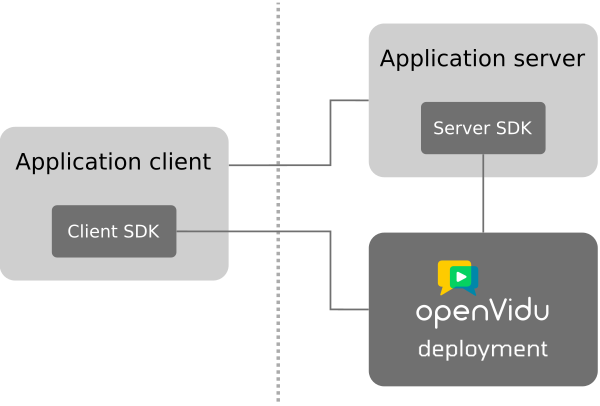
You can use this page as a cheat sheet to know at a glance how to do something: every operation links to the page in the Reference section that documents it in full.
Generate access tokens#
The application client needs an access token to connect to a Room. This token must be generated by the application server, which signs it with your deployment's API secret:
From your application client#
Everything a Participant does inside a Room happens in the client SDK: connecting, publishing its camera and microphone, subscribing to what others publish, and exchanging data. Each operation is documented with its code in the Client SDK reference:
| Operation | What it is for |
|---|---|
| Connect to a Room | Join a Room with an access token, and register the event handlers before doing so |
| Disconnect from a Room | Leave the Room and release the local devices |
| Publish a Track | Send the camera, the microphone or a Track built by your application |
| Mute/Unmute a Track | Stop and resume sending the data of a published Track |
| Unpublish a Track | Remove a published Track from the Room |
| Subscribe to a Track | Receive and render the Tracks of the other Participants, all of them or only some |
| Screen Sharing | Publish the screen, a window or a browser tab |
| Virtual Background | Blur or replace the background of a video Track before publishing it |
| Send data and share state | Exchange messages, files and state between Participants |
From your application server#
Except for the generation of access tokens, it is possible for all the logic of your application to be contained entirely on the client side. Nonetheless, some use cases may require the management of the Rooms from the server side.
These operations are only available in the server SDKs, and not in the client SDKs:
- Closing a Room. From the client side, a user can only leave his own Room.
- Removing any Participant from a Room. From the client side, a user can only leave his own Room.
- Muting any Track of any Participant. From the client side, a user can only mute/unmute his own Tracks.
- Updating the metadata of any Participant. From the client side, a user can only update his own metadata.
- Updating the metadata of the Room. From the client side this is not possible.
- Egress operations. Egress cannot be started and stopped on demand by users from the client side.
- Ingress operations. Ingress cannot be started and stopped on demand by users from the client side.
The dividing line is that a client acts only on itself, while your application server acts on anyone: see Choosing between the server API and the client SDK.
You have here the complete list of the server-side operations, documented for the HTTP Server API. All the LiveKit Server SDKs have the same operations.
- RoomService: to manage Rooms, Participants and Tracks.
- Egress: to manage Egress operations.
- Ingress: to manage Ingress operations.
Recording#
You can record your Rooms using the Egress module. Egress allows exporting media from a Room in different formats, including
- Room Composite Egress: a single video output with all the Tracks of a Room composited in a layout. You can even create your custom layouts.
- Web Egress: a single video output of any web page, not necessarily a Room.
- Participant Egress: a single output per participant, identified by their identity.
- Track Composite Egress: a single video output combining an audio Track and a video Track.
- Track Egress: individual outputs for each Track of a Room, exported without transcoding.
Every Egress type, output format, encoding preset and status value:
Stream ingestion#
You can ingest media streams into your Rooms using the Ingress module. It supports different sources, including:
- RTMP: the Ingress module exposes an RTMP endpoint to which your user can stream their content. The ingress module will transcode and publish the stream to the Room, making it available to all participants.
- WHIP: the Ingress module exposes a WHIP endpoint to which your user can stream their content directly via WebRTC. You can choose whether the Ingress module should transcode the stream or directly relay it to the Room. Avoiding transcoding is the best option to minimize latency when ingesting media to a Room.
- Media pulled from a URL: the Ingress module fetches the media itself, transcodes it and publishes it to the Room. It accepts HLS streams and media files (MP4, MOV, MKV/WebM, OGG, MP3, M4A) served over HTTP, as well as media served by an SRT server. This is also how IP cameras are ingested, passing their
rtsp://URL.
Every input type, transcoding option and Ingress state:
IP Cameras#
With OpenVidu you can ingest RTSP streams into your Rooms. To do so, simply use the Ingress API to create and ingress of input type URL, providing the IP camera RTSP URL as value:
Using LiveKit Node SDK
import { IngressClient, IngressInfo, IngressInput } from 'livekit-server-sdk';

const ingressClient = new IngressClient('https://my-openvidu-host', 'api-key', 'api-secret');

const ingress = {
  name: 'my-ingress',
  roomName: 'my-room',
  participantIdentity: 'my-participant',
  participantName: 'My Participant',
  url: 'rtsp://admin:pass@192.168.1.79/mystream'
};

await ingressClient.createIngress(IngressInput.URL_INPUT, ingress);
Using LiveKit Go SDK
import (
  lksdk "github.com/livekit/server-sdk-go/v2"
  livekit "github.com/livekit/protocol/livekit"
)

ingressClient := lksdk.NewIngressClient(
    "https://my-openvidu-host",
    "api-key",
    "api-secret",
)

ingressRequest := &livekit.CreateIngressRequest{
    InputType:           livekit.IngressInput_URL_INPUT,
    Name:                "my-ingress",
    RoomName:            "my-room",
    ParticipantIdentity: "my-participant",
    ParticipantName:     "My Participant",
    Url:                 "rtsp://admin:pass@192.168.1.79/mystream",
}

ingressInfo, err := ingressClient.CreateIngress(context.Background(), ingressRequest)
Using LiveKit Ruby SDK
require 'livekit'

ingressClient = LiveKit::IngressServiceClient.new("https://my-openvidu-host", api_key: "api-key", api_secret: "api-secret")
response = ingressClient.create_ingress(
  :URL_INPUT,
  name: "my-ingress",
  room_name: "my-room",
  participant_identity: "my-participant",
  participant_name: "My Participant",
  url: "rtsp://admin:pass@192.168.1.79/mystream",
)
if response.error
    puts "Error creating ingress: #{response.error}"
else
    ingressInfo = response.data
    puts "Ingress created: #{ingressInfo}"
end
Using LiveKit Kotlin SDK
import io.livekit.server.IngressServiceClient;
import livekit.LivekitIngress.IngressInfo;
import livekit.LivekitIngress.IngressInput;

IngressServiceClient ingressService = IngressServiceClient.createClient("https://my-openvidu-host", "api-key", "api-secret");

IngressInfo ingressInfo = ingressService.createIngress(
    "my-ingress", // Ingress name
    "my-room", // Room name
    "my-participant", // Ingress participant identity
    "My Participant", // Ingress participant name
    IngressInput.URL_INPUT, // Ingress input type
    null, null, null, null, // Other default options
    "rtsp://admin:pass@192.168.1.79/mystream" // Input URL
).execute().body();
Using LiveKit Python SDK
from livekit.api import LiveKitAPI

lkapi = LiveKitAPI(
    url="https://my-openvidu-host", api_key="api-key", api_secret="api-secret"
)
request = CreateIngressRequest(
    url="rtsp://admin:pass@192.168.1.79/mystream",
    name="my-ingress",
    room_name="my-room",
    participant_identity="my-participant",
    participant_name="My Participant",
    input_type=IngressInput.URL_INPUT,
)
ingressInfo = await lkapi.ingress.create_ingress(request)
Using LiveKit Rust SDK
use livekit_api::services::ingress::*;
use livekit_protocol::*;

let ingress_client = IngressClient::with_api_key(
    "https://my-openvidu-host",
    "api-key",
    "api-secret",
);
let ingress_info = ingress_client.create_ingress(
    IngressInput::UrlInput,
    CreateIngressOptions {
        name: "my-ingress".to_string(),
        room_name: "my-room".to_string(),
        participant_identity: "my-participant".to_string(),
        participant_name: "My Participant".to_string(),
        url: "rtsp://admin:pass@192.168.1.79/mystream".to_string(),
        ..Default::default()
    }).await;
Using LiveKit PHP SDK
<?php
use Agence104\LiveKit\IngressServiceClient;
use Livekit\IngressInput;

$ingress_client = new IngressServiceClient("https://my-openvidu-host", "api-key", "api-secret");
$ingress_info = $ingress_client->createIngress(
  IngressInput::URL_INPUT,
  "my-ingress", // Ingress name
  "my-room", // Room name
  "my-participant", // Ingress participant identity
  "My Participant", // Ingress participant name
  NULL, NULL, NULL, // Other default options
  "rtsp://admin:pass@192.168.1.79/mystream" // Input URL
);
Using LiveKit .NET SDK
using Livekit.Server.Sdk.Dotnet;

IngressServiceClient ingressServiceClient = new IngressServiceClient(
    "https://my-openvidu-host",
    "api-key",
    "api-secret"
);
var ingressInfo = await ingressServiceClient.CreateIngress(new CreateIngressRequest
{
    Name = "my-ingress",
    RoomName = "my-room",
    ParticipantIdentity = "my-participant",
    ParticipantName = "My Participant",
    InputType = IngressInput.UrlInput,
    Url = "rtsp://admin:pass@192.168.1.79/mystream",
});
If your backend technology does not have its own SDK, you have two different options:
-
Consume the Ingress API directly: Reference Docs
-
Use the livekit-cli :
Create a file at
ingress.jsonwith the following content:{ "input_type": "URL_INPUT", "name": "Name of the Ingress goes here", "room_name": "Name of the room to connect to", "participant_identity": "Unique identity for the room participant the Ingress service will connect as", "participant_name": "Name displayed in the room for the participant", "url": "rtsp://admin:pass@192.168.1.79/mystream" }Then run the following commands:
Many audio and video codecs are supported for ingesting IP cameras:
For video:
- H264
- VP8
- VP9
- MPEG4
- MJPEG
For audio:
- AAC
- MP3
- OPUS
- G711
Webhooks#
Your application server may receive webhooks coming from the OpenVidu deployment. These webhooks inform about events happening in the Rooms, including when a Room is created and finished, when a Participant joins and leaves a Room, when a Track is published and unpublished, and when Egress/Ingress operations take place in a Room.
Every application server tutorial here is ready to receive webhooks: Application Server Tutorials.
Every event, its payload and how to verify a request before acting on it: