How the networks of your clients affect their user experience and your server infrastructure costs in a WebRTC platform#
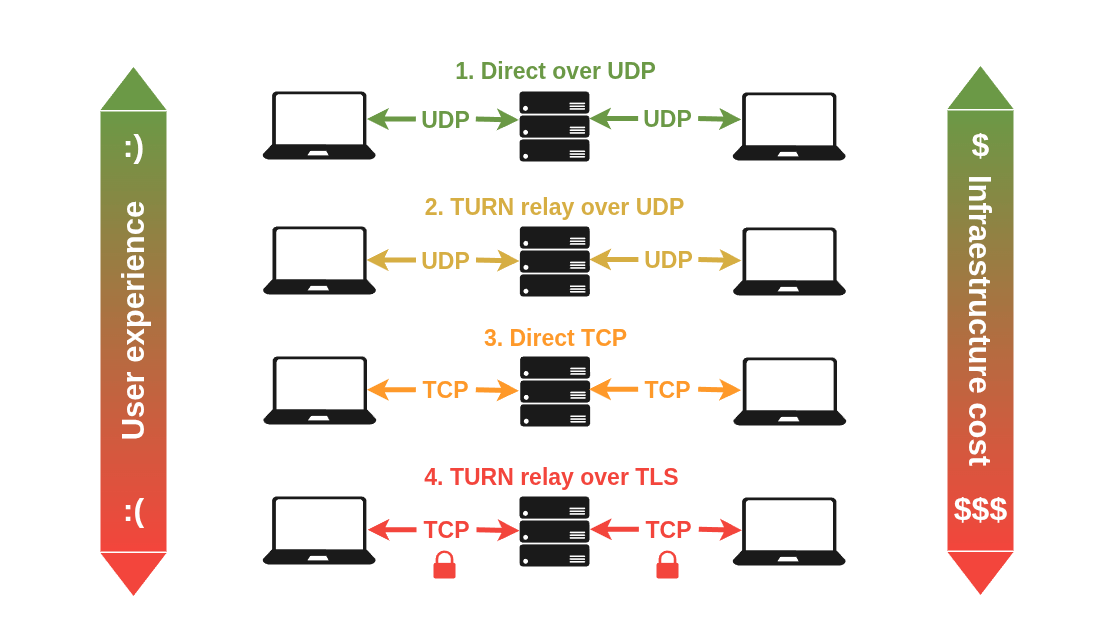
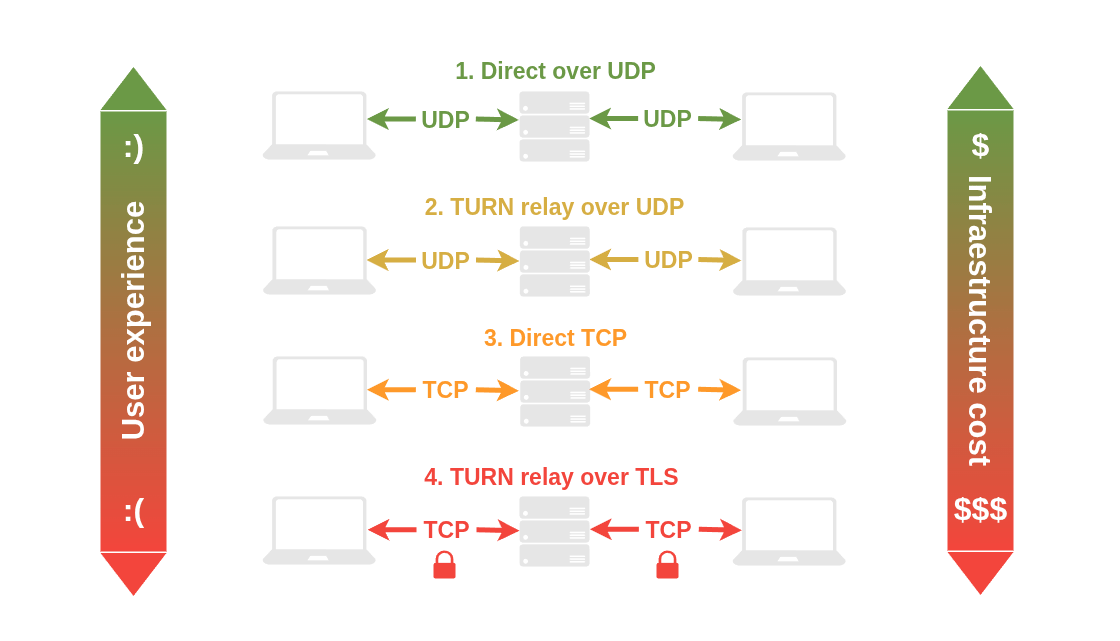
Real-time video applications seem fairly simple at first glance. A user clicks "Join", video and audio start flowing, and everyone can see and hear each other.
But under the hood, WebRTC is making a series of complex networking decisions that determine how media actually travels across the internet. Which ultimately impacts both the final users and your server infrastructure. Including:
- Video quality and latency in your video sessions, and therefore user experience.
- Server resource consumption, and therefore infrastructure cost.
So: not all WebRTC connections between a client and a media server are equal. There are 3 factors to consider: the WebRTC media server that you deploy, how you configure your server's network, and the strictness of your client's firewalls.
Over the first two factors you usually have full control: the WebRTC media server you deploy should support the most modern connectivity mechanisms, and the network where you deploy it should be properly configured to allow optimal connections. The third factor — the client's network — may be under your control if you're deploying an internal solution for a company, but for example in consumer-facing applications with users connecting from their home networks or mobile carriers, you have no control at all.
For these reasons it is crucial to understand how modern WebRTC connectivity works, and the impact of different network conditions in your users' experience and your server infrastructure costs.
Optimal WebRTC Connection Conditions#
Real-time media over the internet has a clear optimal path when connecting a client and a media server. It wants UDP protocol, and a wide range of available ports. An optimal WebRTC connection typically looks like this:
- A being a random port on Alice's firewall.
- B and C being two different random ports over a well-defined wide range (e.g., 50000–60000) on the media server's firewall.
- D being a random port on Bob's firewall.
Why UDP?#
TCP is a reliable, ordered, and connection-oriented protocol. Which in principle sounds good for almost any application... but not for real-time media. TCP's reliability mechanism works by retransmitting lost packets and ensuring they arrive in order. For a live video call, that's totally counterproductive. If a packet carrying 20ms of audio gets lost and retransmitted, by the time it arrives it's already too late — that audio should have played 100ms ago. Delivering it now just causes a glitch worse than if it had been dropped.
UDP, on the other hand, doesn't look back. It just sends packets without waiting for acknowledgments. If one is lost, it's gone — but the rest of the stream continues without interruption. The result is smoother, more natural communication, even on imperfect networks.
TLDR 1
WebRTC prefers UDP over TCP because a UDP packet loss produces brief, barely-perceptible glitches. TCP packet loss produces freezing, stuttering, and audio-video desynchronization.
Why a wide range of ports?#
Simply because establishing a direct, dedicated connection between each client and the media server will always be the optimal path for WebRTC. Forcing a single port introduces (always) multiplexing and (sometimes) relay intermediaries.
TLDR 2
The optimal WebRTC connection will always be a direct UDP connection between the client and the media server, over a dedicated random port. This usually means opening a wide range of UDP ports (50000–60000) on the media server's and client's firewalls.
The Reality: Most Users Are Behind Restrictive Firewalls#
The problem is that most users are behind:
- NAT routers
- Corporate firewalls
- Mobile carrier networks
- VPNs
All of these systems impose restrictions on connectivity, and precisely the most common restrictions tend to be blocking the UDP protocol and not allowing connections to a wide range of ports. The exact conditions that WebRTC needs for optimal connectivity!
So what happens when the ideal path isn't available? This is where WebRTC's connectivity stack comes into play.
ICE, STUN, and TURN: How WebRTC Finds a Path#
WebRTC doesn't give up when the ideal UDP connection isn't possible. Instead, it uses a set of standard protocols to probe the network and find the best path that actually works — even in restrictive environments.
ICE (Interactive Connectivity Establishment) is a protocol that tries multiple connection candidates for a WebRTC connection — direct addresses, public addresses, and relay addresses — ranks them by quality, and selects the best one that succeeds. Think of it as a fallback ladder: ICE always starts at the top, and only steps down when forced to.
To gather those candidates, ICE uses two additional protocols to work:
-
STUN is a protocol that helps a client discover its own public IP address and port, as seen from the internet. It's a lightweight, one-time lookup — no media ever flows through it.
Note
In our scenario where clients connect to a known media server, STUN can help keeping the client's port open to allow direct connections (UDP hole punching).
-
TURN is a protocol that acts as a relay. It was first designed to relay media directly between two peers, coming into play when a direct connection is impossible due to client firewalls.
Note
In our scenario where clients connect to a known media server, TURN is still necessary to support the most restrictive client networks (TURN relay over TLS).
The end result of ICE, STUN and TURN is one of four possible connection types, each representing a different trade-off between quality and network permissiveness.
The Four Connection Types, Ranked#
Assuming that your WebRTC deployment internally supports all connection types, properly implements ICE, STUN and TURN, and that your server's network is configured correctly, this is the strict priority order that WebRTC will attempt:
1. 🟢 Direct connection over UDP (Best)#
This is the ideal scenario. After STUN discovers the client's public address, ICE performs UDP hole punching: both the client and the media server send UDP packets to each other simultaneously, convincing their respective firewalls to allow the traffic through.
Result: Media flows directly between client and server with no intermediate hops and no port multiplexing. Lowest latency, highest quality, zero extra infrastructure load.
Requirements: The client firewall must allow outgoing and incoming UDP traffic on the wide port range used by the media server (tipically something like 50000–60000).
2. 🟡 TURN relay over UDP (Good)#
If the client's firewall blocks the high UDP port range or prevents UDP hole punching (this is the case in symmetric NATs), WebRTC can fall back to using TURN over UDP on a specific known port.
Result: Media still travels over UDP — fast and low-latency — but through a relay. The extra hop adds a small amount of latency and slightly increases server load, but the experience is still good.
Requirements: The client network must allow outgoing UDP traffic to the TURN server's UDP port (tipically 3478).
3. 🟠 Direct connection over TCP (Acceptable)#
Some networks block UDP entirely — this is very common in strict corporate environments and certain VPNs. In this case, WebRTC can fall back to a direct TCP connection on a specific port of your media server.
Result: The video call works, but TCP is not designed for real-time media. A delayed packet causes everything behind it to wait, which in a video calls translates to increased latency and occasional stuttering — rather than the brief, barely-perceptible glitch you'd get with UDP. Better than no connection at all, though!
Requirements: The client network must allow outgoing TCP traffic to the media server's TCP port, which of course must be properly configured to allow direct TCP connections over a specfic port.
4. 🔴 TURN relay over TLS (Last Resort)#
The final fallback is TURN over TLS — media relayed through the TURN server, all on port 443, encrypted with TLS. This passes through even the most locked-down firewalls, since it's indistinguishable from regular HTTPS traffic. If this doesn't work, the client can't access the internet at all.
Result: The video call functions, but this combination — relay overhead, plus TLS encryption, plus TCP's retransmission behavior — produces the highest latency and the greatest server resource consumption of all options. If a significant share of your users are hitting this path, it's worth contacting their IT teams to see if firewall rules can be relaxed.
Requirements: The client network must allow outgoing TCP to port 443. Universally available: any network that allows general internet access will allow this.
How OpenVidu facilitates all of this
If you use OpenVidu as your WebRTC platform, everything is optimized out-of-the-box to allow all kind of client connections, and to automatically select the best possible path for each user. OpenVidu implements ICE, STUN and TURN and optimizes the port configuration for the best results:
- For direct connection over UDP: OpenVidu nodes support direct UDP connections on the high port range (50000–60000).
- For TURN relay over UDP: OpenVidu relays TURN over UDP on port 443.
- For direct connection over TCP: OpenVidu nodes support direct TCP connections on port 7881 (when using Pion as the internal WebRTC engine) or in the range 50000–60000 (when using mediasoup as the internal WebRTC engine). See About mediasoup integration.
- For TURN relay over TLS: OpenVidu relays TURN over TLS on port 443.
A Real-World Scenario: The Cost of Restrictive Client Firewalls#
Let's make all of this information something concrete with a scenario.
Imagine you're deploying a video conferencing platform for a company. A significant portion of their employees connect from a corporate network that blocks all UDP traffic. Without UDP, paths 1 and 2 are immediately ruled out. WebRTC falls back to path 3: a direct TCP connection to the media server.
Here's what that means in practice:
- Media flows directly to the media node, but over TCP instead of UDP.
- Latency is higher, and TCP's behavior under packet loss translates to occasional stuttering rather than brief glitches.
- However, no relay is involved — your TURN server is not under any additional load, and bandwidth costs remain the same.
Now imagine the corporate firewall is even stricter, and also blocks TCP traffic to the media server's port. Now paths 1, 2, and 3 are all unavailable. WebRTC falls back to path 4: TURN relay over TLS on port 443:
- Each user's media stream passes through your TURN server instead of flowing directly to the media node.
- Your TURN server now carries the full bandwidth of every relayed session: video, audio, raw data.
- Increased latency, TLS overhead, and TCP's retransmission behavior all combining.
- Server infrastructure costs go up.
Now flip both scenarios: the same company opens UDP ports 50000–60000 on their firewall to your node IPs. Suddenly, all those users establish direct UDP connections (path 1). Your TURN server is idle. Latency drops, server CPU usage decreases, video quality improves. More video sessions can be supported, and server infrastructure costs go down.
Network configuration is not just a user experience concern — it's a cost optimization lever for your server infrastructure.
That said, this is always a trade-off. Many companies — especially in regulated industries — prioritize firewall strictness over optimal WebRTC performance, and that's a perfectly valid choice. The goal of this negotiation is not to convince IT teams to compromise their security policies, but to help them understand the concrete impact of each rule so they can make an informed decision.
How OpenVidu Handles All of This Automatically#
Here's the good news: you don't have to manage any of this manually.
OpenVidu handles the entire ICE negotiation process automatically, for every client, on every connection. When a user joins a session, OpenVidu's signaling layer orchestrates the exchange of ICE candidates between the client and the Media Node, tries each path in priority order, and selects the best one that works — transparently, in real time, with no configuration required on your part or theirs.
OpenVidu is specifically optimized to support all four connection types out of the box: direct UDP over the full high port range, TURN relay over UDP 443, direct TCP, and TURN relay over TLS 443. The initial session handshake is always established via TCP 443 to the load balancer — allowed in virtually every network — and from there, everything else is negotiated automatically.
In practice, this means: if a user is on an open home network, they get a direct UDP connection. If they're behind a strict corporate firewall that blocks all UDP, they get TURN over TLS. And the many cases in between are handled just as gracefully.
Conclusions#
WebRTC connectivity is not magic — it's a well-defined priority system that adapts to whatever the network allows. Understanding it helps you make better decisions about server infrastructure, troubleshoot quality issues faster, and communicate clearly with IT teams about what firewall rules actually matter.
To summarize the key takeaways:
- The optimal WebRTC connection is always direct UDP over a wide port range — lowest latency, highest quality, no relay overhead.
- Most users are behind firewalls that partially or fully restrict those ideal conditions, forcing WebRTC to fall back to less optimal paths.
- ICE is the protocol that navigates this reality, using STUN for address discovery and TURN for relaying when a direct connection is impossible.
- The four resulting connection types — direct UDP, TURN/UDP, direct TCP, TURN/TLS — represent a clear trade-off between quality and how permissive the client's network is.
- Restrictive client firewalls don't just degrade user experience — they shift real load and cost onto your server relay infrastructure.
OpenVidu abstracts all of this complexity away, and all of our official self-hosted deployments include the necessary components and configurations to ensure the best possible connectivity for every user. But now that you understand what's happening under the hood, you're in a much better position to have informed conversations with your users and their IT teams — and to know exactly which firewall rules to ask them to relax first.