Role Management#
Every participant joins a meeting with a different set of permissions:
- Users and identified guests have by default the permissions of their base role (
ModeratororSpeaker), which can be fine-tuned independently for each member with custom permissions. - Anonymous guests can only join through the shared
ModeratororSpeakerlink, so they always have the predefined permissions of that role and cannot be customized.
During a meeting, these permissions are not fixed. Participants with the participantPromote permission can promote other participants to moderator or demote them back to their original permissions, from the participant's menu in the Participants panel, through the REST API or, when OpenVidu Meet is embedded, with the participantUpdateRole command.
Info
participantPromote is one of the permissions the Moderator predefined role grants by default. For the complete list of permissions, see the MeetPermissions schema.
Promoting participants to moderator#
A participant with the participantPromote permission can promote to moderator any other participant whose permissions are lower than the full set of Moderator predefined role permissions. The promotion grants that participant all the moderator permissions they were missing.
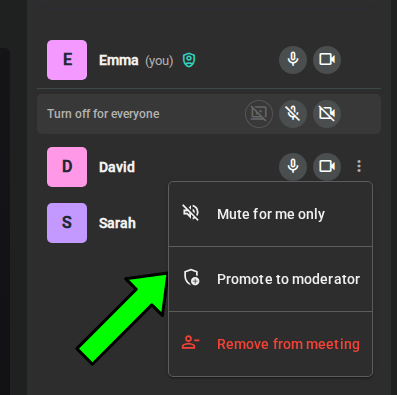
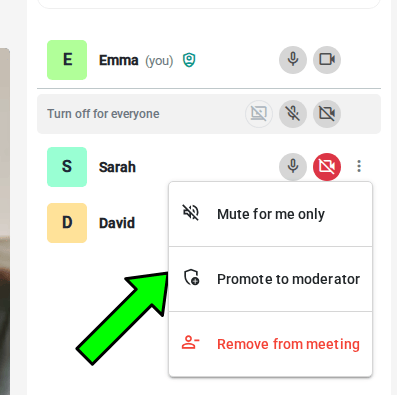
The promotion is temporary and scoped to the ongoing meeting:
- It does not modify the member's configured base role or custom permissions.
- As soon as the promoted participant leaves the meeting — including refreshing the browser — the extra permissions are dropped and they return to their original permissions.
Demoting participants#
A participant with the participantPromote permission can also demote a promoted participant at any time, reverting them to the original permissions they joined the meeting with.
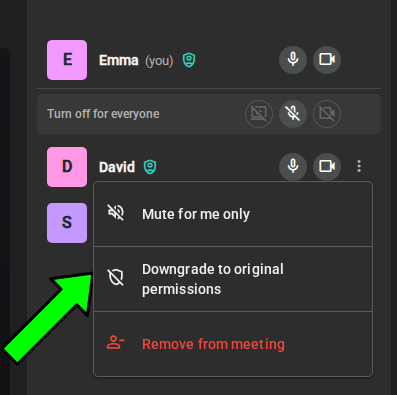
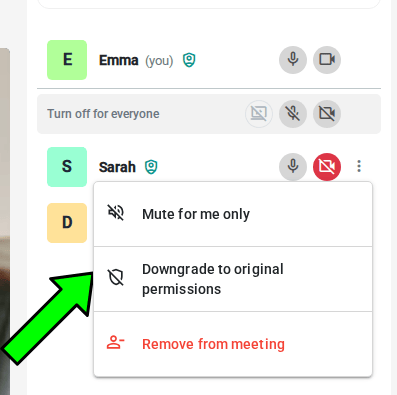
Info
A promoted moderator cannot demote an original moderator — a participant who already had moderator permissions when they joined, rather than being promoted during the meeting. This prevents temporarily-promoted moderators from stripping permissions from the participants who were moderators from the start.
REST API reference#
A participant's role in the live meeting can also be changed from your backend with the Meetings REST API. Like every other moderation action, it requires the corresponding permission unless the request is authenticated with the API key.
| Operation | HTTP Method | Reference |
|---|---|---|
| Update a participant's role | PUT | Reference |
From your application#
When OpenVidu Meet is embedded, the host application promotes or demotes a participant with the participantUpdateRole command of the Web Component and the iframe, giving the participant's identity and the action, upgrade or downgrade. It acts on behalf of the local participant, so it requires that participant to hold the participantPromote permission.
The participant whose role changed is told through the participantRoleChanged event, once the permissions of the new role are in effect. A change made while the participant is still joining is reported after meetingJoined. Neither the other participants nor the one who made the change receive the event.
Webhook#
Every promotion and demotion, whether it comes from the Participants panel, the REST API or the command, is reported to your backend as the participantRoleChanged webhook , which carries the participant with their new role. Editing a member's base role or custom permissions is not a promotion or a demotion, so it is not reported.