ARM or x86 for WebRTC media servers? Participants per node on 3 clouds#
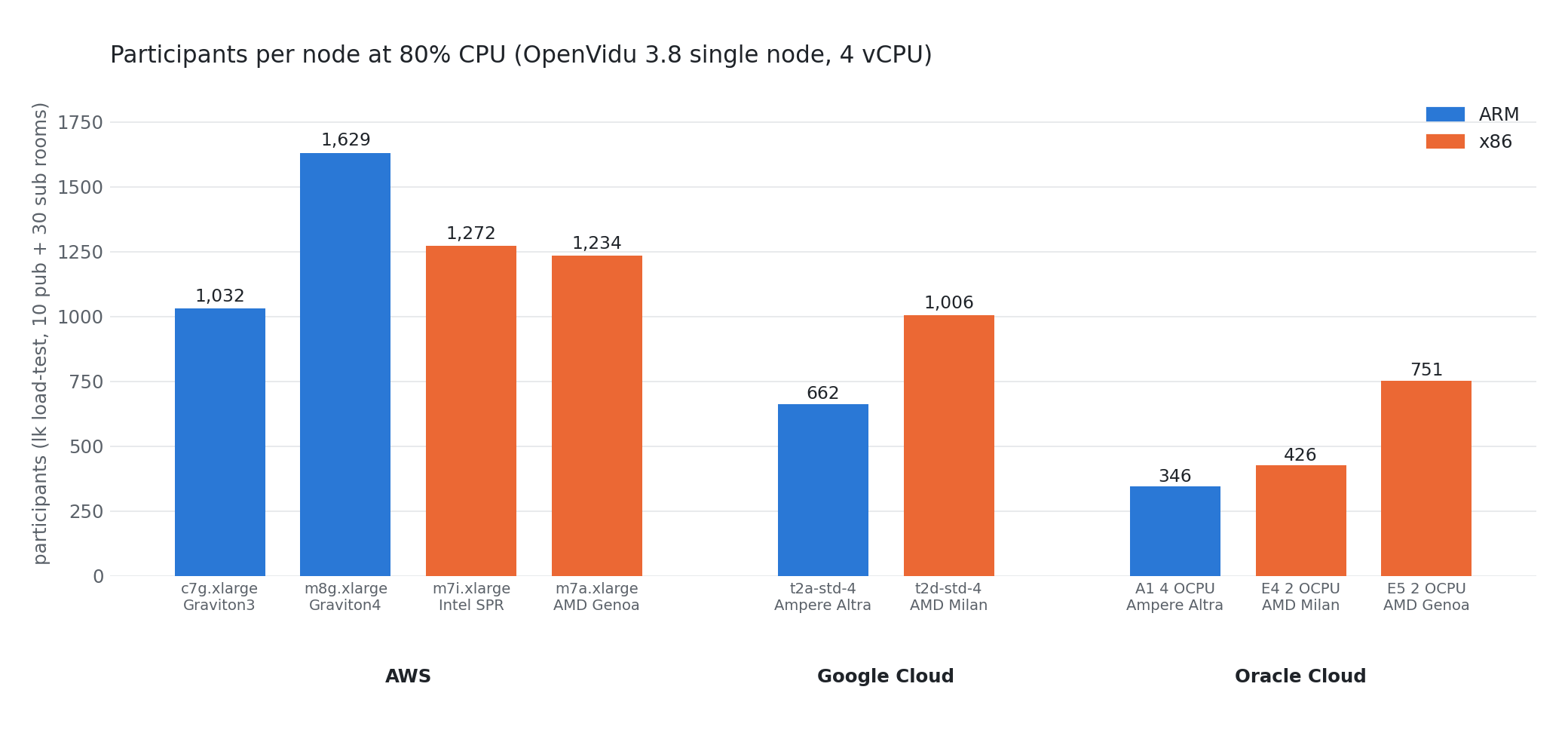
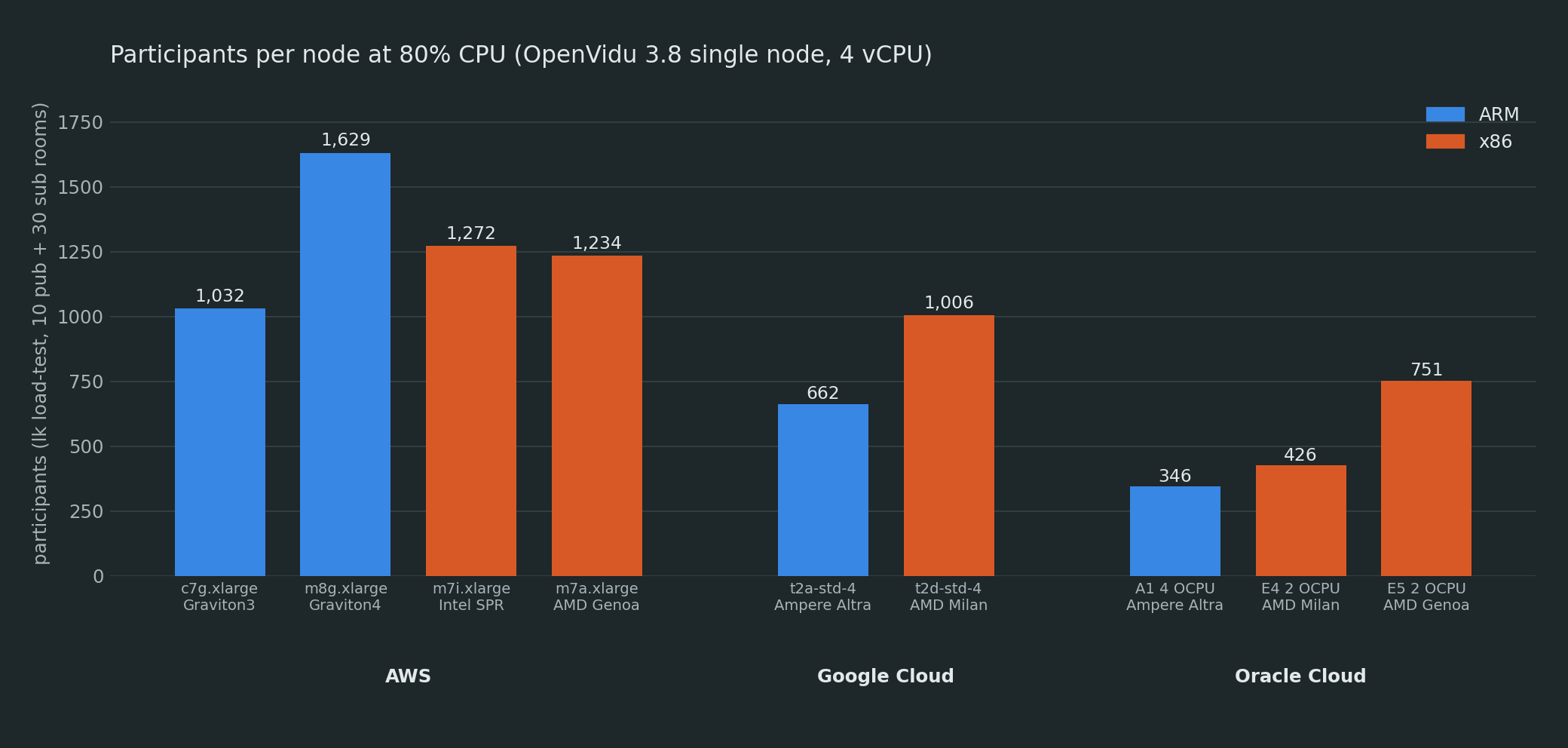
On every major cloud, an ARM instance costs less per hour than the x86 instance of the same size. On AWS, for example, a 4-vCPU Graviton3 machine is about 20% cheaper than its Intel equivalent. But a lower price only saves money if the machine can handle a similar load, and for a WebRTC media server that means forwarding a similar number of RTP packets per second.
We didn't find any published numbers for SFU workloads on ARM, so we ran the test ourselves. We deployed the same OpenVidu 3.8 single node on matching ARM and x86 instances in AWS, Google Cloud and Oracle Cloud, and used the same load generator and ramp on all of them, adding participants until the CPU ran out.
What's in this post
We tested nine 4-vCPU nodes, four ARM and five x86, with lk load-test up to 85% CPU. For each
one we report how many participants it held, the compute cost per participant-hour and which
resource ran out first.
On AWS, Graviton3 costs 15% less than Intel and 28% less than AMD per participant, and Graviton4 is the cheapest instance we tested. On Google Cloud and Oracle, the ARM option is Ampere Altra, an older core that holds far fewer participants, and its lower price doesn't make up for the difference. We also found that the faster CPUs need 16 GB of RAM to reach 80% CPU: with 8 GB they run out of memory first.
Why the hourly price isn't enough#
These are the on-demand prices in the AWS Spain region (eu-south-2) in September 2026, all for 4 vCPUs and 8 GB: c7g.xlarge (Graviton3) $0.155/hour, c8g.xlarge (Graviton4) $0.171, c7i.xlarge (Intel Sapphire Rapids) $0.192 and c7a.xlarge (AMD Genoa) $0.220. Graviton3 is 19% cheaper than Intel and 30% cheaper than AMD, but there are three reasons why that comparison alone can be misleading.
vCPUs are not equivalent across instance families. On Intel instances, a vCPU is one hardware thread, so 4 vCPUs means 2 physical cores with SMT (hyper-threading). On Graviton and Ampere, and also on AWS's c7a and GCP's t2d, each vCPU is a full core. Comparing c7g and c7i is really comparing 4 cores against 2 cores with two threads each. We checked it with lscpu on every node (Thread(s) per core: 1 vs 2).
Oracle bills by OCPU, and an OCPU means different things depending on the shape. On the AMD shapes (E4, E5), one OCPU is a core with two threads, that is, 2 vCPUs. On the Ampere shapes, one OCPU is a single core with a single thread. So an A1 with 4 OCPUs has 4 vCPUs, while an E4 with 4 OCPUs has 8. To keep the comparison fair, we sized every machine by vCPU.
Under load, compute is the smaller part of the bill. A busy media node sends hundreds of gigabytes of video per hour, and on AWS, GCP or Azure that egress traffic makes up 80-95% of the monthly cost. That's why the number we care about is participants per node per dollar, and the only way to get it is to measure it.
Setup#
Nodes. We used OpenVidu 3.8.0 Single Node, Community edition, installed with the official templates for each cloud (the ones linked from the self-hosting docs). We didn't change anything for ARM. Since OpenVidu 3.5, every image is published for linux/amd64 and linux/arm64, and the installer picks the right one for the host. The instance type was the only parameter that differed between an ARM run and its x86 counterpart.
All nodes have 4 vCPUs. The Oracle shapes and AWS's c7g have 8 GB of RAM; Google's standard-4 shapes come with 16 GB. For Graviton4, Sapphire Rapids and Genoa on AWS we list the 16 GB m instance (m8g, m7i, m7a) instead of the 8 GB c one, because the c versions ran out of memory before reaching 80% CPU, as the results explain.
| Cloud | ARM nodes | x86 nodes | Region |
|---|---|---|---|
| AWS | c7g.xlarge (Graviton3), m8g.xlarge (Graviton4) | m7i.xlarge (Intel Sapphire Rapids), m7a.xlarge (AMD Genoa) | eu-south-2 |
| Google Cloud | t2a-standard-4 (Ampere Altra) | t2d-standard-4 (AMD Milan) | europe-west4 |
| Oracle Cloud | A1.Flex 4 OCPU (Ampere Altra) | E4.Flex 2 OCPU (AMD Milan), E5.Flex 2 OCPU (AMD Genoa) | eu-madrid-1 |
Azure is missing because our subscription has zero quota for both the Dpsv5 (ARM) and Dsv5 (x86) families, and our quota increase request was denied. We had the same quota problem with Google's Axion (c4a), and every attempt to launch Oracle's AmpereOne A2 returned a 404. We'll add those three once we can get access to them.
Load. We generated the load with LiveKit CLI 2.18, running on a separate x86 VM with 8 or 16 vCPUs in the same region as the node under test (on AWS, in the same availability zone). This way the load generator doesn't take CPU away from the node, and all the traffic stays inside the cloud. Each room is one lk process:
lk load-test --url wss://<node-domain>/ --api-key <key> --api-secret <secret> \
  --room ovarm-r1 --video-publishers 10 --subscribers 30 \
  --video-resolution medium --video-codec vp8 --duration 7200s
Each subscriber receives six of the ten tracks, at about 1.6 Mbps, so every room has 40 participants and around 180 forwarded streams. We added a new room every 120 seconds. Every 5 seconds we sampled CPU from /proc/stat (busy = total minus idle and iowait, with steal recorded separately) and memory from /proc/meminfo, and for each step we took the mean of its last 60 seconds. The ramp stopped when the node reached 85% CPU. For the AWS m runs we also pointed LiveKit's node_ip at the node's VPC-private address, so the test traffic stayed inside the zone and avoided regional data transfer charges; nothing else changed.
The test only covers the SFU, that is, forwarding media between participants. Recording (headless Chrome plus ffmpeg) and AI agents were not part of it.
Results#
The table shows how many participants each node had when it reached 80% CPU, which is roughly the point where an autoscaler should already have added another node. On every machine, CPU grew almost linearly with the number of rooms, so the ranking would be the same at 50% or 70%.
| Cloud | Instance | CPU | Arch | 4 vCPU are | $/h | Participants at 80% CPU | $ per 1,000 participant-hours |
|---|---|---|---|---|---|---|---|
| AWS | c7g.xlarge (8 GB) |
Graviton3 (Neoverse V1) | ARM | 4 cores | $0.155 | 1,032 | $0.150 |
| AWS | m8g.xlarge (16 GB) |
Graviton4 (Neoverse V2) | ARM | 4 cores | $0.200 | 1,629 | $0.123 |
| AWS | m7i.xlarge (16 GB) |
Intel Xeon 8488C (Sapphire Rapids) | x86 | 2 cores × 2 threads | $0.225 | 1,272 | $0.177 |
| AWS | m7a.xlarge (16 GB) |
AMD EPYC 9R14 (Genoa) | x86 | 4 cores | $0.258 | 1,234 | $0.209 |
| Google Cloud | t2a-standard-4 (16 GB) |
Ampere Altra (Neoverse N1) | ARM | 4 cores | $0.162 | 662 | $0.244 |
| Google Cloud | t2d-standard-4 (16 GB) |
AMD EPYC 7B13 (Milan) | x86 | 4 cores | $0.186 | 1,006 | $0.185 |
| Oracle Cloud | A1.Flex, 4 OCPU (8 GB) |
Ampere Altra (Neoverse N1) | ARM | 4 cores | $0.052 | 346 | $0.150 |
| Oracle Cloud | E4.Flex, 2 OCPU (8 GB) |
AMD EPYC 7J13 (Milan) | x86 | 2 cores × 2 threads | $0.062 | 426 | $0.145 |
| Oracle Cloud | E5.Flex, 2 OCPU (8 GB) |
AMD EPYC 9J14 (Genoa) | x86 | 2 cores × 2 threads | $0.076 | 751 | $0.101 |
Why three of the AWS rows are m instances. We ran the 8 GB c8g.xlarge, c7i.xlarge and c7a.xlarge first. At around 1,150 participants, new connections started to fail with the CPU still between 60% and 72%: the node had run out of memory. OpenVidu uses about 5.7 MB of RAM per connected participant (1.4 GB idle, 7.5 GB at 1,080 and 9.4 GB at 1,400, the same on every architecture), so 8 GB can't take these three CPUs to 80%. We repeated the test on the 16 GB instance with the same CPU and the same 4 vCPUs (m8g, m7i, m7a); those are the values in the table, at their own prices. Graviton3 fit in 8 GB (7.3 GB at its 1,032 participants), so c7g stays. The m version costs 17% more per hour than the c one in all three cases; with enough memory, the c prices would give $0.105 for c8g, $0.151 for c7i and $0.178 for c7a per 1,000 participant-hours.
Breaking the results down:
- AWS. Graviton3 holds 19% fewer participants than Intel and 16% fewer than AMD, but its
c7gis also 31-40% cheaper per hour than them7iandm7athose CPUs need, so per dollar it costs 15% less than Intel ($0.150 vs $0.177 per thousand participant-hours) and 28% less than AMD. Graviton4 holds 58% more participants than Graviton3 for 29% more money, and 28% more than the best x86 instance: by far the cheapest option per participant on AWS. The two-corem7iheld 3% more than the four-corem7a. - Google Cloud and Oracle (Ampere Altra). Here the lower price of ARM doesn't pay off. Google's
t2aholds 34% fewer participants than the AMD-basedt2dand is only 13% cheaper, so per participant the x86 machine costs 24% less. Oracle'sA1holds 19% fewer participants than theE4with the same number of vCPUs and ends up at about the same cost per participant. The newerE5handles 2.2 times the load of theA1for 1.5 times the price. - Steal time (Oracle only). All three Oracle shapes, ARM and AMD alike, showed 13-19% steal at the top of the ramp, while AWS and GCP showed none. This partly explains why Oracle's absolute numbers are low even though its cost per participant is reasonable.
- Media quality. On every node, subscribers kept receiving their tracks at ~1.6 Mbps with zero packet loss until the test stopped.
Cost per participant#
Dividing the hourly price by the number of participants at 80% CPU gives the compute cost of having 1,000 participants in calls for one hour:
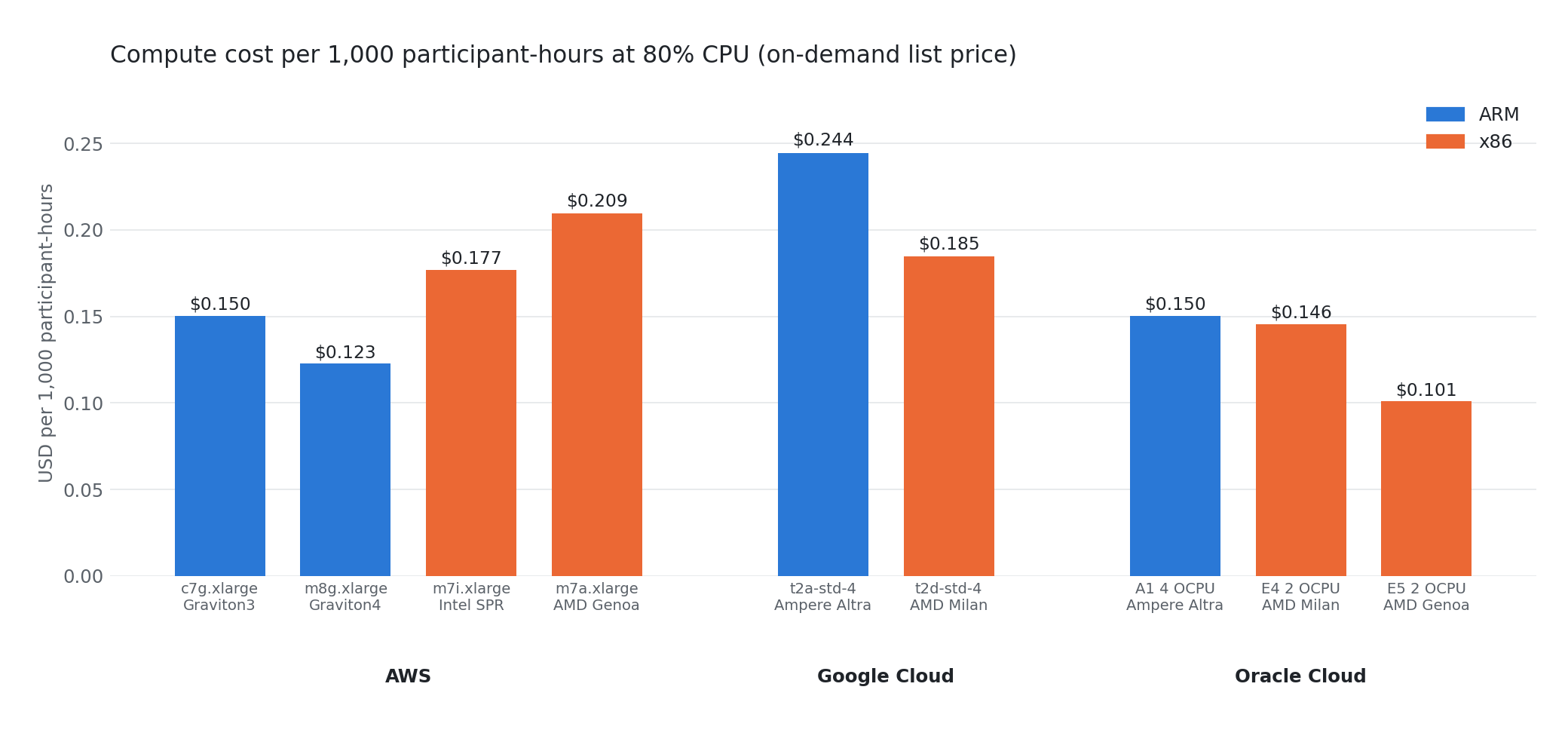
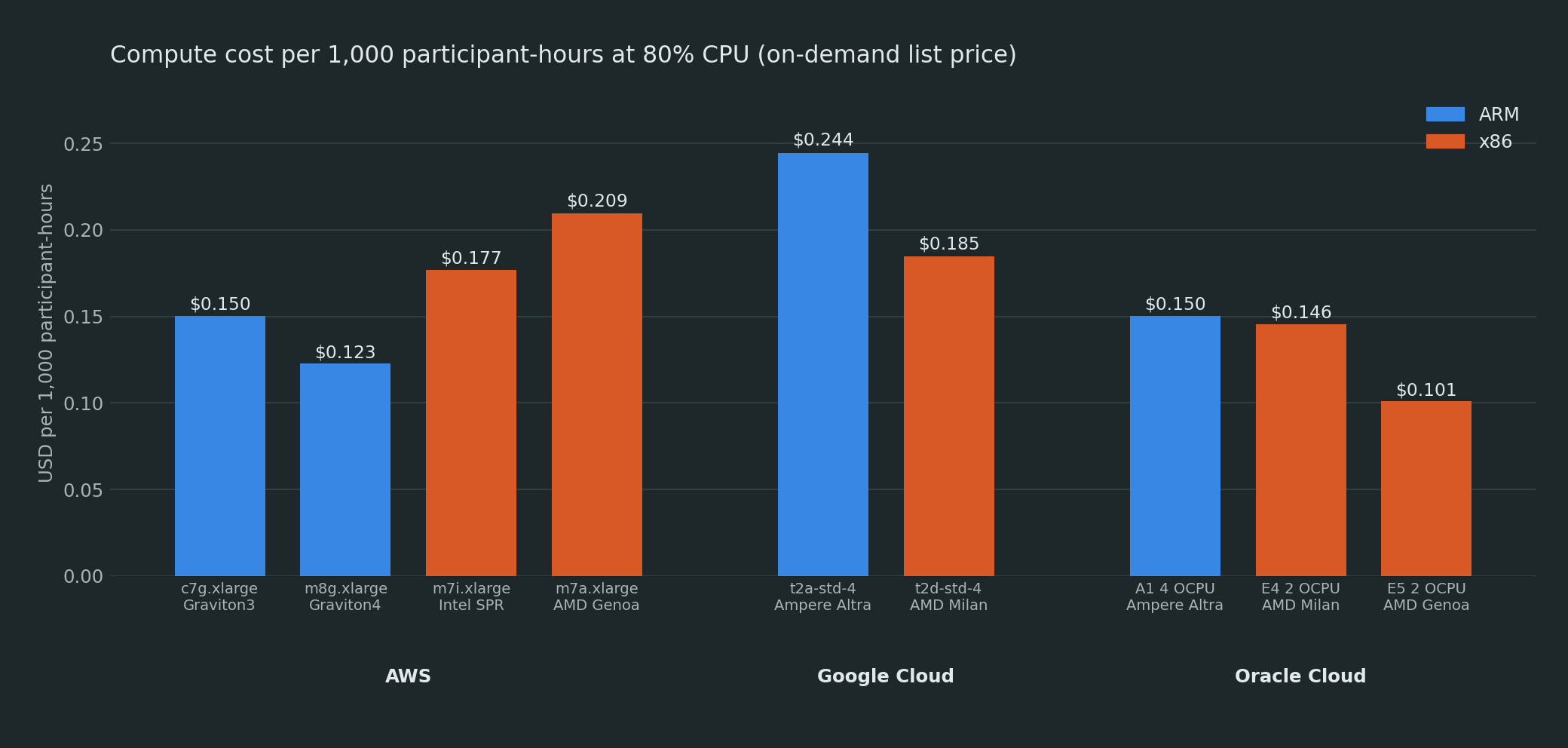
The two cheapest options are Oracle's E5 (x86, $0.101) and AWS's Graviton4 (ARM, $0.123). The most expensive is Google's t2a (ARM, $0.244), 32% more than the t2d in the same cloud.
For reference, 1,000 participants cost between $0.10 and $0.24 per hour in compute on any of these machines. In our test, those same 1,000 participants generated about 1.3 Gbps of outgoing traffic, close to 0.6 TB per hour. At AWS list prices, one hour of that egress costs about as much as 11 days of Graviton4 compute running 24/7. Choosing ARM or x86 only changes the compute part of the bill; the choice of cloud and its egress pricing have a much bigger impact on the total.
Things to check before moving to ARM#
None of the ARM deployments needed any manual step, and they took about the same time to deploy as the x86 ones (within a minute). These are the issues we did run into.
Quotas. ARM instance families have their own quotas, and on a new account they often start at zero. Our Azure subscription couldn't get a single Dpsv5 core, and Google's Axion family didn't even appear in our quota list. Oracle's A1 is also known for "out of capacity" errors in busy regions. Check your quotas before planning a deployment around a specific family.
Instance types supported by the templates. The templates choose the arm64 image based on the instance type prefix: t4g and the c6g-c8g, m6g-m8g and r6g-r8g families (including their d and n variants) on AWS; t2a, c4a and n4a on GCP; VM.Standard.A1/A2 on Oracle; and sizes with a p in the name (D4pls_v5) on Azure. With any other family, the template uses the x86 image and the instance won't boot. Also, burstable families (t4g, Azure B) run on CPU credits, so they aren't suitable for a sustained SFU load.
Memory on fast CPUs. Each participant uses about 5.7 MB of RAM regardless of architecture, so an 8 GB node maxes out at around 1,150 participants, and Graviton4, Sapphire Rapids and Genoa reach that limit with CPU to spare (60-72% in our runs). If you use one of these CPUs with 4 vCPUs, choose a size with 16 GB (the m family on AWS, standard instead of highcpu on GCP, or more instanceMemory on Oracle Flex shapes). Graviton3, Ampere and Milan run out of CPU first, so 8 GB is fine for them.
Mixed clusters. In OpenVidu Elastic and High Availability, the master node and the media nodes are sized separately and can use different architectures. You can keep an x86 master and run the media nodes on ARM, which is where the savings add up, since media nodes are the ones you add as the load grows.
Conclusions#
- On AWS, use Graviton. Graviton3 costs 15% less than Intel and 28% less than AMD per participant once you count the 16 GB those CPUs need. Graviton4 was the best instance we tested, with 58% more participants than Graviton3 for 29% more money. For media nodes we'd choose
m8g, orc8gif you cap the node at around 1,100 participants. - On GCP and Oracle, stick with x86 for now. Ampere Altra is a generation behind, and a 13-16% lower price doesn't make up for holding 19-34% fewer participants.
t2dis cheaper per participant thant2a, andE5is much cheaper thanA1.A1is still a reasonable choice if the lowest hourly price matters more than density: $0.052/hour for 346 participants. - Compare cost per participant, not per vCPU. A vCPU is a full core on Graviton, Ampere,
c7aandt2d, but a hardware thread on Intel and on Oracle's AMD shapes. Even so, the two-corem7iheld 3% more participants than the four-corem7a, so the CPU generation mattered more than the number of cores.
Between the cheapest and the most expensive instance we measured, the compute cost per participant-hour differs by 2.4× ($0.10 vs $0.24 per thousand). Whether a machine is ARM or x86 says little about where it falls in that range; the CPU generation is a much better indicator.
Need more than this?#
All the tests used a standard OpenVidu 3.8 Community single node, so you can reproduce them with the same templates and lk. If you want to go further:
- Deployment types: when a single node is no longer enough, and how Elastic and High Availability split the master and media nodes.
- The single-node install guides for AWS, GCP and Oracle Cloud. The instance type is a parameter, and every ARM family in this post works without changes.
- Performance: why OpenVidu's media server (mediasoup instead of Pion) forwards about twice as much media as stock LiveKit on the same hardware.
- Deploy OpenVidu on Hetzner in 15 minutes: the cheapest way to try a single node.