How we develop and test complex OpenVidu clusters in our laptops#
Any modern software system of a certain size that aims to be scalable and fault-tolerant consists of multiple services running on different nodes. OpenVidu is no exception, and it goes even further: as a real-time system, there are other factors that become critical: shared state, concurrency, and response time.
Developing and testing such a distributed system is not trivial. In this post, we will explain how we are able to replicate production OpenVidu clusters on a single machine using Docker-in-Docker. This allows us to test and find bugs that only appear in a distributed environment, without the need for multiple VMs or physical machines.
The idea is that this short post will serve as inspiration for developers and sysadmins who may face similar challenges when working with distributed systems and need a practical solution to chaos test them, in a cost-effective and efficient way.
The problem#
OpenVidu is not just one server, is a set of services that work together:
- The media server, the SFU that routes the packets from clients.
- Egress and Ingress, which record and stream media out, and pull external media in.
- AI agents, the workers that join rooms to transcribe, translate or process media.
- Caddy proxy, which routes traffic.
- OpenVidu Meet, our flagship videoconferencing application.
- State services: an operator that keeps all nodes in sync, and distributed versions of Redis, MongoDB and MinIO to store in-memory and persistent data.
- Observability services: Grafana, Alloy, Prometheus, Mimir, Loki.
All of these services run in production as carefully configured and orchestrated Docker containers. Each one on different node types [Master Nodes, Media Nodes], and each one with different scaling and fault-tolerance requirements.
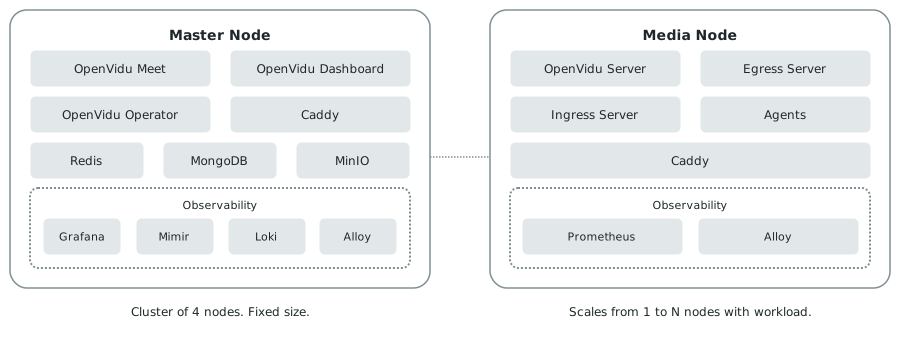
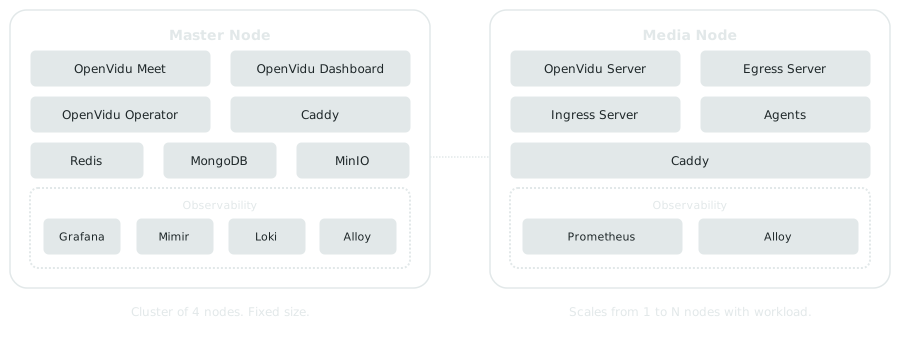
In a High Availability deployment both node types are replicated, and they are replicated differently. The Master Nodes form a fixed cluster of four, because that is what the state services need to keep a quorum. The Media Nodes are an elastic pool that grows and shrinks with the workload.
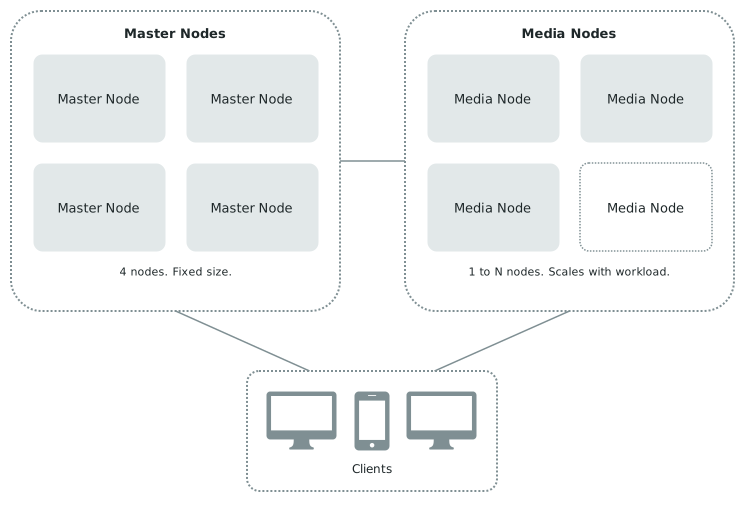
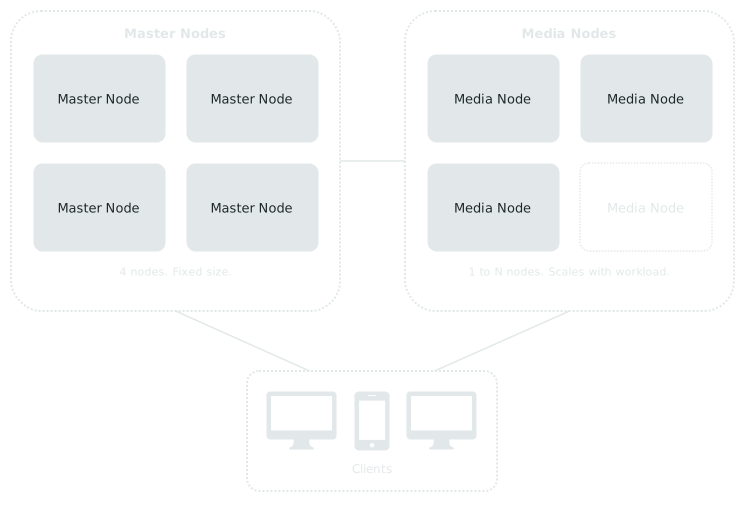
We develop each individual service on its own, carefully testing it in isolation. But integrating all of them together and chaos testing the system as a whole requires a distributed environment, whatever form it may take.
Possible solutions#
There is a logical progression of solutions to the problem of developing and testing a distributed system:
Real production-like clusters#
The most direct and obvious approach: if the production environment is a cluster of 10 physical nodes running 10 different services in distributed mode, simply run that in your dev/test environment.
- Pros: the most realistic approach. What you develop and test is exactly what users will run in production.
- Cons: very expensive in terms of infrastructure, slow, hard to automate, hard to distribute artifacts when developing.
Using VMs (VMWare, VirtualBox, etc.)#
The next logical step: keep the topology, but virtualize the hardware. Each node becomes a virtual machine on a single host, so the 10 nodes are still 10 separate operating systems with their own kernels and network interfaces, except now they can be created and destroyed by a script instead of provisioned by hand.
- Pros: cheaper than real machines, easier to automate.
- Cons: still very resource-intensive and slow to launch. To run a 10 node cluster, you still need a powerful single machine with enough CPU and memory to run all the VM instances.
Docker-in-Docker (DinD)#
The final step: drop the emulated hardware and keep only the isolation. Each node becomes a container running systemd and its own Docker daemon, so from the inside it behaves like an independent Docker host where the real OpenVidu installer runs unmodified. The difference is that all 10 nodes share the host kernel instead of booting 10 of their own.
- Pros: very cheap, very fast to launch, easy to automate. You can run a 10 node cluster on a single machine with 8GB of RAM and 4 CPU cores.
- Cons: sharing the host's kernel and using Docker networking means that you will never be 100% sure that your DinD environment behaves exactly like a real cluster, to the last detail.
This last con is bearable for all the benefits DinD offers. In practice, we have not yet encountered a situation in which the DinD environment has been unable to replicate the behavior of a real-world environment.
In summary:
| Solution | Fidelity | Hardware needed | Cost | Startup time | Updating a running service |
|---|---|---|---|---|---|
| Real production-like clusters | Exact | A real cluster | $$$ | Very slow | Hard. Copy the new Docker image to every machine |
| VMs | Very close | One powerful machine | $$ | Slow | Medium. Copy the new Docker image to every VM |
| Docker-in-Docker | Close enough | A humble laptop | $ | Fast | Easy. One image, shared by every node |
How does it look like in practice#
We created OpenVidu Plaground: a DinD environment that can run complete OpenVidu clusters on a single machine. Designed to be used by OpenVidu developers and testers, everything is driven by a single bash script. One command brings up a complete cluster:
That command does four things:
- It builds the Docker-in-Docker node image (a systemd Ubuntu base with its own Docker daemon inside) and writes a Docker Compose file with the exact cluster topology (4 Master Nodes and 3 Media Nodes in the example above).
- It creates a Docker network and places every node on it with a static address, alongside a pull-through registry mirror which caches images from Docker Hub so that they are downloaded only once for all nodes. This helps drastically reduce download times and disk usage.
- It resolves the cluster under a public wildcard domain whose records point back at those private addresses, with real certificates, so the whole deployment answers over valid HTTPS with no browser warnings and no manual edits to
/etc/hosts. This means we can connect to the cluster from any device on the same network, including mobile phones, without having to install fake certificates or change DNS settings. - It downloads the real OpenVidu installer and runs it inside each node. This last step is what makes the result trustworthy. Nothing about the installation is special-cased for this environment: each node ends up running the same services, from the same images, with the same configuration files in the same paths as a real production deployment.
After a few minutes of Docker images downloading and containers starting, we can see an OpenVidu High Availability cluster running in our laptop:
$ docker ps

CONTAINER ID  NAMES            IMAGE                     CREATED AT           STATUS
df76679a5bc3  master-node-1    playground-master-node-1  2026-10-05 23:01:15  Up 9 minutes
d175c922c581  master-node-2    playground-master-node-2  2026-10-05 23:01:15  Up 9 minutes
5a6e9909ba9f  master-node-3    playground-master-node-3  2026-10-05 23:01:15  Up 9 minutes
09b630a0dd50  master-node-4    playground-master-node-4  2026-10-05 23:01:15  Up 9 minutes
397536ffe61f  media-node-1     playground-media-node-1   2026-10-05 23:01:15  Up 8 minutes
1a5d9b59b53d  media-node-2     playground-media-node-2   2026-10-05 23:01:15  Up 8 minutes
1b0840825fbb  media-node-3     playground-media-node-3   2026-10-05 23:01:15  Up 8 minutes
85ec9596d102  registry-mirror  registry:2                2026-10-05 23:01:15  Up 9 minutes
And inside each Docker-in-Docker node, we can see the real OpenVidu services running just as they do in production:
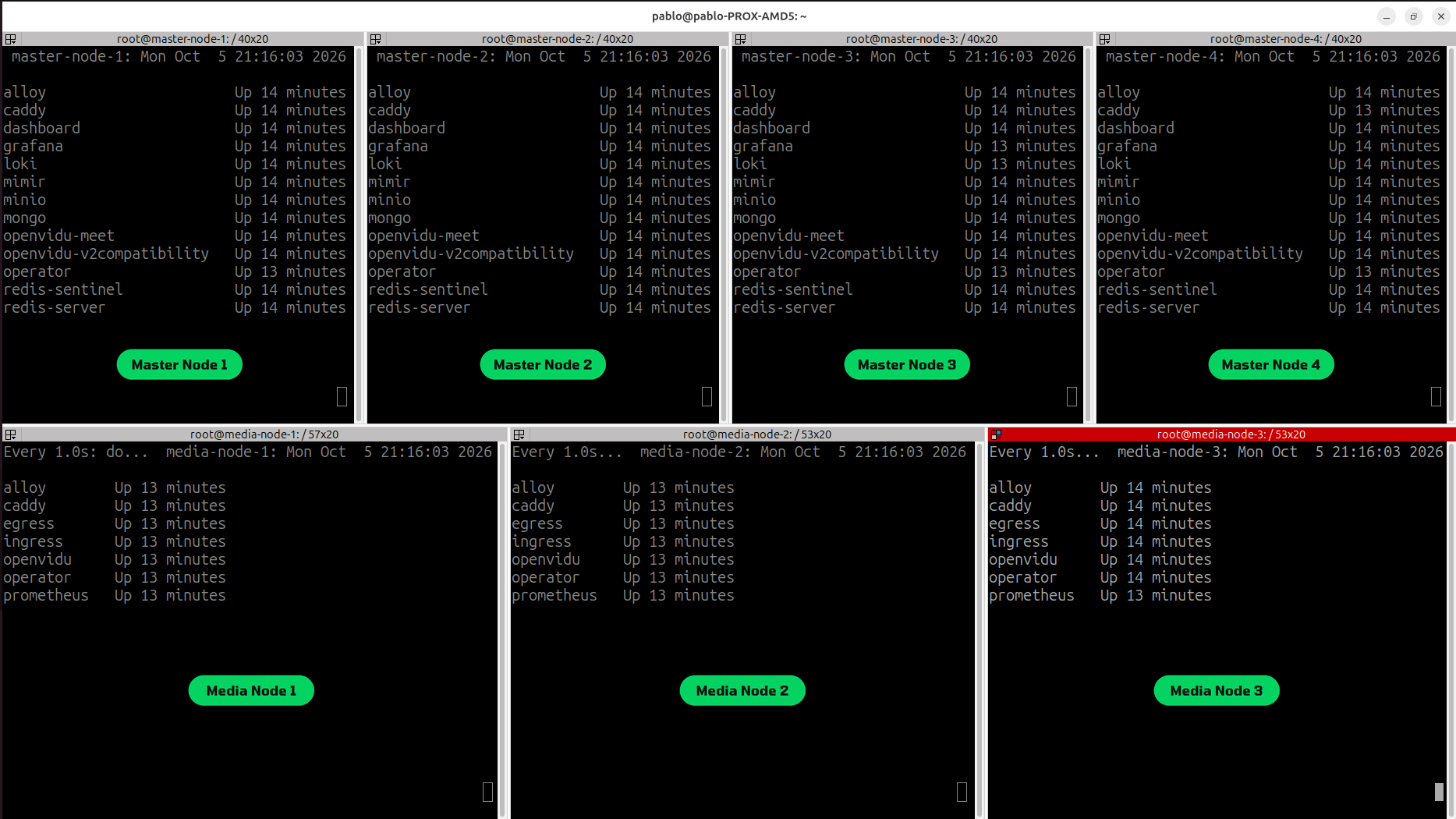
Our bash script openvidu-playground.sh has a lot of other commands to manage the cluster, including stopping and destroying it, scaling nodes up and down, and even breaking things on purpose to test fault-tolerance:
# Stop a specific node gracefully
./openvidu-playground.sh stop-node media-node-1

# Stop a specific node immediately simulating a crash
./openvidu-playground.sh stop-node-crash master-node-1

# Freeze a node, simulating a hung machine or network partition
./openvidu-playground.sh freeze-node media-node-1

# Crash a specific service inside a specific node, simulating a service crash
./openvidu-playground.sh crash-service master-node-2 redis
There are two distinctive features of the OpenVidu Plaground based on Docker-in-Docker that makes it superior to other alternatives: the shared Docker image cache, and the ability to break things on purpose with a single command.
The shared cache#
An OpenVidu Master Node runs services that take up around 4GB of disk space, and each Media Node around 6GB. When running 15 or 20 nodes, most laptops would fill up their valuable disk space very quickly. This is why properly configuring a shared cache of Docker images is critical to making this DinD approach feasible.
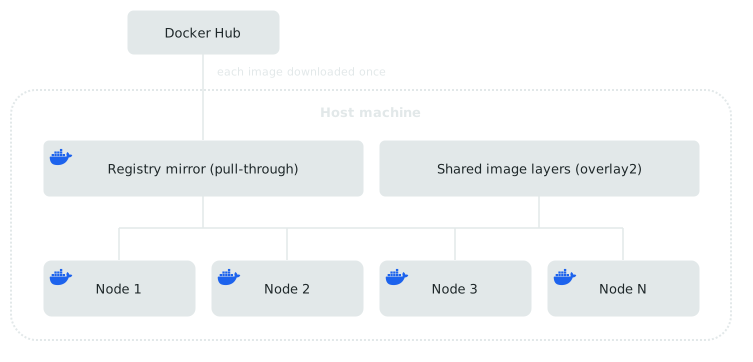
The idea is simple, and it has two parts. First, a pull-through registry mirror runs on the host machine, and every node is configured to use it as its Docker registry. The mirror caches images from Docker Hub, so each image is downloaded only once and then reused by every node. Second, every node bind-mounts the same host directories for its Docker overlay2 layers and image metadata, so all the nodes share one physical copy of each layer on disk.
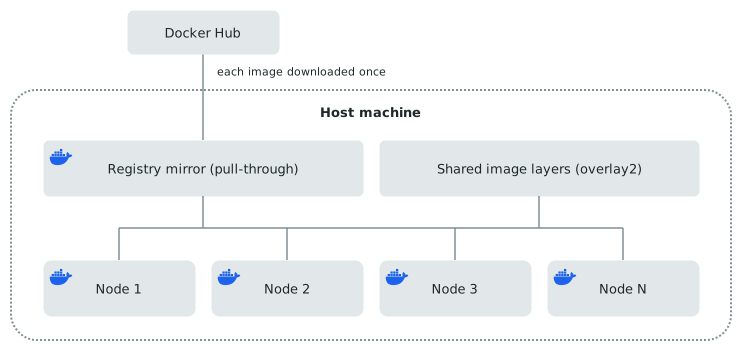
This also has a useful side effect when developing any of the OpenVidu services. You build the image once, load it into the shared registry mirror, and it is immediately available to every node, with no round trip through Docker Hub. The whole development loop runs locally on a single machine, which makes it fast and convenient:
# After this command, image openvidu/egress:main will be available to every node in the cluster
./openvidu-playground.sh load-image openvidu/egress:main
Breaking things on purpose#
A good amount of our openvidu-playground.sh script is dedicated to commands that break the cluster in specific ways. This is how we test fault-tolerance and find bugs that only appear in a distributed environment.
- Nodes can be stopped gracefully (triggering drains of active Rooms, Egresses, Ingresses and Agents), which effectively simulates scale-down operations:
./openvidu-playground.sh stop-node media-node-1 - Nodes can also be stopped immediately, simulating a crash:
./openvidu-playground.sh crash-node master-node-1 - Services can also be crashed individually, without affecting the rest of the node:
./openvidu-playground.sh crash-service master-node-1 redis - We can freeze a node, simulating a hung machine or a network partition:
./openvidu-playground.sh freeze-node media-node-1
All these commands allow us to reproduce very specific failure scenarios that are a pain to reproduce in a real cluster, and hard to automate and test. This is how we have been able to find and fix some of the most obscure bugs in OpenVidu.
Lessons learned#
Since adopting the development and testing strategy described above, we have been able to find and/or fix an important number of bugs that would have been incredibly hard to find otherwise. Below there are some examples related to the shared Redis sentinel and the distributed state of the cluster:
- A slow Redis killed healthy Media Nodes: when hundreds of thousands of entities accumulated in Redis, a routine query left it unresponsive for a few hundred milliseconds. That was long enough for healthy Media Nodes to miss their liveness deadline (also done through Redis), so their peers declared them dead and tore down the Rooms they were serving.
- A configuration change that reverted itself: applying a cluster-wide setting means editing it on one Master Node and restarting that node. If it happened to be the one holding the Redis master role, its own restart triggered a failover that quietly swallowed the change, and the whole cluster carried on with the old configuration silently, without a single error.
- Recordings left marked as active forever: the state of a recording lives in Redis and outlives the service that owns it, so an recording that dies mid-session never writes its final update. The row stays active for good: the dashboard shows a recording that does not exist, and stopping it times out against a handler that is long gone.
- A domain change in the cluster took down every node: OpenVidu stores a cluster id in Redis, and Redis survives restarts, so changing the domain of a deployment left every node with an id that matched nothing. They all exited at startup with a single log line that did not say what to do about it, crash-looped, and left the API answering 5xx.
All of these bugs were found (or at least replicated once a production cluster reported it), and later fixed, thanks to the ability to run a complete OpenVidu cluster on a single machine, and to break it in very specific ways.
And this is just a small sample of all the edge cases and failure scenarios we consistently test in our CI/CD pipelines: below is a screenshot of the results of our integration test suite running our DinD environment in small GitHub Actions runners.
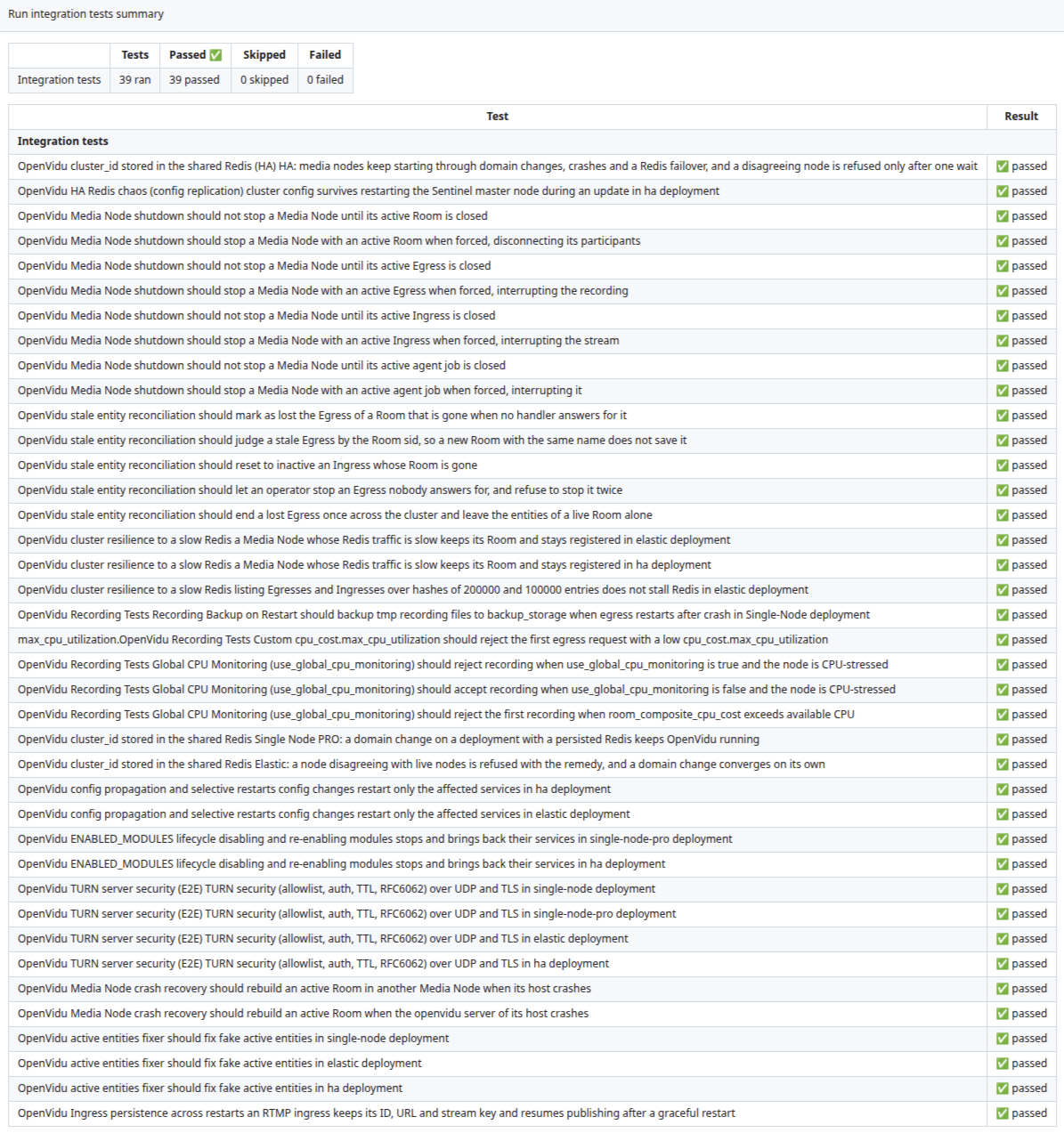
This ever-growing test suite is capable of setting up multiple fresh DinD OpenVidu clusters and running all of those scenarios in a single Ubuntu worker, in just over an hour.
Conclusion#
Chaos testing a distributed system properly means running it as a distributed system. Real clusters are the most faithful way to do that and the least practical one, and virtual machines only move the cost around. Docker-in-Docker gives up a little fidelity, the shared kernel and the Docker networking, and gets back something worth far more: a full production topology on an ordinary laptop, created and destroyed in minutes, with a shared image cache that keeps 20 nodes from needing 20 copies of everything.
What that buys is not just convenience. It is the ability to be deliberately cruel to a cluster. Nodes can be drained, killed, frozen or cut off from Redis on demand, and the bugs that only exist in those moments stop being stories from a production incident and become tests that run before every release. The clusters we break on purpose every day are the same ones our users run in production.
Lucky you, if you are building on OpenVidu, you benefit from this setup indirectly as we improve the product thanks to it. But you do not need any of this to get started:
- A local deployment runs the whole stack on your machine with Docker Compose.
- When you are ready for real infrastructure, take a look to the Deployment types documentation to decide whether you need a Single Node, Elastic or High Availability OpenVidu deployment.