Control your video calls with hand gestures, thanks to a free AI from Google#
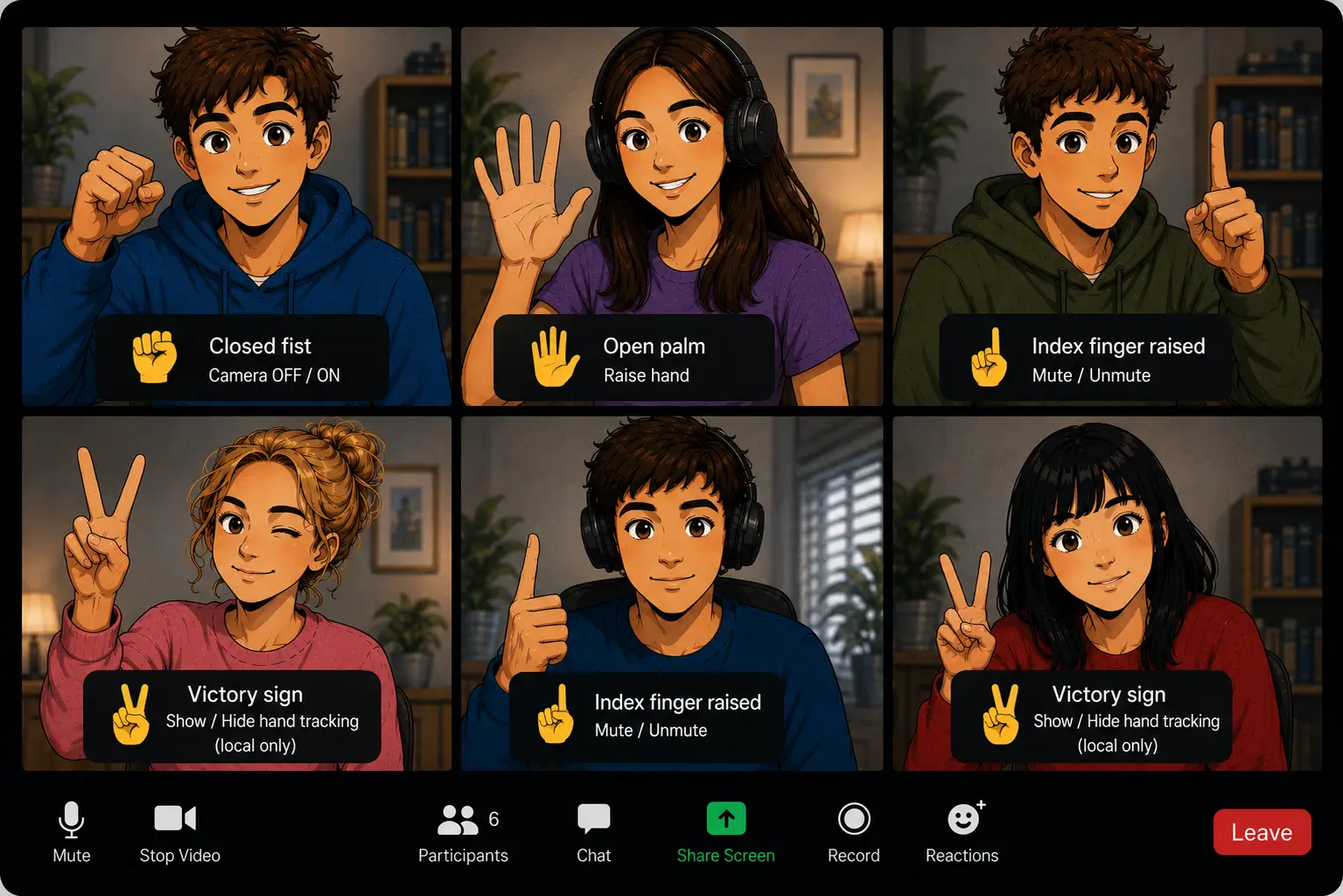
If you're tired of reaching for the cursor to hit the camera icon every time you want to disappear from the meeting, you're in luck. At OpenVidu we've built an open-source prototype that lets you control your video call's features with gestures, like an actual tech shaman.
What this demo does#
This open-source demo lets you control your own video call with four hand gestures, without touching the keyboard or the mouse.
I'll confess it: you'll feel like Harry Potter on his first day of class...

but no, it's not magic. These gestures are recognized in real time with MediaPipe Gesture Recognizer , a free AI model that runs in the browser itself and lets you detect gestures without sending video to the cloud. We can pair these gestures with real actions in the video call, like turning off the camera, muting the microphone, and so on.
The gestures we've wired up are:
- ✊ Closed fist. Turns off your camera. Close the fist again and it turns back on.
- ☝️ Pointing up. Mutes or unmutes your microphone.
- ✋ Open palm. Raises your hand: the rest of the room sees a pulsing badge appear on your tile within a second.
- ✌️ Victory sign. Shows or hides, only in your own view, the hand-tracking skeleton MediaPipe is reading from your hand at that instant.
Each gesture has to be held steady for a period of time (650 ms) for the action to fire, which keeps an unintentional gesture from triggering the action.
What MediaPipe is#
MediaPipe is Google's family of computer vision models, built to run on your own device instead of on a server.
And no, it's not complex to install and set up:
import * as vision from '@mediapipe/tasks-vision';

// Vendored locally (see the repo's client/scripts/vendor-mediapipe.sh, wired to run
// on `npm install`) and served same-origin, so joining a call never fires a
// request to jsDelivr or Google Cloud Storage.
const WASM_FILESET_URL = '/mediapipe/wasm';
const MODEL_URL = '/mediapipe/models/gesture_recognizer.task';

const fileSet = await vision.FilesetResolver.forVisionTasks(WASM_FILESET_URL);
this.recognizer = await vision.GestureRecognizer.createFromOptions(fileSet, {
  baseOptions: { modelAssetPath: MODEL_URL, delegate: 'GPU' },
  runningMode: 'VIDEO',
  numHands: 1,
  minHandDetectionConfidence: 0.5,
  minHandPresenceConfidence: 0.5,
  minTrackingConfidence: 0.5,
});
MediaPipe's own quick-start snippet points WASM_FILESET_URL and MODEL_URL straight at jsDelivr and Google Cloud Storage instead. That's fine for trying something out, but it means every participant's browser calls out to both on every single call. We vendor both locally and serve them from our own origin.
The MediaPipe library is free and open source, maintained by Google under the Apache 2.0 license. The pretrained models it ships, including the gesture recognizer, come with their own model card and aren't necessarily covered by that same license, so it's worth checking before you redistribute a model binary yourself. MediaPipe's privacy notice is also worth reading closely: your video frames stay on-device, but MediaPipe can still send usage metrics to Google, and getting informed consent from your users for that is on you, not Google.
MediaPipe isn't the only option, though. If you need more precision or dedicated commercial support instead, Banuba , a commercial SDK built on its own proprietary neural networks, explicitly marketed for video chats, is worth a look too.
Want to inspect the training data yourself instead of trusting a black box? HaGRIDv2 is a million-plus-image gesture dataset built with video calls in mind, with a lightest baseline that classifies a frame in 5ms on CPU alone.
It isn't open source, though. Its own license file states outright that it's "not a Creative Commons license": it's a bespoke, share-alike-style license, explicitly non-sublicensable, published by SaluteDevices (part of Russia's Sber group) and defined under Russian civil law for its database rights. Read it yourself before building anything commercial on it, a non-sublicensable share-alike license is a real obstacle to shipping a derived product, not a formality. It also only ships as PyTorch checkpoints; MediaPipe already did the "export it for the browser" homework for you, HaGRIDv2 doesn't, yet.
Wiring gestures up to OpenVidu#
Once gesture detection is solved, all that's left is hooking it up to the video call.
There are 4 gestures we've assigned actions to:
- Turn the camera on/off
- Mute/unmute the microphone
- Show/hide the hand-tracking skeleton (only in your own view)
- Raise/lower the hand
OpenVidu lets us control the camera and microphone with these two simple calls:
Other participants find out that your camera or microphone are off thanks to OpenVidu's own architecture.
Raising your hand, however, needs to notify the other participants manually, so it's sent as a participant attribute:
The rest of the participants receive it by subscribing to RoomEvent.ParticipantAttributesChanged. For someone to be able to write their own attributes, the token server needs to add the canUpdateOwnMetadata grant when issuing the token:
Problems we ran into, and how we fixed them#
The first time I tried the prototype, I did exactly what anyone would do: I closed my fist to turn off the camera.
Brilliant, I thought. The model recognized the gesture perfectly and turned off the camera... What I didn't think about is that by turning off the camera, the model stopped seeing my hand and recognizing any gesture at all.

What the model thought when I tried this
The fix is to feed the model from a hidden capture, not from the track that gets published to the room. That way, the AI model keeps seeing your hand exactly the same whether the camera is off or on.
What this actually costs, in resources#
Measuring the resources needed, on a laptop with an integrated GPU, we can see that the AI's cost is very low, and that you don't need a dedicated GPU for it to run in real time:
| Resource | Measured figure |
|---|---|
| Per-frame inference, GPU | ≈ 9.2 ms on average (11% of the 83 ms budget per cycle at 12 Hz) |
| Per-frame inference, CPU (no GPU available) | ≈ 35 ms on average (3.8× slower than GPU, but still 42% of the budget, comfortably real-time) |
| Memory (JS heap) per recognizer instance | ≈ 32 MB |
You don't need a dedicated GPU. The GPU delegate uses WebGL2, supported on practically any desktop or mobile browser today, including integrated GPUs from a decade ago.
Try it in two minutes#
Repository: github.com/openvidu-labs/openvidu-ai-gestures
You'll need Node.js and Docker installed. Then:
# Terminal 1: OpenVidu
git clone https://github.com/OpenVidu/openvidu-local-deployment -b 3.8.0
cd openvidu-local-deployment/community
./configure_lan_private_ip_linux.sh
docker compose up

# Terminal 2: token server
cd server
npm install
npm start   # serves POST /token on port 6084

# Terminal 3: client
cd client
npm install
npm run dev
Open http://localhost:5094 and start trying out the gestures.
Where to go from here#
Everything in this demo runs on your own machine: the gesture model reads your camera locally and never uploads a video frame anywhere, and the OpenVidu Local deployment you just spun up runs the call itself on your own infrastructure too. That combination (local gesture recognition plus a self-hosted video platform) means your video and call metadata stay on infrastructure you control, with no per-minute SaaS bill. It doesn't mean zero data leaves the browser, or that you're off the hook on consent: see the previous section.
If gesture control isn't what you need but self-hosting your own video infrastructure is, that's exactly what OpenVidu is for: the same LiveKit-compatible core you just used, wrapped in a production-ready platform you can run anywhere, from a quick local Docker Compose install to a highly available cluster. The self-hosting docs are the natural next step.