Building an AI agent for transcribing and summarizing audio calls#
With the world being flooded with all kinds of agents, bots, and AI services, let's keep things grounded and code something tangible in a few simple steps. Let's build an AI agent that helps people in an audio call. Our agent will:
- Store the full transcript of the meeting in a text file.
- Send live captions to everyone in the call.
- When someone joins late, send them a private summary of what they missed.
We'll be using OpenVidu as our media server, and LiveKit Agents Python framework to build our agent. These tools handle all the hard parts of real-time audio transport, so we can focus on our agent features.
What we are building#
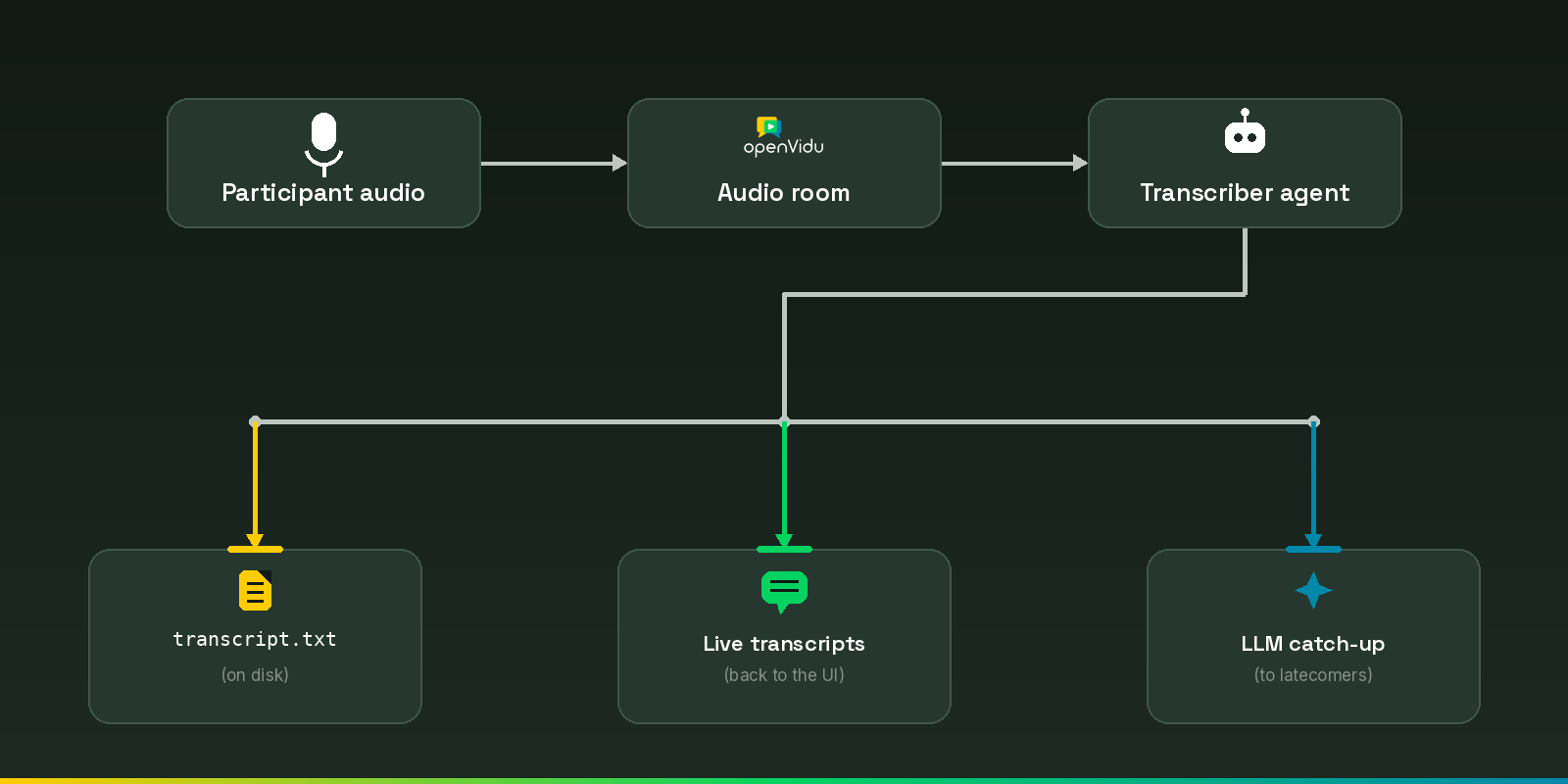
Three moving parts:
- An audio room: where people and our bot meet. We run it inside a local server, so there is nothing to sign up for.
- The transcriber agent: a small Python program that joins every room as an invisible participant, turns each person's speech into text, and saves it.
- A tiny app: a plain web page to join a room, talk, and watch the transcript appear live.
The data flows like this:
Running the demo#
You will need:
- Python 3.10+.
- An OpenAI or AWS account for the summary feature. You can still run the demo without one — just leave
LLM_PROVIDERempty. Live captions and the saved transcript work regardless; you only lose the catch-up summaries.
Now simply follow these steps to run the demo locally:
-
Clone the repository:
-
Activate the Python virtual environment and install the dependencies:
-
Configure the app in the
.envfile. Choose the transcription provider (STT_PROVIDER) and the summarization provider (LLM_PROVIDER):# STT_PROVIDER: openai | aws | vosk (offline) # LLM_PROVIDER: openai | aws | (empty for no summarization) STT_PROVIDER= LLM_PROVIDER= # Required when "openai" is selected for STT_PROVIDER or LLM_PROVIDER OPENAI_API_KEY= # Required when "aws" is selected for STT_PROVIDER or LLM_PROVIDER AWS_ACCESS_KEY_ID= AWS_SECRET_ACCESS_KEY= AWS_DEFAULT_REGION=us-east-1 -
Run the three components in separate terminals:
-
Terminal 1: install and run OpenVidu locally following the official instructions.
-
Terminal 2: Run the transcriber agent
-
Terminal 3: Run the web app
-
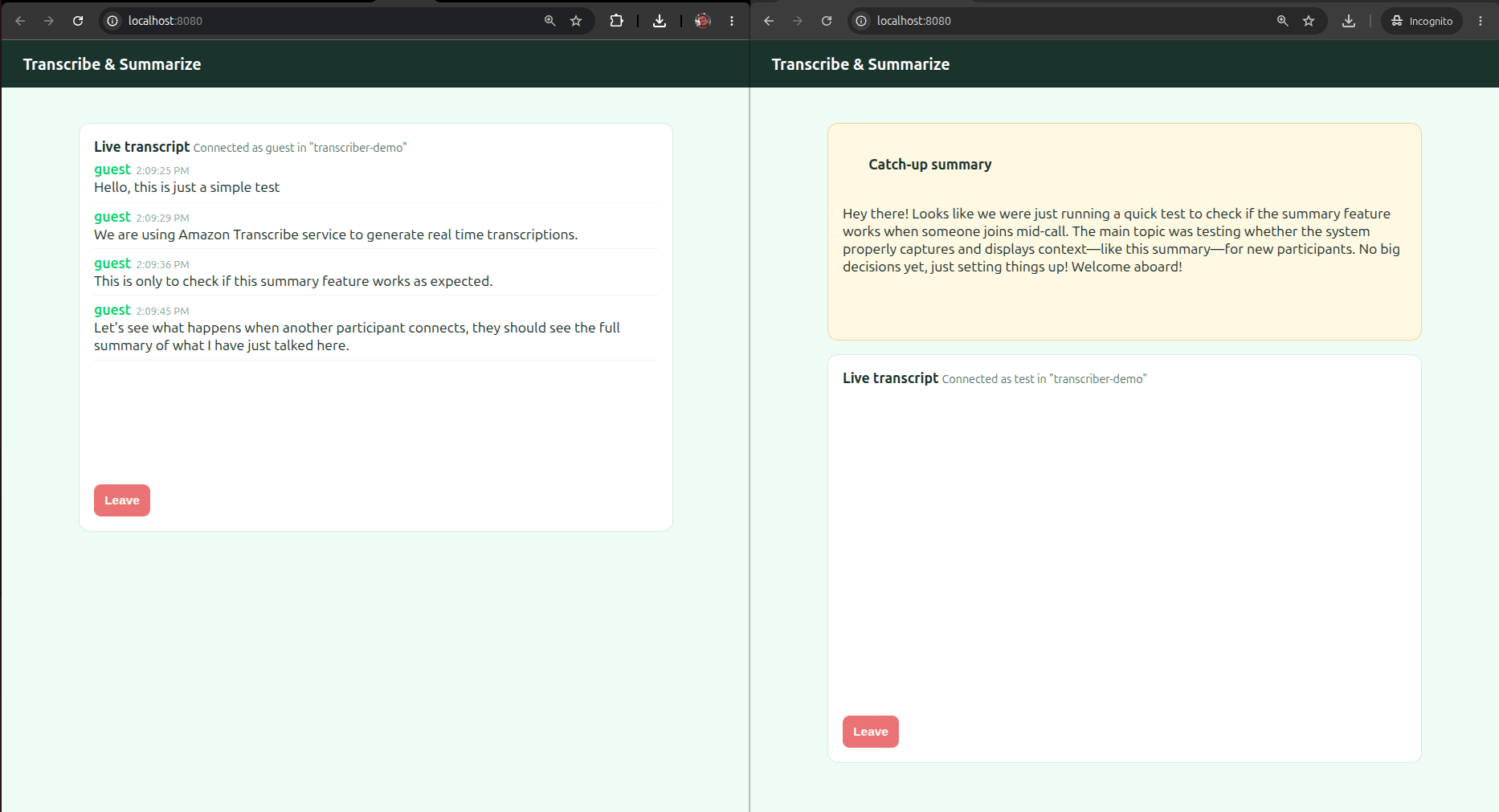
Open http://localhost:8080, type a name, and join. Talk for a bit and watch the transcript fill in. Open the page in a second tab, join with a different name, and within a couple of seconds a yellow box appears summarizing what the first tab said. The full timestamped record waits in transcripts/.
NOTE: If you are using AWS, make sure that your credentials have the necessary policies to access Amazon Transcribe and Amazon Bedrock:
Understanding our agent's code#
Step 1: An agent that listens to everyone#
A LiveKit agent is a function that runs once per room. We register it on an AgentServer and let the CLI do the rest:
from livekit.agents import AgentServer, JobContext, cli

server = AgentServer()

@server.rtc_session()
async def entrypoint(ctx: JobContext):
    await ctx.connect()
    room = ctx.room

if __name__ == "__main__":
    cli.run_app(server)
Note the @server.rtc_session() with no agent_name. Name an agent and LiveKit waits for an explicit dispatch request; leave it out and the agent joins every new room automatically. That's exactly what our transcriber wants.
Now, how do we turn an audio track into text? Because we want to swap providers, we hide the choice behind one small factory. Every LiveKit STT plugin — Vosk, OpenAI, AWS — exposes the same .stream() interface, so this is the only place in the agent that names a provider:
def make_stt():
    if STT_PROVIDER == "vosk":
        from livekit.plugins import vosk
        return vosk.STT(model_path=VOSK_MODEL_PATH, language="en-US", partial_results=False)
    if STT_PROVIDER == "openai":
        from livekit.plugins import openai
        return openai.STT(model="gpt-4o-mini-transcribe")
    if STT_PROVIDER == "aws":
        from livekit.plugins import aws
        return aws.STT()
    raise ValueError(f"Unknown STT_PROVIDER {STT_PROVIDER!r}")
The imports live inside each branch, so whoever picks AWS installs only livekit-plugins-aws (the other lines never run). For Vosk, partial_results=False skips the interim guesses it makes mid-word; we only keep finished sentences.
Now wire it up: build one STT engine, and when ctx.connect() subscribes us to an audio track, start a transcription task for it:
speech_to_text = make_stt()   # one engine, shared by every speaker

@room.on("track_subscribed")
def _on_track_subscribed(track, publication, participant):
    if track.kind == rtc.TrackKind.KIND_AUDIO:
        asyncio.create_task(transcribe_track(participant, track))
Each speaker gets their own audio and STT stream, and we do two things at once: push frames in, read transcripts out (with asyncio.gather). The STT API of LiveKit Agents allows us to do so easily:
async def transcribe_track(participant, track):
    audio = rtc.AudioStream(track, sample_rate=16000, num_channels=1)

    async with speech_to_text.stream() as stt_stream:
        async def feed_audio():
            async for event in audio:
                stt_stream.push_frame(event.frame)
            stt_stream.end_input()       # no more audio: let the recognizer finish

        async def emit_transcripts():
            async for event in stt_stream:
                if event.type == stt_api.SpeechEventType.FINAL_TRANSCRIPT and event.alternatives:
                    text = event.alternatives[0].text.strip()
                    if text:
                        await record_line(participant, track, text)

        await asyncio.gather(feed_audio(), emit_transcripts())
feed_audio pumps frames into the recognizer; emit_transcripts reads finished sentences out; the async with handles cleanup. We act only on FINAL_TRANSCRIPT, the finished sentence rather than every interim guess. The record_line call is the bridge to the next step: saving the transcript, sending it to the browser, and keeping it in memory for the summary.
Step 2: Writing the transcript to a file#
record_line makes a finished utterance permanent: append it to the on-disk file, keep an in-memory copy for the summary, and publish it to the browser.
conversation = []  # in-memory history, used for the summary

async def record_line(participant, track, text):
    speaker = participant.name or participant.identity
    timestamp = datetime.datetime.now().strftime("%H:%M:%S")
    conversation.append(f"{speaker}: {text}")
    with open(transcript_path, "a", encoding="utf-8") as f:
        f.write(f"[{timestamp}] {speaker}: {text}\n")

    # Publish on LiveKit's built-in transcription channel, attributed to the speaker.
    writer = await room.local_participant.stream_text(
        topic=TOPIC_TRANSCRIPTION,                       # "lk.transcription"
        sender_identity=participant.identity,
        attributes={
            ATTRIBUTE_TRANSCRIPTION_FINAL: "true",
            ATTRIBUTE_TRANSCRIPTION_TRACK_ID: track.sid,
            ATTRIBUTE_TRANSCRIPTION_SEGMENT_ID: utils.shortuuid("SG_"),
        },
    )
    await writer.write(text)
    await writer.aclose()
The file reads like a meeting transcript should:
[14:02:11] Alice: should we ship the release today
[14:02:15] Bob: yes but let us wait for the tests to pass
[14:02:20] Alice: agreed lets do it after lunch
That last call is the bridge to the browser. And rather than invent our own channel, we use LiveKit's built-in transcription feature: the reserved lk.transcription topic. Setting sender_identity to the speaker means any LiveKit client receives it as a normal, correctly attributed transcription segment.
Step 3: Catching latecomers up with an LLM#
This is the most exciting feature of this agent: when someone joins a call already in progress, we summarize what they missed and send it only to them. LiveKit fires participant_connected for every new arrival:
@room.on("participant_connected")
def _on_participant_connected(participant):
    asyncio.create_task(summarize_for(participant))
async def summarize_for(participant):
    await asyncio.sleep(2)          # let the newcomer's browser get ready
    if not conversation:
        return                       # nothing said yet, nothing to summarize

    summary = await summarize(conversation)
    await room.local_participant.send_text(
        summary,
        topic="summary",
        destination_identities=[participant.identity],
    )
Like the STT, the LLM hides behind a factory: every LiveKit LLM exposes the same .chat(), so summarize() never branches:
def make_llm():
    model = os.getenv("SUMMARY_MODEL")   # optional override; default per provider
    if LLM_PROVIDER == "openai":
        from livekit.plugins import openai
        return openai.LLM(model=model or "gpt-4.1")
    if LLM_PROVIDER == "aws":
        from livekit.plugins import aws
        return aws.LLM(model=model or "us.amazon.nova-2-lite-v1:0")
    raise ValueError(f"Unknown LLM_PROVIDER {LLM_PROVIDER!r}")


async def summarize(conversation):
    ctx = llm.ChatContext.empty()
    ctx.add_message(role="system", content=SUMMARY_PROMPT)
    ctx.add_message(role="user", content="Transcript so far:\n" + "\n".join(conversation))
    chunks = [c async for c in make_llm().chat(chat_ctx=ctx).to_str_iterable()]
    return "".join(chunks).strip()
SUMMARY_PROMPT is one friendly line asking for a 3-4 sentence catch-up. .to_str_iterable() turns the streamed reply into text chunks we join: the same code for every provider, no per-vendor SDK.
Two small things make delivery clean: the two-second pause avoids a race where participant_connected fires a hair before the newcomer's browser has registered its handlers, and destination_identities sends the recap to that one person, so nobody already chatting gets spammed.
One key for both halves#
The payoff of using LiveKit plugins on both sides: for a vendor, the STT and the LLM come from the same package and read the same credentials. Pick openai and one OPENAI_API_KEY transcribes and summarizes; pick aws and one IAM key/secret covers Amazon Transcribe and Bedrock.
| Vendor | Credentials for both STT + LLM |
|---|---|
| OpenAI | one OPENAI_API_KEY (Whisper transcription + chat) |
| AWS | one IAM key/secret — Amazon Transcribe + Bedrock (the IAM policy must allow both) |
Of course, you can always use the vosk offline STT and leave LLM_PROVIDER empty for an offline, free-to-use agent. The transcription will be generated locally by Vosk, and the summary feature will be disabled (simply replaced with a full transcript).
Step 4: A dead-simple frontend#
The frontend is deliberately boring: one HTML file, the LiveKit browser SDK from a CDN, and a bit of JavaScript. No framework, no bundler.
Browsers cannot mint their own access tokens (that would leak your API secret to every visitor), so we add the smallest possible token server with Python's standard library and livekit-api:
from livekit.api import AccessToken, VideoGrants

token = (
    AccessToken(API_KEY, API_SECRET)
    .with_identity(identity)
    .with_name(name)
    .with_grants(VideoGrants(room_join=True, room=room))
    .to_jwt()
)
On the page, joining takes three calls: fetch a token, connect, enable the mic:
const { token, url } = await (await fetch(`/token?room=${room}&identity=${id}&name=${name}`)).json();
const room = new LivekitClient.Room();
await room.connect(url, token);
await room.localParticipant.setMicrophoneEnabled(true);
To show the transcript, we register a handler for the built-in lk.transcription topic; the callback's second argument tells us the speaker, and the lk.transcription_final attribute filters out anything unfinished:
room.registerTextStreamHandler("lk.transcription", async (reader, participantInfo) => {
  if (reader.info.attributes?.["lk.transcription_final"] !== "true") return;
  const text = await reader.readAll();
  addLine(nameFor(participantInfo?.identity), text, new Date().toLocaleTimeString());
});
Because we used the standard channel, that is exactly the handler any LiveKit client would use. The catch-up summary is our own summary topic: when it fires, we drop the recap into a highlighted box. That is the whole client.
Where to go from here#
You now have an agent that scales from a one-on-one to a full meeting: a clean transcript on disk, live captions, and a recap for latecomers. All that in a couple hundred lines. It runs on Vosk, OpenAI or AWS, switchable with one line in .env because both halves sit behind a make_stt() / make_llm() factory. From here you could persist transcripts, translate them live, or turn summaries into action items.
It stayed short because you never built the hard part. That is: the real-time audio transport, the track subscriptions, the AI provider communication layers. LiveKit Agents and its plugins provides all the building blocks necessary to focus on your agent's logic, not the plumbing.
Taking this idea to production is exactly what OpenVidu is for. It wraps the same LiveKit API compatible core in a battle-tested, self-hosted platform, so the agent you just wrote runs unchanged while OpenVidu handles everything that gets hard at scale: autoscaling, high availability, TURN relaying for restrictive networks, recording management, built-in observability... All within your own infrastructure, keeping all data under your control in complete privacy, and with predictable costs avoiding per-minute SaaS bills. Explore the OpenVidu documentation to self-host the whole stack, from a one-command local install to a production-grade cluster.