Egress#
Egress exports media out of a Room. Recording a meeting to MP4, streaming it to RTMP, producing HLS segments, capturing periodic thumbnails: all of it is Egress. Your application server starts and stops Egress through the API; the Egress service joins the Room as a hidden participant of kind EGRESS and subscribes only to the tracks it needs.
OpenVidu ships Egress already wired to the storage of the deployment (the bundled S3-compatible MinIO, or the cloud provider's object storage), so a recording has somewhere to land with no extra setup.
For copy-paste code snippets, see Recording examples. For working tutorials, see the Recording tutorials.
Starting an Egress#
Egress are started by making a StartEgress request to the Egress API from your application server. Requests to the Egress API require a token with the roomRecord grant (any LiveKit server SDK automatically generates it from your LIVEKIT_API_KEY and LIVEKIT_API_SECRET).
SDK requirements
- .NET and PHP: both SDKs refuse an API secret shorter than 32 characters. The .NET SDK throws an error, and the PHP SDK sends the request without a token, which fails with
permissions denied. The local deployment uses a shorter secret by default. - Rust: to call an
https://URL, enable one of the TLS features of cratelivekit-api, for examplefeatures = ["rustls-tls-native-roots"]. With the default features, requests fail withinvalid URL, scheme is not http.
The example below records "my-room" to an MP4 file: a template source with layout grid, and one file output. The output carries no explicit storage, so OpenVidu sends it to the storage of the deployment:
Using LiveKit Node SDK
import { EgressClient, EncodedFileType, FileOutput, Output, StartEgressRequest, TemplateSource } from 'livekit-server-sdk';

const egressClient = new EgressClient('https://my-openvidu-host', 'api-key', 'api-secret');

const egressInfo = await egressClient.startEgress(new StartEgressRequest({
  roomName: 'my-room',
  source: { case: 'template', value: new TemplateSource({ layout: 'grid' }) },
  outputs: [new Output({
    config: {
      case: 'file',
      value: new FileOutput({ fileType: EncodedFileType.MP4, filepath: 'my-room-recording.mp4' }),
    },
  })],
}));
Using LiveKit Go SDK
import (
  "context"

  livekit "github.com/livekit/protocol/livekit"
  lksdk "github.com/livekit/server-sdk-go/v2"
)

egressClient := lksdk.NewEgressClient("https://my-openvidu-host", "api-key", "api-secret")

egressInfo, err := egressClient.StartEgress(context.Background(), &livekit.StartEgressRequest{
    RoomName: "my-room",
    Source: &livekit.StartEgressRequest_Template{
        Template: &livekit.TemplateSource{Layout: "grid"},
    },
    Outputs: []*livekit.Output{{
        Config: &livekit.Output_File{
            File: &livekit.FileOutput{
                FileType: livekit.EncodedFileType_MP4,
                Filepath: "my-room-recording.mp4",
            },
        },
    }},
})
Using LiveKit Ruby SDK
The Ruby SDK does not support method StartEgress yet, so this example uses its deprecated start_room_composite_egress method.
require 'livekit'

egress_client = LiveKit::EgressServiceClient.new("https://my-openvidu-host", api_key: "api-key", api_secret: "api-secret")

output = LiveKit::Proto::EncodedFileOutput.new(
  file_type: LiveKit::Proto::EncodedFileType::MP4,
  filepath: "my-room-recording.mp4"
)
egress_info = egress_client.start_room_composite_egress("my-room", output, layout: "grid")
Using LiveKit Kotlin SDK
import io.livekit.server.EgressServiceClient;
import java.util.List;
import livekit.LivekitEgress;

EgressServiceClient egressClient = EgressServiceClient.createClient("https://my-openvidu-host", "api-key", "api-secret");

LivekitEgress.TemplateSource template = LivekitEgress.TemplateSource.newBuilder()
        .setLayout("grid")
        .build();
LivekitEgress.Output output = LivekitEgress.Output.newBuilder()
        .setFile(LivekitEgress.FileOutput.newBuilder()
                .setFileType(LivekitEgress.EncodedFileType.MP4)
                .setFilepath("my-room-recording.mp4"))
        .build();

LivekitEgress.EgressInfo egressInfo = egressClient
        .startEgress("my-room", template, List.of(output))
        .execute().body();
Using LiveKit Python SDK
from livekit import api

lkapi = api.LiveKitAPI(
    url="https://my-openvidu-host", api_key="api-key", api_secret="api-secret"
)
egress_info = await lkapi.egress.start_egress(
    api.StartEgressRequest(
        room_name="my-room",
        template=api.TemplateSource(layout="grid"),
        outputs=[api.Output(file=api.FileOutput(
            file_type=api.EncodedFileType.MP4,
            filepath="my-room-recording.mp4",
        ))],
    )
)
Using LiveKit Rust SDK
use livekit_api::services::egress::EgressClient;
use livekit_protocol as proto;

let egress_client = EgressClient::with_api_key(
    "https://my-openvidu-host",
    "api-key",
    "api-secret",
);

let egress_info = egress_client.start_egress(proto::StartEgressRequest {
    room_name: "my-room".to_string(),
    source: Some(proto::start_egress_request::Source::Template(proto::TemplateSource {
        layout: "grid".to_string(),
        ..Default::default()
    })),
    outputs: vec![proto::Output {
        config: Some(proto::output::Config::File(proto::FileOutput {
            file_type: proto::EncodedFileType::Mp4 as i32,
            filepath: "my-room-recording.mp4".to_string(),
            ..Default::default()
        })),
        ..Default::default()
    }],
    ..Default::default()
}).await?;
Using LiveKit PHP SDK
The PHP SDK does not support method StartEgress yet, so this example uses its deprecated startRoomCompositeEgress method.
<?php
use Agence104\LiveKit\EgressServiceClient;
use Livekit\EncodedFileOutput;
use Livekit\EncodedFileType;

$egressClient = new EgressServiceClient("https://my-openvidu-host", "api-key", "api-secret");

$fileOutput = new EncodedFileOutput([
    'file_type' => EncodedFileType::MP4,
    'filepath' => 'my-room-recording.mp4',
]);
$egressInfo = $egressClient->startRoomCompositeEgress('my-room', 'grid', $fileOutput);
Using LiveKit .NET SDK
using Livekit.Server.Sdk.Dotnet;

var egressClient = new EgressServiceClient("https://my-openvidu-host", "api-key", "api-secret");

var request = new StartEgressRequest
{
    RoomName = "my-room",
    Template = new TemplateSource { Layout = "grid" },
};
request.Outputs.Add(new Output
{
    File = new FileOutput { FileType = EncodedFileType.Mp4, Filepath = "my-room-recording.mp4" },
});
EgressInfo egressInfo = await egressClient.StartEgress(request);
If your backend technology does not have its own SDK, you have two options:
-
Call the Egress API directly.
StartEgressis a POST to/twirp/livekit.Egress/StartEgress, authenticated with a token carrying theroomRecordgrant:curl -X POST 'https://my-openvidu-host/twirp/livekit.Egress/StartEgress' \ -H 'Authorization: Bearer <TOKEN>' \ -H 'Content-Type: application/json' \ -d '{ "room_name": "my-room", "template": { "layout": "grid" }, "outputs": [ { "file": { "file_type": "MP4", "filepath": "my-room-recording.mp4" } } ] }' -
Use the livekit-cli :
Create a file at
egress.jsonwith the following content:{ "room_name": "my-room", "template": { "layout": "grid" }, "outputs": [ { "file": { "file_type": "MP4", "filepath": "my-room-recording.mp4" } } ] }Then run the following commands:
How it works#
Every Egress is started with StartEgress . This operation requires specifying:
- A source (
template,web,media): what gets captured. - One or more outputs (
file,stream,segments,images): where the source is exported to, and in which format.
Egress sources#
| Source | Description | Use cases |
|---|---|---|
template |
Exports a whole Room's video and/or audio, composited with a web layout rendered by Chrome. It is tied to the Room's lifecycle, and stops on its own when the Room ends. Layouts are customizable web pages: see Layouts and custom templates | Record meetings in composite format, with all their participants and interactions, in a single file ready for playback |
web |
Records any web page. It is similar to template source, but not tied to a Room: it can record content from outside OpenVidu |
Restreaming third-party content to YouTube or Twitch, recording external web applications |
media |
Captures tracks straight from the Room, with no browser: a participant's camera or screen share (participant_video), or a video track by ID (video_track_id), plus the audio chosen with AudioConfig routes, each in the channel you want. The participant or track IDs it names must be in the Room when it starts, or within 30 seconds. It runs until you stop it or the Room ends, even after the participant leaves (with the PASSTHROUGH preset, it ends when its track is unpublished) |
Recording individual participants, exporting specific tracks, recording an AI Agent and a caller on separate channels |
OpenVidu also offers a way of exporting participants without transcoding: Participant Passthrough Egress records every track a participant publishes in .webm or .mkv files that honor track synchronization, and ends when the participant leaves the Room. It is a media source with the PASSTHROUGH preset that names a whole participant.
Egress and transcoding
There are two kinds of Egress based on their source: the ones that transcode, and the ones that don't transcode:
template,webandmediasources transcode by default: they decode the published tracks, compose them and encode the result again. This is a heavy operation, many orders of magnitude more CPU cycles than the Rooms themselves, and it is what sizes the hardware of an Egress deployment.- A
mediasource with thePASSTHROUGHpreset and Participant Passthrough Egress do not transcode: they write the tracks to the output as published, at a small fraction of the cost. Use them when possible to maximize recording capacity.
Egress outputs#
Egress can write to files, push RTMP and SRT streams, generate HLS segments and capture still images (thumbnails).
A transcoded Egress encodes once and fans out, so a single request can write a file, push a stream and generate thumbnails at the same time. Which outputs are available depends on the type of egress:
| Egress | File | HLS segments | RTMP / SRT stream | Images (thumbnails) | WebSocket |
|---|---|---|---|---|---|
template, web and media sources |
✅ | ✅ | ✅ | ✅ | ✅ (audio only) |
media source with the PASSTHROUGH preset |
✅ (one track, as published) | ||||
| Participant Passthrough | ✅ (several files, as published) |
A StartEgress request lists its outputs in array outputs. Each Output sets one of these fields:
| Field | Produces | Type |
|---|---|---|
file |
A single media file | FileOutput |
stream |
A live stream pushed to one or more RTMP or SRT URLs, or raw audio sent to a WebSocket | StreamOutput |
segments |
Segmented output plus a playlist (HLS) | SegmentedFileOutput |
images |
Still images captured at an interval. You can use it to generate thumbnails | ImageOutput |
Some notes on egress outputs:
- A
StartEgressrequest can hold onefile, onestreamand onesegmentsoutput, plus any number ofimagesoutputs: one Egress cannot write two files, but it can write a file and HLS segments and a stream. Each output can also set its ownstorage(see Storage). - A
mediasource with thePASSTHROUGHpreset capturing a single track (avideo_track_id, or oneaudioroute matching atrack_id) requires a singlefileoutput of the default file type. The container follows the codec the track was published with:- MP4 for H.264.
- WebM for VP8 and VP9.
- Ogg for Opus.
- AV1 tracks are transcoded to MP4 in OpenVidu COMMUNITY and are stored directly without transcoding to WebM in OpenVidu PRO.
- G.711 audio is always transcoded to Opus, in Ogg.
- Participant Passthrough Egress requires a single
fileoutput of the default file type. - A
streamoutput with protocolWEBSOCKETsends audio to a server of yours as rawpcm_s16lebinary frames, and makes the whole Egress audio-only. With amediasource, JSON text frames such as{"muted": true}also report track events.
Filenames#
When outputting to files (file, segments or images outputs), you can customize the path and filename using filepath and filename_prefix fields.
Both accept template variables, though not every variable makes sense for every Egress type:
| Variable | Value | Available in |
|---|---|---|
{room_name} |
Name of the Room | template and media sources, Participant Passthrough |
{room_id} |
Unique id of the Room | template and media sources, Participant Passthrough |
{time} |
Timestamp of when the recording started | Every Egress |
{publisher_identity} |
Identity of the participant publishing the track | Participant Passthrough, PASSTHROUGH preset |
{track_id} |
Unique id of the track | PASSTHROUGH preset |
{track_type} |
audio or video |
PASSTHROUGH preset |
{track_source} |
Source of the track, such as camera or microphone |
PASSTHROUGH preset |
Three notes:
- With no filename, you get
{room_name}-{time}(web-{time}for awebsource). Participant Passthrough Egress uses{publisher_identity}-{time}instead, and thePASSTHROUGHpreset{track_id}-{time}. - A value ending in
/is treated as a directory, and the default filename is appended inside it. - Participant Passthrough Egress always replaces the extension with
.webmor.mkv, and names its extra files by adding-screen, or the source and the track ID of a single track (-camera-TR_xxx), to the filename. See Recording files.
Some examples of how the template variables are expanded:
| Requested filename | Resulting filename |
|---|---|
"" |
my-room-2026-08-24T173012.mp4 |
"recordings/" |
recordings/my-room-2026-08-24T173012.mp4 |
"{room_name}/{time}" |
my-room/2026-08-24T173012.mp4 |
"{track_type}_{publisher_identity}.mp4" |
audio_my-participant.ogg (an Opus track: the wrong extension is replaced) |
"{track_source}-{track_id}" |
microphone-TR_VCa8sTgxQpMv.ogg |
Streams#
Stream outputs push RTMP or SRT. URLs can be added to and removed from a running Egress with UpdateStream . To start an Egress that will stream later, include a StreamOutput with the right protocol and an empty urls list, next to another output such as a file: an Egress cannot start with no output at all. UpdateStream applies to RTMP and SRT streams only.
Warning
RTMP and SRT streaming is very sensitive to long distances. Locate your ingest endpoints close to the servers running your Egress for best results.
Encoding#
An Egress that transcodes can define its resolution, framerate, codecs, bitrates and more. Egress sources template, web and media transcode by default. When calling StartEgress, you can set encoding options in two ways:
- Using a preset: field
presetof typeEncodingOptionsPreset. - Explicitly: field
advancedof typeEncodingOptions.
Avoid transcoding
You can record individual tracks without transcoding with the PASSTHROUGH preset when using a media source, or you can record whole participants by using Participant Passthrough Egress. These kinds of recordings are much cheaper than transcoding, and should be preferred whenever possible.
For example, this records a Room with a template source to an MP4 file, transcoding with the H264_720P_30 preset:
Using LiveKit Node SDK
import {
  EgressClient,
  EncodedFileType,
  EncodingOptionsPreset,
  FileOutput,
  Output,
  StartEgressRequest,
  TemplateSource,
} from 'livekit-server-sdk';

const egressClient = new EgressClient('https://my-openvidu-host', 'api-key', 'api-secret');

const egressInfo = await egressClient.startEgress(new StartEgressRequest({
  roomName: 'my-room',
  source: { case: 'template', value: new TemplateSource({ layout: 'grid' }) },
  encoding: { case: 'preset', value: EncodingOptionsPreset.H264_720P_30 },
  outputs: [new Output({
    config: {
      case: 'file',
      value: new FileOutput({ fileType: EncodedFileType.MP4, filepath: 'my-room-recording.mp4' }),
    },
  })],
}));
Using LiveKit Go SDK
import (
  "context"

  livekit "github.com/livekit/protocol/livekit"
  lksdk "github.com/livekit/server-sdk-go/v2"
)

egressClient := lksdk.NewEgressClient("https://my-openvidu-host", "api-key", "api-secret")

egressInfo, err := egressClient.StartEgress(context.Background(), &livekit.StartEgressRequest{
    RoomName: "my-room",
    Source: &livekit.StartEgressRequest_Template{
        Template: &livekit.TemplateSource{Layout: "grid"},
    },
    Encoding: &livekit.StartEgressRequest_Preset{
        Preset: livekit.EncodingOptionsPreset_H264_720P_30,
    },
    Outputs: []*livekit.Output{{
        Config: &livekit.Output_File{
            File: &livekit.FileOutput{
                FileType: livekit.EncodedFileType_MP4,
                Filepath: "my-room-recording.mp4",
            },
        },
    }},
})
Using LiveKit Ruby SDK
The Ruby SDK does not support method StartEgress yet, so this example uses its deprecated start_room_composite_egress method.
require 'livekit'

egress_client = LiveKit::EgressServiceClient.new("https://my-openvidu-host", api_key: "api-key", api_secret: "api-secret")

output = LiveKit::Proto::EncodedFileOutput.new(
  file_type: LiveKit::Proto::EncodedFileType::MP4,
  filepath: "my-room-recording.mp4"
)
egress_info = egress_client.start_room_composite_egress(
  "my-room",
  output,
  layout: "grid",
  preset: LiveKit::Proto::EncodingOptionsPreset::H264_720P_30
)
Using LiveKit Kotlin SDK
import io.livekit.server.EgressServiceClient;
import java.util.List;
import livekit.LivekitEgress;

EgressServiceClient egressClient = EgressServiceClient.createClient("https://my-openvidu-host", "api-key", "api-secret");

LivekitEgress.TemplateSource template = LivekitEgress.TemplateSource.newBuilder()
        .setLayout("grid")
        .build();
LivekitEgress.Output output = LivekitEgress.Output.newBuilder()
        .setFile(LivekitEgress.FileOutput.newBuilder()
                .setFileType(LivekitEgress.EncodedFileType.MP4)
                .setFilepath("my-room-recording.mp4"))
        .build();

LivekitEgress.EgressInfo egressInfo = egressClient
        .startEgress("my-room", template, List.of(output),
                LivekitEgress.EncodingOptionsPreset.H264_720P_30)
        .execute().body();
Using LiveKit Python SDK
from livekit import api

lkapi = api.LiveKitAPI(
    url="https://my-openvidu-host", api_key="api-key", api_secret="api-secret"
)
egress_info = await lkapi.egress.start_egress(
    api.StartEgressRequest(
        room_name="my-room",
        template=api.TemplateSource(layout="grid"),
        preset=api.EncodingOptionsPreset.H264_720P_30,
        outputs=[api.Output(file=api.FileOutput(
            file_type=api.EncodedFileType.MP4,
            filepath="my-room-recording.mp4",
        ))],
    )
)
Using LiveKit Rust SDK
use livekit_api::services::egress::EgressClient;
use livekit_protocol as proto;

let egress_client = EgressClient::with_api_key(
    "https://my-openvidu-host",
    "api-key",
    "api-secret",
);

let egress_info = egress_client.start_egress(proto::StartEgressRequest {
    room_name: "my-room".to_string(),
    source: Some(proto::start_egress_request::Source::Template(proto::TemplateSource {
        layout: "grid".to_string(),
        ..Default::default()
    })),
    encoding: Some(proto::start_egress_request::Encoding::Preset(
        proto::EncodingOptionsPreset::H264720p30 as i32,
    )),
    outputs: vec![proto::Output {
        config: Some(proto::output::Config::File(proto::FileOutput {
            file_type: proto::EncodedFileType::Mp4 as i32,
            filepath: "my-room-recording.mp4".to_string(),
            ..Default::default()
        })),
        ..Default::default()
    }],
    ..Default::default()
}).await?;
Using LiveKit PHP SDK
The PHP SDK does not support method StartEgress yet, and its startRoomCompositeEgress method cannot take a preset, so this example calls its generated Egress client with the deprecated Room Composite request.
<?php
use Agence104\LiveKit\AccessToken;
use Agence104\LiveKit\AccessTokenOptions;
use Agence104\LiveKit\VideoGrant;
use Livekit\EgressClient;
use Livekit\EncodedFileOutput;
use Livekit\EncodedFileType;
use Livekit\EncodingOptionsPreset;
use Livekit\RoomCompositeEgressRequest;
use Twirp\Context;

$token = (new AccessToken("api-key", "api-secret"))
    ->init((new AccessTokenOptions())->setTtl(600))
    ->setGrant((new VideoGrant())->setRoomRecord())
    ->toJwt();
$egressClient = new EgressClient("https://my-openvidu-host");

$egressInfo = $egressClient->StartRoomCompositeEgress(
    Context::withHttpRequestHeaders([], ['Authorization' => 'Bearer ' . $token]),
    new RoomCompositeEgressRequest([
        'room_name' => 'my-room',
        'layout' => 'grid',
        'preset' => EncodingOptionsPreset::H264_720P_30,
        'file_outputs' => [
            new EncodedFileOutput([
                'file_type' => EncodedFileType::MP4,
                'filepath' => 'my-room-recording.mp4',
            ]),
        ],
    ])
);
Using LiveKit .NET SDK
using Livekit.Server.Sdk.Dotnet;

var egressClient = new EgressServiceClient("https://my-openvidu-host", "api-key", "api-secret");

var request = new StartEgressRequest
{
    RoomName = "my-room",
    Template = new TemplateSource { Layout = "grid" },
    Preset = EncodingOptionsPreset.H264720P30,
};
request.Outputs.Add(new Output
{
    File = new FileOutput { FileType = EncodedFileType.Mp4, Filepath = "my-room-recording.mp4" },
});
EgressInfo egressInfo = await egressClient.StartEgress(request);
If your backend technology does not have its own SDK, you have two options:
-
Call the Egress API directly.
StartEgressis a POST to/twirp/livekit.Egress/StartEgress, authenticated with a token carrying theroomRecordgrant:curl -X POST 'https://my-openvidu-host/twirp/livekit.Egress/StartEgress' \ -H 'Authorization: Bearer <TOKEN>' \ -H 'Content-Type: application/json' \ -d '{ "room_name": "my-room", "template": { "layout": "grid" }, "preset": "H264_720P_30", "outputs": [ { "file": { "file_type": "MP4", "filepath": "my-room-recording.mp4" } } ] }' -
Use the livekit-cli :
Create a file at
egress.jsonwith the following content:{ "room_name": "my-room", "template": { "layout": "grid" }, "preset": "H264_720P_30", "outputs": [ { "file": { "file_type": "MP4", "filepath": "my-room-recording.mp4" } } ] }Then run the following commands:
Storage#
You can send Egress output to any S3-compatible service, Google Cloud Storage, Azure Blob Storage or Alibaba Cloud OSS. Set the target in a storage field of type StorageConfig , either on one output or on the whole StartEgress request, where it applies to every output that sets none. With neither, the output goes to the storage configured in OpenVidu:
| Target | Type |
|---|---|
s3 |
S3Upload |
gcp |
GCPUpload |
azure |
AzureBlobUpload |
aliOSS |
AliOSSUpload |
For example, this sends the recording of a template source to an Azure Blob Storage container, set on its file output:
Using LiveKit Node SDK
import {
  AzureBlobUpload,
  EgressClient,
  EncodedFileType,
  FileOutput,
  Output,
  StartEgressRequest,
  StorageConfig,
  TemplateSource,
} from 'livekit-server-sdk';

const egressClient = new EgressClient('https://my-openvidu-host', 'api-key', 'api-secret');

const egressInfo = await egressClient.startEgress(new StartEgressRequest({
  roomName: 'my-room',
  source: { case: 'template', value: new TemplateSource({ layout: 'grid' }) },
  outputs: [new Output({
    config: {
      case: 'file',
      value: new FileOutput({ fileType: EncodedFileType.MP4, filepath: 'my-room-recording.mp4' }),
    },
    storage: new StorageConfig({
      provider: {
        case: 'azure',
        value: new AzureBlobUpload({
          accountName: 'mystorageaccount',
          accountKey: 'my-account-key',
          containerName: 'my-container',
        }),
      },
    }),
  })],
}));
Using LiveKit Go SDK
import (
  "context"

  livekit "github.com/livekit/protocol/livekit"
  lksdk "github.com/livekit/server-sdk-go/v2"
)

egressClient := lksdk.NewEgressClient("https://my-openvidu-host", "api-key", "api-secret")

egressInfo, err := egressClient.StartEgress(context.Background(), &livekit.StartEgressRequest{
    RoomName: "my-room",
    Source: &livekit.StartEgressRequest_Template{
        Template: &livekit.TemplateSource{Layout: "grid"},
    },
    Outputs: []*livekit.Output{{
        Config: &livekit.Output_File{
            File: &livekit.FileOutput{
                FileType: livekit.EncodedFileType_MP4,
                Filepath: "my-room-recording.mp4",
            },
        },
        Storage: &livekit.StorageConfig{
            Provider: &livekit.StorageConfig_Azure{
                Azure: &livekit.AzureBlobUpload{
                    AccountName:   "mystorageaccount",
                    AccountKey:    "my-account-key",
                    ContainerName: "my-container",
                },
            },
        },
    }},
})
Using LiveKit Ruby SDK
The Ruby SDK does not support method StartEgress yet, so this example uses its deprecated start_room_composite_egress method.
require 'livekit'

egress_client = LiveKit::EgressServiceClient.new("https://my-openvidu-host", api_key: "api-key", api_secret: "api-secret")

output = LiveKit::Proto::EncodedFileOutput.new(
  file_type: LiveKit::Proto::EncodedFileType::MP4,
  filepath: "my-room-recording.mp4",
  azure: LiveKit::Proto::AzureBlobUpload.new(
    account_name: "mystorageaccount",
    account_key: "my-account-key",
    container_name: "my-container"
  )
)
egress_info = egress_client.start_room_composite_egress("my-room", output, layout: "grid")
Using LiveKit Kotlin SDK
import io.livekit.server.EgressServiceClient;
import java.util.List;
import livekit.LivekitEgress;

EgressServiceClient egressClient = EgressServiceClient.createClient("https://my-openvidu-host", "api-key", "api-secret");

LivekitEgress.TemplateSource template = LivekitEgress.TemplateSource.newBuilder()
        .setLayout("grid")
        .build();
LivekitEgress.Output output = LivekitEgress.Output.newBuilder()
        .setFile(LivekitEgress.FileOutput.newBuilder()
                .setFileType(LivekitEgress.EncodedFileType.MP4)
                .setFilepath("my-room-recording.mp4"))
        .setStorage(LivekitEgress.StorageConfig.newBuilder()
                .setAzure(LivekitEgress.AzureBlobUpload.newBuilder()
                        .setAccountName("mystorageaccount")
                        .setAccountKey("my-account-key")
                        .setContainerName("my-container")))
        .build();

LivekitEgress.EgressInfo egressInfo = egressClient
        .startEgress("my-room", template, List.of(output))
        .execute().body();
Using LiveKit Python SDK
from livekit import api

lkapi = api.LiveKitAPI(
    url="https://my-openvidu-host", api_key="api-key", api_secret="api-secret"
)
egress_info = await lkapi.egress.start_egress(
    api.StartEgressRequest(
        room_name="my-room",
        template=api.TemplateSource(layout="grid"),
        outputs=[api.Output(
            file=api.FileOutput(
                file_type=api.EncodedFileType.MP4,
                filepath="my-room-recording.mp4",
            ),
            storage=api.StorageConfig(azure=api.AzureBlobUpload(
                account_name="mystorageaccount",
                account_key="my-account-key",
                container_name="my-container",
            )),
        )],
    )
)
Using LiveKit Rust SDK
use livekit_api::services::egress::EgressClient;
use livekit_protocol as proto;

let egress_client = EgressClient::with_api_key(
    "https://my-openvidu-host",
    "api-key",
    "api-secret",
);

let egress_info = egress_client.start_egress(proto::StartEgressRequest {
    room_name: "my-room".to_string(),
    source: Some(proto::start_egress_request::Source::Template(proto::TemplateSource {
        layout: "grid".to_string(),
        ..Default::default()
    })),
    outputs: vec![proto::Output {
        config: Some(proto::output::Config::File(proto::FileOutput {
            file_type: proto::EncodedFileType::Mp4 as i32,
            filepath: "my-room-recording.mp4".to_string(),
            ..Default::default()
        })),
        storage: Some(proto::StorageConfig {
            provider: Some(proto::storage_config::Provider::Azure(proto::AzureBlobUpload {
                account_name: "mystorageaccount".to_string(),
                account_key: "my-account-key".to_string(),
                container_name: "my-container".to_string(),
            })),
        }),
    }],
    ..Default::default()
}).await?;
Using LiveKit PHP SDK
The PHP SDK does not support method StartEgress yet, so this example uses its deprecated startRoomCompositeEgress method.
<?php
use Agence104\LiveKit\EgressServiceClient;
use Livekit\AzureBlobUpload;
use Livekit\EncodedFileOutput;
use Livekit\EncodedFileType;

$egressClient = new EgressServiceClient("https://my-openvidu-host", "api-key", "api-secret");

$fileOutput = new EncodedFileOutput([
    'file_type' => EncodedFileType::MP4,
    'filepath' => 'my-room-recording.mp4',
    'azure' => new AzureBlobUpload([
        'account_name' => 'mystorageaccount',
        'account_key' => 'my-account-key',
        'container_name' => 'my-container',
    ]),
]);
$egressInfo = $egressClient->startRoomCompositeEgress('my-room', 'grid', $fileOutput);
Using LiveKit .NET SDK
using Livekit.Server.Sdk.Dotnet;

var egressClient = new EgressServiceClient("https://my-openvidu-host", "api-key", "api-secret");

var request = new StartEgressRequest
{
    RoomName = "my-room",
    Template = new TemplateSource { Layout = "grid" },
};
request.Outputs.Add(new Output
{
    File = new FileOutput { FileType = EncodedFileType.Mp4, Filepath = "my-room-recording.mp4" },
    Storage = new StorageConfig
    {
        Azure = new AzureBlobUpload
        {
            AccountName = "mystorageaccount",
            AccountKey = "my-account-key",
            ContainerName = "my-container",
        },
    },
});
EgressInfo egressInfo = await egressClient.StartEgress(request);
If your backend technology does not have its own SDK, you have two options:
-
Call the Egress API directly.
StartEgressis a POST to/twirp/livekit.Egress/StartEgress, authenticated with a token carrying theroomRecordgrant:curl -X POST 'https://my-openvidu-host/twirp/livekit.Egress/StartEgress' \ -H 'Authorization: Bearer <TOKEN>' \ -H 'Content-Type: application/json' \ -d '{ "room_name": "my-room", "template": { "layout": "grid" }, "outputs": [ { "file": { "file_type": "MP4", "filepath": "my-room-recording.mp4" }, "storage": { "azure": { "account_name": "mystorageaccount", "account_key": "my-account-key", "container_name": "my-container" } } } ] }' -
Use the livekit-cli :
Create a file at
egress.jsonwith the following content:{ "room_name": "my-room", "template": { "layout": "grid" }, "outputs": [ { "file": { "file_type": "MP4", "filepath": "my-room-recording.mp4" }, "storage": { "azure": { "account_name": "mystorageaccount", "account_key": "my-account-key", "container_name": "my-container" } } } ] }Then run the following commands:
Output files may survive crashes
If the Egress process crashes, the output is not necessarily lost: OpenVidu keeps a copy on the node's disk. Visit Recovering Egress from node failures for how to retrieve it.
Layouts and custom templates#
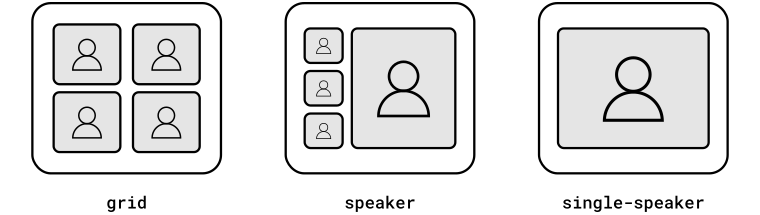
A template source records a web page rendered in a headless Chrome instance, which is what makes the output look like your application instead of a grid of raw tracks. Its layout field chooses between the built-in layouts: grid, speaker, single-speaker:
Two notes on the built-in layouts:
- Add a
-lightsuffix (grid-light,speaker-light,single-speaker-light) for a white background. - The layout is fixed when the Egress starts. Method
UpdateLayoutchanges it on a running Egress only with a custom template that handles layout changes (EgressHelper.onLayoutChanged).
A custom template is a web application you host and point the template source's custom_base_url at, so the Egress records your view instead of one of the built-in layouts. Visit the LiveKit docs for the full specification.
Audio-only and video-only egress#
In a template or web source, you can set audio_only to true to generate an output with no video at all. With a template source, that is one audio file with every participant of the Room mixed into it. The opposite parameter video_only drops the audio instead.
This is not just a matter of what ends up in the file. An audio-only template Egress skips the browser compositor and the video encoder, which is where nearly all of the CPU cost of an Egress lives. An audio-only web Egress still runs the browser, and only skips the video encoder.
Warning
For an audio-only template Egress to actually skip the browser, leave layout and custom_base_url unset. Setting either of them routes the recording through the compositor anyway.
To choose which audio is captured, and which channel each participant or track lands in, use a media source with no video and an audio field of type AudioConfig . Its routes are evaluated in order, the first match wins, and each one sends the matching audio to AUDIO_CHANNEL_LEFT, AUDIO_CHANNEL_RIGHT or both channels (the default). Audio that no route matches is captured only with capture_all, in both channels. A route can also set two more fields:
track_namenarrows the route to the audio tracks published with that name. Alone, with nothing else to match, it takes the tracks of that name from any participant.excludedrops the audio the route matches, whatevercapture_alland the other routes say.
audio |
Result |
|---|---|
capture_all: true |
Every participant mixed together |
capture_all: true, and a route matching a participant_identity with exclude: true |
Every participant mixed together, except that one |
A route matching participant_kind AGENT to the left channel, and another matching STANDARD to the right channel |
AI Agent audio in the left channel, standard participants in the right channel |
Routes matching a participant_identity or a track_id |
Each chosen participant or track in the channel of its route |
A route with only track_name |
The audio tracks published with that name, from every participant |
Participant Passthrough Egress#
Participant Passthrough Egress is part of OpenVidu PRO edition.
Participant Passthrough Egress records a whole participant without transcoding: every track they publish is written to video files as it arrives.
Participant Passthrough Egress gives you:
- The whole participant in one request. Recording individual tracks with the
PASSTHROUGHpreset requires one request per track, and their lifecycle is tied to each track's publication. Participant Passthrough Egress automatically records every track a participant publishes (camera, microphone, screen share, ...), and automatically manages mutes, republishes and reconnections. - File synchronization. Recording individual tracks with the
PASSTHROUGHpreset writes audio and video to separate files, each with its own timeline. Participant Passthrough Egress keeps camera, microphone and screen share tracks together, properly synced. All files share one timeline, and its manifest lines them up with those of other participants. This facilitates post-processing tasks, making it easier to combine and composite multiple participants after the Room ends. - Original quality at a fraction of the cost. Every other Egress that is not a single track with the
PASSTHROUGHpreset decodes and encodes the media again, potentially losing quality and always spending a lot of CPU. Participant Passthrough Egress stores every frame as published, in its original codec, resolution and frame rate, and uses a fraction of the CPU, comparable to thePASSTHROUGHpreset.
For a single composited video, an RTMP/SRT stream, an HLS playlist or thumbnails, use a transcoding Egress source instead. If you only need one specific track, with no synchronization with the participant's other tracks, a media source with the PASSTHROUGH preset is enough.
A Participant Passthrough Egress is started with StartEgress , like any other Egress. The request needs 3 things:
- A
mediasource naming the participant twice, with the same identity: inparticipant_video(fieldidentityofParticipantVideo) and in its onlyaudioroute (fieldparticipant_identityofAudioRoute). presetset toPASSTHROUGH.- A single
fileoutput of the default file type.
That media source is the one that records a participant with transcoding. With the PASSTHROUGH preset, instead of mixing the participant's camera and audio into one file, the Egress records every track the participant publishes, as published, until the participant leaves the Room. With prefer_screen_share set in participant_video, it records only the participant's screen share and its audio, in file {filepath}.webm.
The example below records participant alice of Room my-room:
Using LiveKit Node SDK
import {
  EgressClient,
  EncodingOptionsPreset,
  FileOutput,
  MediaSource,
  Output,
  ParticipantVideo,
  StartEgressRequest,
} from 'livekit-server-sdk';

const egressClient = new EgressClient('https://my-openvidu-host', 'api-key', 'api-secret');

const egressInfo = await egressClient.startEgress(new StartEgressRequest({
  roomName: 'my-room',
  source: {
    case: 'media',
    value: new MediaSource({
      video: { case: 'participantVideo', value: new ParticipantVideo({ identity: 'alice' }) },
      audio: { routes: [{ match: { case: 'participantIdentity', value: 'alice' } }] },
    }),
  },
  encoding: { case: 'preset', value: EncodingOptionsPreset.PASSTHROUGH },
  outputs: [new Output({
    config: { case: 'file', value: new FileOutput({ filepath: 'recordings/alice.webm' }) },
  })],
}));
Using LiveKit Go SDK
import (
  "context"

  livekit "github.com/livekit/protocol/livekit"
  lksdk "github.com/livekit/server-sdk-go/v2"
)

egressClient := lksdk.NewEgressClient("https://my-openvidu-host", "api-key", "api-secret")

egressInfo, err := egressClient.StartEgress(context.Background(), &livekit.StartEgressRequest{
    RoomName: "my-room",
    Source: &livekit.StartEgressRequest_Media{
        Media: &livekit.MediaSource{
            Video: &livekit.MediaSource_ParticipantVideo{
                ParticipantVideo: &livekit.ParticipantVideo{Identity: "alice"},
            },
            Audio: &livekit.AudioConfig{
                Routes: []*livekit.AudioRoute{{
                    Match: &livekit.AudioRoute_ParticipantIdentity{ParticipantIdentity: "alice"},
                }},
            },
        },
    },
    Encoding: &livekit.StartEgressRequest_Preset{
        Preset: livekit.EncodingOptionsPreset_PASSTHROUGH,
    },
    Outputs: []*livekit.Output{{
        Config: &livekit.Output_File{
            File: &livekit.FileOutput{Filepath: "recordings/alice.webm"},
        },
    }},
})
Using LiveKit Ruby SDK
The Ruby SDK does not support method StartEgress yet, so this example uses its deprecated start_participant_egress method, which records the same.
require 'livekit'

egress_client = LiveKit::EgressServiceClient.new("https://my-openvidu-host", api_key: "api-key", api_secret: "api-secret")

output = LiveKit::Proto::EncodedFileOutput.new(
  filepath: "recordings/alice.webm"
)
egress_info = egress_client.start_participant_egress(
  "my-room",
  "alice",
  output,
  preset: 8 # PASSTHROUGH, not yet a constant of this SDK
)
Using LiveKit Kotlin SDK
import io.livekit.server.EgressServiceClient;
import java.util.List;
import livekit.LivekitEgress;

EgressServiceClient egressClient = EgressServiceClient.createClient("https://my-openvidu-host", "api-key", "api-secret");

LivekitEgress.MediaSource media = LivekitEgress.MediaSource.newBuilder()
        .setParticipantVideo(LivekitEgress.ParticipantVideo.newBuilder()
                .setIdentity("alice"))
        .setAudio(LivekitEgress.AudioConfig.newBuilder()
                .addRoutes(LivekitEgress.AudioRoute.newBuilder()
                        .setParticipantIdentity("alice")))
        .build();
LivekitEgress.Output output = LivekitEgress.Output.newBuilder()
        .setFile(LivekitEgress.FileOutput.newBuilder()
                .setFilepath("recordings/alice.webm"))
        .build();

LivekitEgress.EgressInfo egressInfo = egressClient
        .startEgress("my-room", media, List.of(output),
                LivekitEgress.EncodingOptionsPreset.PASSTHROUGH)
        .execute().body();
Using LiveKit Python SDK
from livekit import api

lkapi = api.LiveKitAPI(
    url="https://my-openvidu-host", api_key="api-key", api_secret="api-secret"
)
egress_info = await lkapi.egress.start_egress(
    api.StartEgressRequest(
        room_name="my-room",
        media=api.MediaSource(
            participant_video=api.ParticipantVideo(identity="alice"),
            audio=api.AudioConfig(
                routes=[api.AudioRoute(participant_identity="alice")],
            ),
        ),
        preset=api.EncodingOptionsPreset.PASSTHROUGH,
        outputs=[api.Output(file=api.FileOutput(
            filepath="recordings/alice.webm",
        ))],
    )
)
Using LiveKit Rust SDK
use livekit_api::services::egress::EgressClient;
use livekit_protocol as proto;

let egress_client = EgressClient::with_api_key(
    "https://my-openvidu-host",
    "api-key",
    "api-secret",
);

let egress_info = egress_client.start_egress(proto::StartEgressRequest {
    room_name: "my-room".to_string(),
    source: Some(proto::start_egress_request::Source::Media(proto::MediaSource {
        video: Some(proto::media_source::Video::ParticipantVideo(proto::ParticipantVideo {
            identity: "alice".to_string(),
            ..Default::default()
        })),
        audio: Some(proto::AudioConfig {
            routes: vec![proto::AudioRoute {
                r#match: Some(proto::audio_route::Match::ParticipantIdentity(
                    "alice".to_string(),
                )),
                ..Default::default()
            }],
            ..Default::default()
        }),
        ..Default::default()
    })),
    encoding: Some(proto::start_egress_request::Encoding::Preset(
        proto::EncodingOptionsPreset::Passthrough as i32,
    )),
    outputs: vec![proto::Output {
        config: Some(proto::output::Config::File(proto::FileOutput {
            filepath: "recordings/alice.webm".to_string(),
            ..Default::default()
        })),
        ..Default::default()
    }],
    ..Default::default()
}).await?;
Using LiveKit PHP SDK
The PHP SDK does not support method StartEgress yet, and its startParticipantEgress method cannot take a preset, so this example calls its generated Egress client with the deprecated StartParticipantEgress request, which records the same:
<?php
use Agence104\LiveKit\AccessToken;
use Agence104\LiveKit\AccessTokenOptions;
use Agence104\LiveKit\VideoGrant;
use Livekit\EgressClient;
use Livekit\EncodedFileOutput;
use Livekit\ParticipantEgressRequest;
use Twirp\Context;

$token = (new AccessToken("api-key", "api-secret"))
    ->init((new AccessTokenOptions())->setTtl(600))
    ->setGrant((new VideoGrant())->setRoomRecord())
    ->toJwt();
$egressClient = new EgressClient("https://my-openvidu-host");

$egressInfo = $egressClient->StartParticipantEgress(
    Context::withHttpRequestHeaders([], ['Authorization' => 'Bearer ' . $token]),
    new ParticipantEgressRequest([
        'room_name' => 'my-room',
        'identity' => 'alice',
        'preset' => 8, // PASSTHROUGH, not yet a constant of this SDK
        'file_outputs' => [
            new EncodedFileOutput(['filepath' => 'recordings/alice.webm']),
        ],
    ])
);
Using LiveKit .NET SDK
using Livekit.Server.Sdk.Dotnet;

var egressClient = new EgressServiceClient("https://my-openvidu-host", "api-key", "api-secret");

var request = new StartEgressRequest
{
    RoomName = "my-room",
    Media = new MediaSource
    {
        ParticipantVideo = new ParticipantVideo { Identity = "alice" },
        Audio = new AudioConfig
        {
            Routes = { new AudioRoute { ParticipantIdentity = "alice" } },
        },
    },
    Preset = EncodingOptionsPreset.Passthrough,
};
request.Outputs.Add(new Output
{
    File = new FileOutput { Filepath = "recordings/alice.webm" },
});
EgressInfo egressInfo = await egressClient.StartEgress(request);
If your backend technology does not have its own SDK, you have two options:
-
Call the Egress API directly.
StartEgressis a POST to/twirp/livekit.Egress/StartEgress, authenticated with a token carrying theroomRecordgrant:curl -X POST 'https://my-openvidu-host/twirp/livekit.Egress/StartEgress' \ -H 'Authorization: Bearer <TOKEN>' \ -H 'Content-Type: application/json' \ -d '{ "room_name": "my-room", "media": { "participant_video": { "identity": "alice" }, "audio": { "routes": [ { "participant_identity": "alice" } ] } }, "preset": "PASSTHROUGH", "outputs": [ { "file": { "filepath": "recordings/alice.webm" } } ] }' -
Use the livekit-cli :
Create a file at
egress.jsonwith the following content:{ "room_name": "my-room", "media": { "participant_video": { "identity": "alice" }, "audio": { "routes": [ { "participant_identity": "alice" } ] } }, "preset": "PASSTHROUGH", "outputs": [ { "file": { "filepath": "recordings/alice.webm" } } ] }Then run the following commands:
Deprecated StartParticipantEgress
A Participant Passthrough Egress can also be started with the deprecated StartParticipantEgress request, with preset set to PASSTHROUGH and a single file_outputs entry of the default file type (screen_share stands for prefer_screen_share). It records the same. It is the form that Auto Egress uses, and the only one for SDKs without StartEgress.
Recording files#
Participants can publish as many tracks as they want (see Publish a Track). Participant Passthrough Egress never puts more than one video track and one audio track in the same file. It groups them by source like this:
| File | Name | Holds |
|---|---|---|
| Camera | {filepath}.webm |
The camera and microphone tracks |
| Screen | {filepath}-screen.webm |
The screen share track, and its audio track if available |
| Single tracks | {filepath}-{source}-{track_id}.webm |
Any other published track |
Each file is created on demand as tracks reach the server:
- A participant with a camera and a microphone produces one file
{filepath}.webm. - Only if the participant publishes a screen share track, file
{filepath}-screen.webmis created. - Any other track gets a file of its own, named after its source and its track ID: for example
{filepath}-camera-TR_VC3Jxgmn5Fcu2Q.webm. This includes:- A second camera, microphone or screen track published while the first is still published.
- A new camera, microphone or screen track that replaces a previous one, but has a different codec. Tracks that are muted-unmuted, or republished again with the same codec, keep their place in their file.
- Any track with
UNKNOWNasTrackSource(see below), in a file named{filepath}-unknown-{track_id}.webm.
How Participant Passthrough Egress identifies track types
Track types are identified by their TrackSource field . This field is automatically set by all LiveKit client SDKs when publishing tracks, but it can also be overwritten manually. With Participant Passthrough Egress, the recording file in which each track will end up depends on this TrackSource field. Keep this in mind in your client logic when publishing tracks.
Give a name to the tracks you publish
Reconnecting tracks (for example during a network interruption) will try their best to continue their previous file, as long as they have the same codec and source. You can help Participant Passthrough Egress with this decision by setting a name to each track when publishing it (property name of the TrackPublishOptions in every LiveKit client SDK). This is especially important if your participant may publish two cameras or two screen shares at the same time.
The resulting files of Participant Passthrough Egress may have 2 different extensions: .webm or .mkv. Extensions cannot be configured on-demand: they are automatically assigned by the Egress service.
.webm: WebM files are a natural fit for WebRTC and directly playable by browsers. It is automatically selected when video codec VP8, VP9 or AV1 and audio codec OPUS are received..mkv: MKV multimedia container is a superset of WebM. It replaces WebM when video codec H.264 or audio codec G.711 are received.
Manifest file#
A manifest file named <egress_id>.json and placed next to the recording files lists all the files and tracks generated by the Participant Passthrough Egress. It includes start and end times for each track, so you can align different tracks and participants when replaying or post-processing.
For example, below is the manifest of participant alice who joined with a microphone and a VP8 camera, shared the screen 5 seconds later and, 10 seconds in, replaced the camera with an H.264 one, which gets a file of its own:
{
  "egress_id": "EG_H6jJwvWk99vs",
  "room_id": "RM_HBog6ZkND3QC",
  "room_name": "my-room",
  "started_at": 1793040422232000000,
  "ended_at": 1793040437732000000,
  "publisher_identity": "alice",
  "tracks": [
    {
      "group": "camera",
      "file": "recordings/alice.webm",
      "number": 1,
      "kind": "audio",
      "codec": "A_OPUS",
      "source": "microphone",
      "default": true,
      "track_ids": ["TR_AMeheVigB8wYYr"],
      "start_ms": 0,
      "end_ms": 15000,
      "first_frame_at": 1793040422532000000,
      "last_frame_at": 1793040437532000000
    },
    {
      "group": "camera",
      "file": "recordings/alice.webm",
      "number": 2,
      "kind": "video",
      "codec": "V_VP8",
      "source": "camera",
      "default": true,
      "track_ids": ["TR_VCTvgyD3UtUSDJ"],
      "start_ms": 200,
      "end_ms": 9900,
      "first_frame_at": 1793040422732000000,
      "last_frame_at": 1793040432432000000
    },
    {
      "group": "screen",
      "file": "recordings/alice-screen.webm",
      "number": 1,
      "kind": "video",
      "codec": "V_VP8",
      "source": "screen_share",
      "default": true,
      "track_ids": ["TR_VS8hC7T5ZrCGjq"],
      "start_ms": 0,
      "end_ms": 9960,
      "first_frame_at": 1793040427532000000,
      "last_frame_at": 1793040437492000000
    },
    {
      "group": "track",
      "file": "recordings/alice-camera-TR_VC3Jxgmn5Fcu2Q.mkv",
      "number": 1,
      "kind": "video",
      "codec": "V_MPEG4/ISO/AVC",
      "source": "camera",
      "default": true,
      "track_ids": ["TR_VC3Jxgmn5Fcu2Q"],
      "start_ms": 0,
      "end_ms": 4980,
      "first_frame_at": 1793040432532000000,
      "last_frame_at": 1793040437512000000
    }
  ],
  "files": [
    {
      "filename": "recordings/alice.webm",
      "location": "https://my-s3-endpoint/my-bucket/recordings/alice.webm"
    },
    {
      "filename": "recordings/alice-screen.webm",
      "location": "https://my-s3-endpoint/my-bucket/recordings/alice-screen.webm"
    },
    {
      "filename": "recordings/alice-camera-TR_VC3Jxgmn5Fcu2Q.mkv",
      "location": "https://my-s3-endpoint/my-bucket/recordings/alice-camera-TR_VC3Jxgmn5Fcu2Q.mkv"
    }
  ]
}
| Field | Type | Description |
|---|---|---|
egress_id |
string | ID of the Egress that wrote the manifest |
room_id |
string | Unique id of the Room |
room_name |
string | Name of the Room |
started_at |
int64 | When the Egress started, on the wall clock, in nanoseconds since the Unix epoch |
ended_at |
int64 | When the Egress ended, in nanoseconds since the Unix epoch |
publisher_identity |
string | Identity of the recorded participant. Not in a whole-Room manifest, whose entries carry it instead |
tracks |
list of Track entry | One entry per track of each file |
files |
list of File entry | The files produced. With one Egress per participant, in the same order as file_results |
errors |
list of Error entry | Only in a whole-Room manifest, and only if a recording failed |
Track entry#
| Field | Type | Description |
|---|---|---|
publisher_identity |
string | Identity of the participant who published the track. Only in a whole-Room manifest |
group |
string | The file the track is in: camera, screen or track (a file of its own). With prefer_screen_share set, the requested file's tracks report screen |
file |
string | The filename of that file in files |
number |
uint64 | Position of the track in its file |
kind |
string | audio or video |
codec |
string | Matroska codec ID, such as V_VP8 or A_OPUS |
source |
string | camera, microphone, screen_share, screen_share_audio or unknown |
default |
bool | Whether players show the track by default |
track_ids |
list of string | The LiveKit tracks that wrote to it, in order. More than one if the participant published the track again with the same codec |
start_ms |
int64 | First frame of the track in the file's own time, in milliseconds. The file's time starts at 0 with its first frame |
end_ms |
int64 | Last frame of the track in the file's own time, in milliseconds |
first_frame_at |
int64 | The first frame on the wall clock, in nanoseconds like started_at. The instant the file starts is first_frame_at minus start_ms × 1,000,000, which is how files line up |
last_frame_at |
int64 | The last frame on the wall clock, in nanoseconds |
File entry#
| Field | Type | Description |
|---|---|---|
publisher_identity |
string | Identity of the participant the file belongs to. Only in a whole-Room manifest |
filename |
string | The storage path of the file |
location |
string | The URL of the file in the storage |
Error entry#
| Field | Type | Description |
|---|---|---|
publisher_identity |
string | Identity of the participant whose recording failed |
error |
string | Why it failed |
Whole-Room manifest#
One Egress for the whole Room writes a single manifest for every participant. It has the same fields, with three differences:
- There is no top-level
publisher_identity. Every track entry and every file entry carries thepublisher_identityof its participant instead. tracksandfileshold the entries of all the participants, so group them bypublisher_identityto get each participant's files.errorslists the participants whose recording failed. The Egress itself keeps recording the others.
For example, this is the manifest of a Room where alice and bob were recorded and the recording of charlie failed, shortened to one track entry:
{
  "egress_id": "EG_Rm8cTn4WqLzA",
  "room_id": "RM_HBog6ZkND3QC",
  "room_name": "my-room",
  "started_at": 1793040422232000000,
  "ended_at": 1793040472732000000,
  "tracks": [
    {
      "publisher_identity": "alice",
      "group": "camera",
      "file": "recordings/my-room/alice.webm",
      "number": 1,
      "kind": "audio",
      "codec": "A_OPUS",
      "source": "microphone",
      "default": true,
      "track_ids": ["TR_AMeheVigB8wYYr"],
      "start_ms": 0,
      "end_ms": 40000,
      "first_frame_at": 1793040422532000000,
      "last_frame_at": 1793040462532000000
    }
  ],
  "files": [
    {
      "publisher_identity": "alice",
      "filename": "recordings/my-room/alice.webm",
      "location": "https://my-s3-endpoint/my-bucket/recordings/my-room/alice.webm"
    },
    {
      "publisher_identity": "bob",
      "filename": "recordings/my-room/bob.webm",
      "location": "https://my-s3-endpoint/my-bucket/recordings/my-room/bob.webm"
    }
  ],
  "errors": [
    {
      "publisher_identity": "charlie",
      "error": "failed to subscribe to track"
    }
  ]
}
Recording a whole Room with Participant Passthrough#
Every participant of a Room can be recorded with Participant Passthrough in two ways: with one Egress per participant, or with one Egress for the whole Room. Each way can be started by your application, whenever it wants, or automatically with the Room (using Auto Egress):
| One Egress per participant | One Egress for the whole Room | |
|---|---|---|
| Started by your application, at any moment | StartEgress with a media source, once for each participant. See |
StartEgress with a template source whose layout is PARTICIPANT_PASSTHROUGH. See |
| Started with the Room, from its creation (Auto Egress) | Field participant of the Room's egress configuration. See |
Field room of the Room's egress configuration, with layout PARTICIPANT_PASSTHROUGH. See |
The four of them write the same files for every participant: the recording files and the manifest of a Participant Passthrough Egress. What changes is how the recording is managed:
- One Egress per participant: each participant has an Egress of their own, with its own ID, status, webhooks and manifest. Each one can run on a different egress node, and a failure affects only that participant. To rebuild the Room, you combine the manifests of all of them.
- One Egress for the whole Room: a single Egress, with one ID, one status, one manifest and one
file_resultslist with every participant's files. One egress node records the whole Room. - Started by your application: you decide when the recording starts and stops, for a Room that already exists. With one Egress per participant, you also decide which participants are recorded.
- Started with the Room: the recording is set when the Room is created, with
CreateRoomor with theroomConfigclaim of an access token, and it records every participant who publishes for the whole life of the Room.
One Egress per participant#
Started by your application#
To record one or more specific participants, simply start a Participant Passthrough Egress for each one of them.
Started with the Room#
To have the Room record every participant on its own, use Auto Egress: in the Room's egress configuration, set field participant with preset set to PASSTHROUGH and a single file_outputs entry. The Room then starts one Participant Passthrough Egress per participant whenever they publish their first track.
All participants share the same filepath, so make it different for each of them with the {publisher_identity} and {time} template variables, for example recordings/{room_name}/{publisher_identity}-{time}. With no filepath, or with just a directory, each participant's files are named {publisher_identity}-{time}.
Each Egress uploads its own manifest file, and all of them share the same wall clock: a file starts at the first_frame_at of any of its tracks minus its start_ms. With the manifests of all the Egresses of a Room, you can place every file of every participant on the same timeline, and rebuild the whole Room. To find those Egresses, list them by Room name with ListEgress , or watch the egress_started and egress_ended webhooks.
The example below creates Room my-room, recording each of its participants under recordings/my-room/:
Using LiveKit Node SDK
import {
  AutoParticipantEgress,
  EncodedFileOutput,
  EncodingOptionsPreset,
  RoomEgress,
  RoomServiceClient,
} from 'livekit-server-sdk';

const roomService = new RoomServiceClient('https://my-openvidu-host', 'api-key', 'api-secret');

const room = await roomService.createRoom({
  name: 'my-room',
  egress: new RoomEgress({
    participant: new AutoParticipantEgress({
      options: { case: 'preset', value: EncodingOptionsPreset.PASSTHROUGH },
      fileOutputs: [
        new EncodedFileOutput({
          filepath: 'recordings/{room_name}/{publisher_identity}-{time}',
        }),
      ],
    }),
  }),
});
Using LiveKit Go SDK
import (
  "context"

  livekit "github.com/livekit/protocol/livekit"
  lksdk "github.com/livekit/server-sdk-go/v2"
)

roomClient := lksdk.NewRoomServiceClient("https://my-openvidu-host", "api-key", "api-secret")

room, err := roomClient.CreateRoom(context.Background(), &livekit.CreateRoomRequest{
    Name: "my-room",
    Egress: &livekit.RoomEgress{
        Participant: &livekit.AutoParticipantEgress{
            Options: &livekit.AutoParticipantEgress_Preset{
                Preset: livekit.EncodingOptionsPreset_PASSTHROUGH,
            },
            FileOutputs: []*livekit.EncodedFileOutput{{
                Filepath: "recordings/{room_name}/{publisher_identity}-{time}",
            }},
        },
    },
})
Using LiveKit Ruby SDK
require 'livekit'

room_service = LiveKit::RoomServiceClient.new("https://my-openvidu-host", api_key: "api-key", api_secret: "api-secret")

egress = LiveKit::Proto::RoomEgress.new(
  participant: LiveKit::Proto::AutoParticipantEgress.new(
    preset: 8, # PASSTHROUGH, not yet a constant of this SDK
    file_outputs: [
      LiveKit::Proto::EncodedFileOutput.new(
        filepath: "recordings/{room_name}/{publisher_identity}-{time}"
      )
    ]
  )
)
room = room_service.create_room("my-room", egress: egress)
Using LiveKit Kotlin SDK
The Kotlin SDK's createRoom takes no egress configuration, so it cannot create a Room that records itself. Call the Room Service API directly instead, as in the Server API tab.
Using LiveKit Python SDK
from livekit import api

lkapi = api.LiveKitAPI(
    url="https://my-openvidu-host", api_key="api-key", api_secret="api-secret"
)
room = await lkapi.room.create_room(
    api.CreateRoomRequest(
        name="my-room",
        egress=api.RoomEgress(
            participant=api.AutoParticipantEgress(
                preset=api.EncodingOptionsPreset.PASSTHROUGH,
                file_outputs=[api.EncodedFileOutput(
                    filepath="recordings/{room_name}/{publisher_identity}-{time}",
                )],
            ),
        ),
    )
)
Using LiveKit Rust SDK
use livekit_api::services::room::{CreateRoomOptions, RoomClient};
use livekit_protocol as proto;

let room_client = RoomClient::with_api_key(
    "https://my-openvidu-host",
    "api-key",
    "api-secret",
);

let room = room_client.create_room(
    "my-room",
    CreateRoomOptions {
        egress: Some(proto::RoomEgress {
            participant: Some(proto::AutoParticipantEgress {
                options: Some(proto::auto_participant_egress::Options::Preset(
                    proto::EncodingOptionsPreset::Passthrough as i32,
                )),
                file_outputs: vec![proto::EncodedFileOutput {
                    filepath: "recordings/{room_name}/{publisher_identity}-{time}".to_string(),
                    ..Default::default()
                }],
                ..Default::default()
            }),
            ..Default::default()
        }),
        ..Default::default()
    },
).await?;
Using LiveKit PHP SDK
<?php
use Agence104\LiveKit\RoomCreateOptions;
use Agence104\LiveKit\RoomServiceClient;
use Livekit\AutoParticipantEgress;
use Livekit\EncodedFileOutput;
use Livekit\RoomEgress;

$roomService = new RoomServiceClient("https://my-openvidu-host", "api-key", "api-secret");

$egress = new RoomEgress([
    'participant' => new AutoParticipantEgress([
        'preset' => 8, // PASSTHROUGH, not yet a constant of this SDK
        'file_outputs' => [
            new EncodedFileOutput([
                'filepath' => 'recordings/{room_name}/{publisher_identity}-{time}',
            ]),
        ],
    ]),
]);
$room = $roomService->createRoom((new RoomCreateOptions())->setName('my-room')->setEgress($egress));
Using LiveKit .NET SDK
using Livekit.Server.Sdk.Dotnet;

var roomClient = new RoomServiceClient("https://my-openvidu-host", "api-key", "api-secret");

var participantEgress = new AutoParticipantEgress
{
    Preset = EncodingOptionsPreset.Passthrough,
};
participantEgress.FileOutputs.Add(new EncodedFileOutput
{
    Filepath = "recordings/{room_name}/{publisher_identity}-{time}",
});
Room room = await roomClient.CreateRoom(new CreateRoomRequest
{
    Name = "my-room",
    Egress = new RoomEgress { Participant = participantEgress },
});
If your backend technology does not have its own SDK, you have two options:
-
Call the Room Service API directly.
CreateRoomis a POST to/twirp/livekit.RoomService/CreateRoom, authenticated with a token carrying theroomCreategrant:curl -X POST 'https://my-openvidu-host/twirp/livekit.RoomService/CreateRoom' \ -H 'Authorization: Bearer <TOKEN>' \ -H 'Content-Type: application/json' \ -d '{ "name": "my-room", "egress": { "participant": { "preset": "PASSTHROUGH", "file_outputs": [ { "filepath": "recordings/{room_name}/{publisher_identity}-{time}" } ] } } }' -
Use the livekit-cli :
Create a file at
egress.jsonwith the following content:{ "preset": "PASSTHROUGH", "file_outputs": [ { "filepath": "recordings/{room_name}/{publisher_identity}-{time}" } ] }Then run the following commands:
One Egress for the whole Room#
An Egress with a template source whose layout is PARTICIPANT_PASSTHROUGH records every participant of a Room as a single Egress, just like a template Egress that composites the Room. The difference is that it writes each participant's Participant Passthrough files instead of one composited video, and transcodes nothing. Being a single Egress for the whole Room means:
- One Egress to manage: one ID, one status and one set of webhooks.
ListEgressandStopEgressact on the whole Room, never on a single participant. It ends withStopEgressor when the Room ends, and a participant's failed recording does not end it. - File names:
filepathmust contain{publisher_identity}, so that each participant gets files of their own. With nofilepath, or with just a directory ending in/, files are named{publisher_identity}-{time}. - One
file_resultslist and one manifest with every participant's files. The manifest's entries carry theirpublisher_identity, and itserrorslist the participants whose recording failed (see Whole-Room manifest). It is<egress_id>.json, stored in the directory offilepathshared by all participants, andmanifest_locationpoints to it.
Started by your application#
Call StartEgress with a template source whose layout is PARTICIPANT_PASSTHROUGH, a single file output of the default file type, and no encoding options (or the PASSTHROUGH preset). To stop it, call StopEgress with its ID, as for any Egress:
Using LiveKit Node SDK
import { EgressClient, FileOutput, Output, StartEgressRequest, TemplateSource } from 'livekit-server-sdk';

const egressClient = new EgressClient('https://my-openvidu-host', 'api-key', 'api-secret');

const egressInfo = await egressClient.startEgress(new StartEgressRequest({
  roomName: 'my-room',
  source: { case: 'template', value: new TemplateSource({ layout: 'PARTICIPANT_PASSTHROUGH' }) },
  outputs: [new Output({
    config: {
      case: 'file',
      value: new FileOutput({ filepath: 'recordings/{room_name}/{publisher_identity}-{time}' }),
    },
  })],
}));

// ...later, to stop recording the Room:
await egressClient.stopEgress(egressInfo.egressId);
Using LiveKit Go SDK
import (
  "context"

  livekit "github.com/livekit/protocol/livekit"
  lksdk "github.com/livekit/server-sdk-go/v2"
)

egressClient := lksdk.NewEgressClient("https://my-openvidu-host", "api-key", "api-secret")

egressInfo, err := egressClient.StartEgress(context.Background(), &livekit.StartEgressRequest{
    RoomName: "my-room",
    Source: &livekit.StartEgressRequest_Template{
        Template: &livekit.TemplateSource{Layout: "PARTICIPANT_PASSTHROUGH"},
    },
    Outputs: []*livekit.Output{{
        Config: &livekit.Output_File{
            File: &livekit.FileOutput{
                Filepath: "recordings/{room_name}/{publisher_identity}-{time}",
            },
        },
    }},
})

// ...later, to stop recording the Room:
_, err = egressClient.StopEgress(context.Background(), &livekit.StopEgressRequest{
    EgressId: egressInfo.EgressId,
})
Using LiveKit Ruby SDK
The Ruby SDK does not support method StartEgress yet, so this example uses its deprecated start_room_composite_egress method, which records the same. The output goes in an array, so that the SDK sends it only in field file_outputs.
require 'livekit'

egress_client = LiveKit::EgressServiceClient.new("https://my-openvidu-host", api_key: "api-key", api_secret: "api-secret")

output = LiveKit::Proto::EncodedFileOutput.new(
  filepath: "recordings/{room_name}/{publisher_identity}-{time}"
)
egress_info = egress_client.start_room_composite_egress("my-room", [output], layout: "PARTICIPANT_PASSTHROUGH")

# ...later, to stop recording the Room:
egress_client.stop_egress(egress_info.egress_id)
Using LiveKit Kotlin SDK
import io.livekit.server.EgressServiceClient;
import java.util.List;
import livekit.LivekitEgress;

EgressServiceClient egressClient = EgressServiceClient.createClient("https://my-openvidu-host", "api-key", "api-secret");

LivekitEgress.TemplateSource template = LivekitEgress.TemplateSource.newBuilder()
        .setLayout("PARTICIPANT_PASSTHROUGH")
        .build();
LivekitEgress.Output output = LivekitEgress.Output.newBuilder()
        .setFile(LivekitEgress.FileOutput.newBuilder()
                .setFilepath("recordings/{room_name}/{publisher_identity}-{time}"))
        .build();

LivekitEgress.EgressInfo egressInfo = egressClient
        .startEgress("my-room", template, List.of(output))
        .execute().body();

// ...later, to stop recording the Room:
egressClient.stopEgress(egressInfo.getEgressId()).execute();
Using LiveKit Python SDK
from livekit import api

lkapi = api.LiveKitAPI(
    url="https://my-openvidu-host", api_key="api-key", api_secret="api-secret"
)
egress_info = await lkapi.egress.start_egress(
    api.StartEgressRequest(
        room_name="my-room",
        template=api.TemplateSource(layout="PARTICIPANT_PASSTHROUGH"),
        outputs=[api.Output(file=api.FileOutput(
            filepath="recordings/{room_name}/{publisher_identity}-{time}",
        ))],
    )
)

# ...later, to stop recording the Room:
await lkapi.egress.stop_egress(api.StopEgressRequest(egress_id=egress_info.egress_id))
Using LiveKit Rust SDK
use livekit_api::services::egress::EgressClient;
use livekit_protocol as proto;

let egress_client = EgressClient::with_api_key(
    "https://my-openvidu-host",
    "api-key",
    "api-secret",
);

let egress_info = egress_client.start_egress(proto::StartEgressRequest {
    room_name: "my-room".to_string(),
    source: Some(proto::start_egress_request::Source::Template(proto::TemplateSource {
        layout: "PARTICIPANT_PASSTHROUGH".to_string(),
        ..Default::default()
    })),
    outputs: vec![proto::Output {
        config: Some(proto::output::Config::File(proto::FileOutput {
            filepath: "recordings/{room_name}/{publisher_identity}-{time}".to_string(),
            ..Default::default()
        })),
        ..Default::default()
    }],
    ..Default::default()
}).await?;

// ...later, to stop recording the Room:
egress_client.stop_egress(&egress_info.egress_id).await?;
Using LiveKit PHP SDK
The PHP SDK does not support method StartEgress yet, so this example uses its deprecated startRoomCompositeEgress method, which records the same. The file output goes inside an EncodedOutputs, so that the SDK sends it only in field file_outputs.
<?php
use Agence104\LiveKit\EgressServiceClient;
use Agence104\LiveKit\EncodedOutputs;
use Livekit\EncodedFileOutput;

$egressClient = new EgressServiceClient("https://my-openvidu-host", "api-key", "api-secret");

$fileOutput = new EncodedFileOutput([
    'filepath' => 'recordings/{room_name}/{publisher_identity}-{time}',
]);
$outputs = (new EncodedOutputs())->setFile($fileOutput);
$egressInfo = $egressClient->startRoomCompositeEgress('my-room', 'PARTICIPANT_PASSTHROUGH', $outputs);

// ...later, to stop recording the Room:
$egressClient->stopEgress($egressInfo->getEgressId());
Using LiveKit .NET SDK
using Livekit.Server.Sdk.Dotnet;

var egressClient = new EgressServiceClient("https://my-openvidu-host", "api-key", "api-secret");

var request = new StartEgressRequest
{
    RoomName = "my-room",
    Template = new TemplateSource { Layout = "PARTICIPANT_PASSTHROUGH" },
};
request.Outputs.Add(new Output
{
    File = new FileOutput { Filepath = "recordings/{room_name}/{publisher_identity}-{time}" },
});
EgressInfo egressInfo = await egressClient.StartEgress(request);

// ...later, to stop recording the Room:
await egressClient.StopEgress(new StopEgressRequest { EgressId = egressInfo.EgressId });
If your backend technology does not have its own SDK, you have two options:
-
Call the Egress API directly.
StartEgressis a POST to/twirp/livekit.Egress/StartEgress, andStopEgressa POST to/twirp/livekit.Egress/StopEgress, both authenticated with a token carrying theroomRecordgrant:curl -X POST 'https://my-openvidu-host/twirp/livekit.Egress/StartEgress' \ -H 'Authorization: Bearer <TOKEN>' \ -H 'Content-Type: application/json' \ -d '{ "room_name": "my-room", "template": { "layout": "PARTICIPANT_PASSTHROUGH" }, "outputs": [ { "file": { "filepath": "recordings/{room_name}/{publisher_identity}-{time}" } } ] }' # ...later, to stop recording the Room: curl -X POST 'https://my-openvidu-host/twirp/livekit.Egress/StopEgress' \ -H 'Authorization: Bearer <TOKEN>' \ -H 'Content-Type: application/json' \ -d '{ "egress_id": "<EGRESS_ID>" }' -
Use the livekit-cli :
Create a file at
egress.jsonwith the following content:{ "room_name": "my-room", "template": { "layout": "PARTICIPANT_PASSTHROUGH" }, "outputs": [ { "file": { "filepath": "recordings/{room_name}/{publisher_identity}-{time}" } } ] }Then run the following commands:
Started with the Room#
In the Room's egress configuration (Auto Egress), set field room with layout to PARTICIPANT_PASSTHROUGH and a single file_outputs entry. The Egress starts when the Room is created, waits in EGRESS_STARTING until someone publishes, and ends with the Room (as EGRESS_ABORTED if nobody ever published). The example below creates Room my-room, recording every participant under recordings/my-room/:
Using LiveKit Node SDK
import { EncodedFileOutput, RoomCompositeEgressRequest, RoomEgress, RoomServiceClient } from 'livekit-server-sdk';

const roomService = new RoomServiceClient('https://my-openvidu-host', 'api-key', 'api-secret');

const room = await roomService.createRoom({
  name: 'my-room',
  egress: new RoomEgress({
    room: new RoomCompositeEgressRequest({
      layout: 'PARTICIPANT_PASSTHROUGH',
      fileOutputs: [
        new EncodedFileOutput({ filepath: 'recordings/{room_name}/{publisher_identity}-{time}' }),
      ],
    }),
  }),
});
Using LiveKit Go SDK
import (
  "context"

  livekit "github.com/livekit/protocol/livekit"
  lksdk "github.com/livekit/server-sdk-go/v2"
)

roomClient := lksdk.NewRoomServiceClient("https://my-openvidu-host", "api-key", "api-secret")

room, err := roomClient.CreateRoom(context.Background(), &livekit.CreateRoomRequest{
    Name: "my-room",
    Egress: &livekit.RoomEgress{
        Room: &livekit.RoomCompositeEgressRequest{
            Layout: "PARTICIPANT_PASSTHROUGH",
            FileOutputs: []*livekit.EncodedFileOutput{{
                Filepath: "recordings/{room_name}/{publisher_identity}-{time}",
            }},
        },
    },
})
Using LiveKit Ruby SDK
require 'livekit'

room_service = LiveKit::RoomServiceClient.new("https://my-openvidu-host", api_key: "api-key", api_secret: "api-secret")

egress = LiveKit::Proto::RoomEgress.new(
  room: LiveKit::Proto::RoomCompositeEgressRequest.new(
    layout: "PARTICIPANT_PASSTHROUGH",
    file_outputs: [
      LiveKit::Proto::EncodedFileOutput.new(
        filepath: "recordings/{room_name}/{publisher_identity}-{time}"
      )
    ]
  )
)
room = room_service.create_room("my-room", egress: egress)
Using LiveKit Kotlin SDK
The Kotlin SDK's createRoom takes no egress configuration, so it cannot create a Room that records itself. Call the Room Service API directly instead, as in the Server API tab.
Using LiveKit Python SDK
from livekit import api

lkapi = api.LiveKitAPI(
    url="https://my-openvidu-host", api_key="api-key", api_secret="api-secret"
)
room = await lkapi.room.create_room(
    api.CreateRoomRequest(
        name="my-room",
        egress=api.RoomEgress(
            room=api.RoomCompositeEgressRequest(
                layout="PARTICIPANT_PASSTHROUGH",
                file_outputs=[api.EncodedFileOutput(
                    filepath="recordings/{room_name}/{publisher_identity}-{time}",
                )],
            ),
        ),
    )
)
Using LiveKit Rust SDK
use livekit_api::services::room::{CreateRoomOptions, RoomClient};
use livekit_protocol as proto;

let room_client = RoomClient::with_api_key(
    "https://my-openvidu-host",
    "api-key",
    "api-secret",
);

let room = room_client.create_room(
    "my-room",
    CreateRoomOptions {
        egress: Some(proto::RoomEgress {
            room: Some(proto::RoomCompositeEgressRequest {
                layout: "PARTICIPANT_PASSTHROUGH".to_string(),
                file_outputs: vec![proto::EncodedFileOutput {
                    filepath: "recordings/{room_name}/{publisher_identity}-{time}".to_string(),
                    ..Default::default()
                }],
                ..Default::default()
            }),
            ..Default::default()
        }),
        ..Default::default()
    },
).await?;
Using LiveKit PHP SDK
<?php
use Agence104\LiveKit\RoomCreateOptions;
use Agence104\LiveKit\RoomServiceClient;
use Livekit\EncodedFileOutput;
use Livekit\RoomCompositeEgressRequest;
use Livekit\RoomEgress;

$roomService = new RoomServiceClient("https://my-openvidu-host", "api-key", "api-secret");

$egress = new RoomEgress([
    'room' => new RoomCompositeEgressRequest([
        'layout' => 'PARTICIPANT_PASSTHROUGH',
        'file_outputs' => [
            new EncodedFileOutput([
                'filepath' => 'recordings/{room_name}/{publisher_identity}-{time}',
            ]),
        ],
    ]),
]);
$room = $roomService->createRoom((new RoomCreateOptions())->setName('my-room')->setEgress($egress));
Using LiveKit .NET SDK
using Livekit.Server.Sdk.Dotnet;

var roomClient = new RoomServiceClient("https://my-openvidu-host", "api-key", "api-secret");

var roomComposite = new RoomCompositeEgressRequest { Layout = "PARTICIPANT_PASSTHROUGH" };
roomComposite.FileOutputs.Add(new EncodedFileOutput
{
    Filepath = "recordings/{room_name}/{publisher_identity}-{time}",
});
Room room = await roomClient.CreateRoom(new CreateRoomRequest
{
    Name = "my-room",
    Egress = new RoomEgress { Room = roomComposite },
});
If your backend technology does not have its own SDK, you have two options:
-
Call the Room Service API directly.
CreateRoomis a POST to/twirp/livekit.RoomService/CreateRoom, authenticated with a token carrying theroomCreategrant:curl -X POST 'https://my-openvidu-host/twirp/livekit.RoomService/CreateRoom' \ -H 'Authorization: Bearer <TOKEN>' \ -H 'Content-Type: application/json' \ -d '{ "name": "my-room", "egress": { "room": { "layout": "PARTICIPANT_PASSTHROUGH", "file_outputs": [ { "filepath": "recordings/{room_name}/{publisher_identity}-{time}" } ] } } }' -
Use the livekit-cli :
Create a file at
egress.jsonwith the following content:{ "layout": "PARTICIPANT_PASSTHROUGH", "file_outputs": [ { "filepath": "recordings/{room_name}/{publisher_identity}-{time}" } ] }Then run the following commands:
Post-processing#
Participant Passthrough Egress records each participant in files of their own. You can compose them into a single video in a post-processing step, using the manifest file information to know when each video starts and ends.
Let's see a working example: a Room recorded with one Egress for the whole Room, with filepath set to recordings/{room_name}/{publisher_identity}. Its 4 participants publish their camera and microphone:
aliceandbobjoin the Room and talk for 20 seconds.charlieanddavejoin, and the 4 of them talk for 20 seconds more.aliceleaves, and the other 3 talk for 10 more seconds before the Room is closed.
The Egress writes alice.webm, bob.webm, charlie.webm and dave.webm in recordings/my-room/, next to its manifest EG_Rm8cTn4WqLzA.json.
First, get from the manifest when each file starts, in seconds since the first one started. A file starts at the first_frame_at of any of its tracks minus its start_ms. With jq :
jq -r '[.tracks[] | {file, start: (.first_frame_at - .start_ms * 1e6)}]
  | (map(.start) | min) as $first
  | unique_by(.file)[] | "\(.file) \((.start - $first) / 1e6 | round / 1e3)"' \
  recordings/my-room/EG_Rm8cTn4WqLzA.json
This outputs for each file the delay in seconds that must be added to its start time:
recordings/my-room/alice.webm 0
recordings/my-room/bob.webm 0.35
recordings/my-room/charlie.webm 20.12
recordings/my-room/dave.webm 20.71
We can now compose a single file using those start times. In the examples below, we do so with both FFmpeg and GStreamer:
- A 1280x720 grid with a 640x360 tile per participant, delaying each file by its start, and mixing their audio.
- Each participant keeps their tile, which is empty while they are not in the Room.
- Both examples write
room.mp4, with H.264 video and AAC audio.
ffmpeg \
  -reinit_filter 0 -itsoffset 0     -i recordings/my-room/alice.webm \
  -reinit_filter 0 -itsoffset 0.35  -i recordings/my-room/bob.webm \
  -reinit_filter 0 -itsoffset 20.12 -i recordings/my-room/charlie.webm \
  -reinit_filter 0 -itsoffset 20.71 -i recordings/my-room/dave.webm \
  -filter_complex "
    color=black:size=1280x720:rate=30[bg];
    [0:v]scale=640:360[v0]; [1:v]scale=640:360[v1]; [2:v]scale=640:360[v2]; [3:v]scale=640:360[v3];
    [bg][v0]overlay=0:0:eof_action=pass[t0];
    [t0][v1]overlay=640:0:eof_action=pass[t1];
    [t1][v2]overlay=0:360:eof_action=pass[t2];
    [t2][v3]overlay=640:360:eof_action=pass[video];
    [0:a]aresample=async=1:first_pts=0[a0]; [1:a]aresample=async=1:first_pts=0[a1];
    [2:a]aresample=async=1:first_pts=0[a2]; [3:a]aresample=async=1:first_pts=0[a3];
    [a0][a1][a2][a3]amix=inputs=4:normalize=0[audio]" \
  -map "[video]" -map "[audio]" -shortest room.mp4
-itsoffsetdelays each file by its start.-reinit_filter 0keeps the filters running when a video changes resolution, as published videos do with the publisher's network and CPU. Without it, FFmpeg restarts all the filters and the audio gets out of sync.aresample=async=1:first_pts=0fills with silence the time before each participant's audio, and the gaps left by their mutes.eof_action=passempties the tile of a participant who left, and-shortestends the video, whose black background never ends, with the audio.
gst-launch-1.0 -e \
  compositor name=video background=black \
    sink_0::xpos=0   sink_0::ypos=0   sink_0::width=640 sink_0::height=360 \
    sink_1::xpos=640 sink_1::ypos=0   sink_1::width=640 sink_1::height=360 sink_1::offset=350000000 \
    sink_2::xpos=0   sink_2::ypos=360 sink_2::width=640 sink_2::height=360 sink_2::offset=20120000000 \
    sink_3::xpos=640 sink_3::ypos=360 sink_3::width=640 sink_3::height=360 sink_3::offset=20710000000 \
  ! video/x-raw,width=1280,height=720,framerate=30/1 ! x264enc ! mp4mux name=mux ! filesink location=room.mp4 \
  audiomixer name=audio sink_1::offset=350000000 sink_2::offset=20120000000 sink_3::offset=20710000000 \
  ! audioconvert ! avenc_aac ! mux. \
  filesrc location=recordings/my-room/alice.webm ! decodebin name=d0 \
    d0. ! videoconvert ! queue ! video.sink_0  d0. ! audioconvert ! audioresample ! queue ! audio.sink_0 \
  filesrc location=recordings/my-room/bob.webm ! decodebin name=d1 \
    d1. ! videoconvert ! queue ! video.sink_1  d1. ! audioconvert ! audioresample ! queue ! audio.sink_1 \
  filesrc location=recordings/my-room/charlie.webm ! decodebin name=d2 \
    d2. ! videoconvert ! queue ! video.sink_2  d2. ! audioconvert ! audioresample ! queue ! audio.sink_2 \
  filesrc location=recordings/my-room/dave.webm ! decodebin name=d3 \
    d3. ! videoconvert ! queue ! video.sink_3  d3. ! audioconvert ! audioresample ! queue ! audio.sink_3
- The
offsetof eachcompositorandaudiomixerpad delays a file by its start, in nanoseconds. compositorscales each video to its tile, whatever its resolution at each moment, and leaves the tile of a participant who left empty.
Auto Egress#
A Room can record itself automatically from the moment it is created, until the Room is closed or the Egress is manually stopped. Pass an egress configuration when creating the Room (method CreateRoom ). This egress configuration is an object of type RoomEgress , and lets you record the Room:
Composite#
Field room records the whole Room composited into a single output, like a template source. The example below creates Room my-room, recording it to an MP4 file:
Using LiveKit Node SDK
import { EncodedFileOutput, RoomCompositeEgressRequest, RoomEgress, RoomServiceClient } from 'livekit-server-sdk';

const roomService = new RoomServiceClient('https://my-openvidu-host', 'api-key', 'api-secret');

const room = await roomService.createRoom({
  name: 'my-room',
  egress: new RoomEgress({
    room: new RoomCompositeEgressRequest({
      fileOutputs: [new EncodedFileOutput({ filepath: 'my-room-recording.mp4' })],
    }),
  }),
});
Using LiveKit Go SDK
import (
  "context"

  livekit "github.com/livekit/protocol/livekit"
  lksdk "github.com/livekit/server-sdk-go/v2"
)

roomClient := lksdk.NewRoomServiceClient("https://my-openvidu-host", "api-key", "api-secret")

room, err := roomClient.CreateRoom(context.Background(), &livekit.CreateRoomRequest{
    Name: "my-room",
    Egress: &livekit.RoomEgress{
        Room: &livekit.RoomCompositeEgressRequest{
            FileOutputs: []*livekit.EncodedFileOutput{{
                Filepath: "my-room-recording.mp4",
            }},
        },
    },
})
Using LiveKit Ruby SDK
require 'livekit'

room_service = LiveKit::RoomServiceClient.new("https://my-openvidu-host", api_key: "api-key", api_secret: "api-secret")

egress = LiveKit::Proto::RoomEgress.new(
  room: LiveKit::Proto::RoomCompositeEgressRequest.new(
    file_outputs: [LiveKit::Proto::EncodedFileOutput.new(filepath: "my-room-recording.mp4")]
  )
)
room = room_service.create_room("my-room", egress: egress)
Using LiveKit Kotlin SDK
The Kotlin SDK's createRoom takes no egress configuration, so it cannot create a Room that records itself. Call the Room Service API directly instead, as in the Server API tab.
Using LiveKit Python SDK
from livekit import api

lkapi = api.LiveKitAPI(
    url="https://my-openvidu-host", api_key="api-key", api_secret="api-secret"
)
room = await lkapi.room.create_room(
    api.CreateRoomRequest(
        name="my-room",
        egress=api.RoomEgress(
            room=api.RoomCompositeEgressRequest(
                file_outputs=[api.EncodedFileOutput(filepath="my-room-recording.mp4")],
            ),
        ),
    )
)
Using LiveKit Rust SDK
use livekit_api::services::room::{CreateRoomOptions, RoomClient};
use livekit_protocol as proto;

let room_client = RoomClient::with_api_key(
    "https://my-openvidu-host",
    "api-key",
    "api-secret",
);

let room = room_client.create_room(
    "my-room",
    CreateRoomOptions {
        egress: Some(proto::RoomEgress {
            room: Some(proto::RoomCompositeEgressRequest {
                file_outputs: vec![proto::EncodedFileOutput {
                    filepath: "my-room-recording.mp4".to_string(),
                    ..Default::default()
                }],
                ..Default::default()
            }),
            ..Default::default()
        }),
        ..Default::default()
    },
).await?;
Using LiveKit PHP SDK
<?php
use Agence104\LiveKit\RoomCreateOptions;
use Agence104\LiveKit\RoomServiceClient;
use Livekit\EncodedFileOutput;
use Livekit\RoomCompositeEgressRequest;
use Livekit\RoomEgress;

$roomService = new RoomServiceClient("https://my-openvidu-host", "api-key", "api-secret");

$egress = new RoomEgress([
    'room' => new RoomCompositeEgressRequest([
        'file_outputs' => [new EncodedFileOutput(['filepath' => 'my-room-recording.mp4'])],
    ]),
]);
$room = $roomService->createRoom((new RoomCreateOptions())->setName('my-room')->setEgress($egress));
Using LiveKit .NET SDK
using Livekit.Server.Sdk.Dotnet;

var roomClient = new RoomServiceClient("https://my-openvidu-host", "api-key", "api-secret");

var roomComposite = new RoomCompositeEgressRequest();
roomComposite.FileOutputs.Add(new EncodedFileOutput { Filepath = "my-room-recording.mp4" });
Room room = await roomClient.CreateRoom(new CreateRoomRequest
{
    Name = "my-room",
    Egress = new RoomEgress { Room = roomComposite },
});
If your backend technology does not have its own SDK, you have two options:
-
Call the Room Service API directly.
CreateRoomis a POST to/twirp/livekit.RoomService/CreateRoom, authenticated with a token carrying theroomCreategrant: -
Use the livekit-cli :
Create a file at
egress.jsonwith the following content:Then run the following commands:
Individual tracks#
Field tracks records every track published in the Room to a file of its own, without transcoding, like the PASSTHROUGH preset. The example below creates Room my-room, naming each file after its track:
Using LiveKit Node SDK
import { AutoTrackEgress, RoomEgress, RoomServiceClient } from 'livekit-server-sdk';

const roomService = new RoomServiceClient('https://my-openvidu-host', 'api-key', 'api-secret');

const room = await roomService.createRoom({
  name: 'my-room',
  egress: new RoomEgress({
    tracks: new AutoTrackEgress({ filepath: '{room_name}/{track_source}-{track_id}' }),
  }),
});
Using LiveKit Go SDK
import (
  "context"

  livekit "github.com/livekit/protocol/livekit"
  lksdk "github.com/livekit/server-sdk-go/v2"
)

roomClient := lksdk.NewRoomServiceClient("https://my-openvidu-host", "api-key", "api-secret")

room, err := roomClient.CreateRoom(context.Background(), &livekit.CreateRoomRequest{
    Name: "my-room",
    Egress: &livekit.RoomEgress{
        Tracks: &livekit.AutoTrackEgress{
            Filepath: "{room_name}/{track_source}-{track_id}",
        },
    },
})
Using LiveKit Ruby SDK
require 'livekit'

room_service = LiveKit::RoomServiceClient.new("https://my-openvidu-host", api_key: "api-key", api_secret: "api-secret")

egress = LiveKit::Proto::RoomEgress.new(
  tracks: LiveKit::Proto::AutoTrackEgress.new(filepath: "{room_name}/{track_source}-{track_id}")
)
room = room_service.create_room("my-room", egress: egress)
Using LiveKit Kotlin SDK
The Kotlin SDK's createRoom takes no egress configuration, so it cannot create a Room that records itself. Call the Room Service API directly instead, as in the Server API tab.
Using LiveKit Python SDK
from livekit import api

lkapi = api.LiveKitAPI(
    url="https://my-openvidu-host", api_key="api-key", api_secret="api-secret"
)
room = await lkapi.room.create_room(
    api.CreateRoomRequest(
        name="my-room",
        egress=api.RoomEgress(
            tracks=api.AutoTrackEgress(filepath="{room_name}/{track_source}-{track_id}"),
        ),
    )
)
Using LiveKit Rust SDK
use livekit_api::services::room::{CreateRoomOptions, RoomClient};
use livekit_protocol as proto;

let room_client = RoomClient::with_api_key(
    "https://my-openvidu-host",
    "api-key",
    "api-secret",
);

let room = room_client.create_room(
    "my-room",
    CreateRoomOptions {
        egress: Some(proto::RoomEgress {
            tracks: Some(proto::AutoTrackEgress {
                filepath: "{room_name}/{track_source}-{track_id}".to_string(),
                ..Default::default()
            }),
            ..Default::default()
        }),
        ..Default::default()
    },
).await?;
Using LiveKit PHP SDK
<?php
use Agence104\LiveKit\RoomCreateOptions;
use Agence104\LiveKit\RoomServiceClient;
use Livekit\AutoTrackEgress;
use Livekit\RoomEgress;

$roomService = new RoomServiceClient("https://my-openvidu-host", "api-key", "api-secret");

$egress = new RoomEgress([
    'tracks' => new AutoTrackEgress(['filepath' => '{room_name}/{track_source}-{track_id}']),
]);
$room = $roomService->createRoom((new RoomCreateOptions())->setName('my-room')->setEgress($egress));
Using LiveKit .NET SDK
using Livekit.Server.Sdk.Dotnet;

var roomClient = new RoomServiceClient("https://my-openvidu-host", "api-key", "api-secret");

Room room = await roomClient.CreateRoom(new CreateRoomRequest
{
    Name = "my-room",
    Egress = new RoomEgress
    {
        Tracks = new AutoTrackEgress { Filepath = "{room_name}/{track_source}-{track_id}" },
    },
});
If your backend technology does not have its own SDK, you have two options:
-
Call the Room Service API directly.
CreateRoomis a POST to/twirp/livekit.RoomService/CreateRoom, authenticated with a token carrying theroomCreategrant: -
Use the livekit-cli :
Create a file at
egress.jsonwith the following content:Then run the following commands:
Participant Passthrough#
A Room can also record the Participant Passthrough files of every participant who publishes, without transcoding, in either of two ways:
- Field
participantwithpresetset toPASSTHROUGH: one Participant Passthrough Egress per participant. See One Egress per participant. - Field
roomwith layoutPARTICIPANT_PASSTHROUGH: one Egress for the whole Room. See One Egress for the whole Room.
Recording a whole Room with Participant Passthrough compares them, with examples for every SDK.
Tip
You can also include the same egress field in the roomConfig claim of access tokens, in case you are letting participants create Rooms when they join.
Warning
Automatic recordings fail silently, since no API call of yours returns their error. Enable webhooks and watch egress_ended, and see Troubleshoot OpenVidu recordings when auto egress does not produce the expected output.
Egress lifecycle#
Managing a running Egress#
StartEgress starts an Egress with any of the Egress sources. Four more operations find and act on running Egress. The last three identify an Egress by its egress_id:
| Operation | What it does |
|---|---|
ListEgress |
Lists Egress, optionally filtered by Room or to only the active ones |
StopEgress |
Stops an Egress before it ends on its own |
UpdateLayout |
Changes the layout of a running Egress whose custom template handles layout changes (see Layouts and custom templates) |
UpdateStream |
Adds or removes stream URLs on a running Egress |
EgressInfo#
Every one of those operations returns an EgressInfo (ListEgress, a list of them), and so does every Egress webhook. It is the complete state of an Egress at that moment:
{
  "egress_id": "EG_AbCdEfGhIjKl",
  "room_id": "RM_GmENxWJemFqL",
  "room_name": "my-room",
  "status": "EGRESS_COMPLETE",
  "started_at": "1755678000000000000",
  "ended_at": "1755681600000000000",
  "file_results": [
    {
      "filename": "my-room-recording.mp4",
      "location": "https://my-s3-endpoint/my-bucket/my-room-recording.mp4",
      "size": "104857600",
      "duration": "3600000000000"
    }
  ],
  "backup_storage_used": false
}
The fields that matter most while an application is running:
egress_id: the identifier every operation above takes.status: where the Egress is in its lifecycle. See below.started_at,ended_atandupdated_at: timestamps in nanoseconds (divide by 1,000,000 for milliseconds).file_results,stream_results,segment_resultsandimage_results: one entry per output, carrying the final location, size and duration of what was produced. A Participant Passthrough Egress has onefile_resultsentry per file it produced.error,error_codeanddetails: populated when something went wrong.backup_storage_used: the output was written to the node's disk instead of the upload target.
Webhooks#
Rather than polling ListEgress, let OpenVidu tell you. Three webhook events track an Egress, and all of them carry the full egressInfo:
| Event | Fires when |
|---|---|
egress_started |
The Egress has begun recording or streaming |
egress_updated |
Its state changed while running |
egress_ended |
It finished, successfully or not |
Status#
| Status | Meaning |
|---|---|
EGRESS_STARTING |
Accepted, not yet producing output |
EGRESS_ACTIVE |
Running |
EGRESS_ENDING |
Shutting down: the output is being finalized and uploaded |
EGRESS_COMPLETE |
Finished successfully |
EGRESS_FAILED |
Finished with an error. Check error and error_code |
EGRESS_ABORTED |
Ended before producing any output |
EGRESS_LIMIT_REACHED |
Stopped because a configured limit was hit |
A recording is only complete at EGRESS_COMPLETE. Until then the file may not exist at its final location, and its location may not be final either. This is why an application waits for the egress_ended webhook rather than acting on the EgressInfo returned by StopEgress, which reports EGRESS_ENDING.
Recording examples#
The basic form of the most common recordings. All of them upload to the storage configured in OpenVidu: see Storage to send them elsewhere. For .NET, PHP and Rust, check the SDK requirements first.
Record a whole Room with transcoding#
- Output: a single MP4 file with all participants, mixed and composited.
import { EgressClient, EncodedFileType, FileOutput, Output, StartEgressRequest, TemplateSource } from 'livekit-server-sdk';

const egressClient = new EgressClient('https://my-openvidu-host', 'api-key', 'api-secret');

const egressInfo = await egressClient.startEgress(new StartEgressRequest({
  roomName: 'my-room',
  source: { case: 'template', value: new TemplateSource({ layout: 'grid' }) },
  outputs: [new Output({
    config: { case: 'file', value: new FileOutput({ fileType: EncodedFileType.MP4, filepath: 'my-room.mp4' }) },
  })],
}));
import (
  "context"

  livekit "github.com/livekit/protocol/livekit"
  lksdk "github.com/livekit/server-sdk-go/v2"
)

egressClient := lksdk.NewEgressClient("https://my-openvidu-host", "api-key", "api-secret")

egressInfo, err := egressClient.StartEgress(context.Background(), &livekit.StartEgressRequest{
    RoomName: "my-room",
    Source: &livekit.StartEgressRequest_Template{
        Template: &livekit.TemplateSource{Layout: "grid"},
    },
    Outputs: []*livekit.Output{{
        Config: &livekit.Output_File{
            File: &livekit.FileOutput{FileType: livekit.EncodedFileType_MP4, Filepath: "my-room.mp4"},
        },
    }},
})
The Ruby SDK does not support method StartEgress yet, so this example uses its deprecated start_room_composite_egress method.
require 'livekit'

egress_client = LiveKit::EgressServiceClient.new("https://my-openvidu-host", api_key: "api-key", api_secret: "api-secret")

output = LiveKit::Proto::EncodedFileOutput.new(file_type: LiveKit::Proto::EncodedFileType::MP4, filepath: "my-room.mp4")
egress_info = egress_client.start_room_composite_egress("my-room", output, layout: "grid")
import io.livekit.server.EgressServiceClient;
import java.util.List;
import livekit.LivekitEgress;

EgressServiceClient egressClient = EgressServiceClient.createClient("https://my-openvidu-host", "api-key", "api-secret");

LivekitEgress.TemplateSource template = LivekitEgress.TemplateSource.newBuilder()
        .setLayout("grid")
        .build();
LivekitEgress.Output output = LivekitEgress.Output.newBuilder()
        .setFile(LivekitEgress.FileOutput.newBuilder()
                .setFileType(LivekitEgress.EncodedFileType.MP4)
                .setFilepath("my-room.mp4"))
        .build();

LivekitEgress.EgressInfo egressInfo = egressClient
        .startEgress("my-room", template, List.of(output))
        .execute().body();
from livekit import api

lkapi = api.LiveKitAPI(
    url="https://my-openvidu-host", api_key="api-key", api_secret="api-secret"
)
egress_info = await lkapi.egress.start_egress(
    api.StartEgressRequest(
        room_name="my-room",
        template=api.TemplateSource(layout="grid"),
        outputs=[api.Output(file=api.FileOutput(
            file_type=api.EncodedFileType.MP4,
            filepath="my-room.mp4",
        ))],
    )
)
use livekit_api::services::egress::EgressClient;
use livekit_protocol as proto;

let egress_client = EgressClient::with_api_key("https://my-openvidu-host", "api-key", "api-secret");

let egress_info = egress_client.start_egress(proto::StartEgressRequest {
    room_name: "my-room".to_string(),
    source: Some(proto::start_egress_request::Source::Template(proto::TemplateSource {
        layout: "grid".to_string(),
        ..Default::default()
    })),
    outputs: vec![proto::Output {
        config: Some(proto::output::Config::File(proto::FileOutput {
            file_type: proto::EncodedFileType::Mp4 as i32,
            filepath: "my-room.mp4".to_string(),
            ..Default::default()
        })),
        ..Default::default()
    }],
    ..Default::default()
}).await?;
The PHP SDK does not support method StartEgress yet, so this example uses its deprecated startRoomCompositeEgress method.
<?php
use Agence104\LiveKit\EgressServiceClient;
use Livekit\EncodedFileOutput;
use Livekit\EncodedFileType;

$egressClient = new EgressServiceClient("https://my-openvidu-host", "api-key", "api-secret");

$fileOutput = new EncodedFileOutput(['file_type' => EncodedFileType::MP4, 'filepath' => 'my-room.mp4']);
$egressInfo = $egressClient->startRoomCompositeEgress('my-room', 'grid', $fileOutput);
using Livekit.Server.Sdk.Dotnet;

var egressClient = new EgressServiceClient("https://my-openvidu-host", "api-key", "api-secret");

var request = new StartEgressRequest
{
    RoomName = "my-room",
    Template = new TemplateSource { Layout = "grid" },
};
request.Outputs.Add(new Output
{
    File = new FileOutput { FileType = EncodedFileType.Mp4, Filepath = "my-room.mp4" },
});
EgressInfo egressInfo = await egressClient.StartEgress(request);
With a token carrying the roomRecord grant:
Record an individual track#
- Output: a single file with one track as published, without transcoding (MP4 for H.264, WebM for VP8 and VP9, Ogg for Opus, and for AV1 the container of your edition).
The examples record a video track. To record an audio track, replace video_track_id with an audio route matching its track_id.
import { EgressClient, EncodingOptionsPreset, FileOutput, MediaSource, Output, StartEgressRequest } from 'livekit-server-sdk';

const egressClient = new EgressClient('https://my-openvidu-host', 'api-key', 'api-secret');

const egressInfo = await egressClient.startEgress(new StartEgressRequest({
  roomName: 'my-room',
  source: { case: 'media', value: new MediaSource({ video: { case: 'videoTrackId', value: 'TR_VCTvgyD3UtUSDJ' } }) },
  encoding: { case: 'preset', value: EncodingOptionsPreset.PASSTHROUGH },
  outputs: [new Output({
    config: { case: 'file', value: new FileOutput({ filepath: '{room_name}/{track_source}-{track_id}' }) },
  })],
}));
import (
  "context"

  livekit "github.com/livekit/protocol/livekit"
  lksdk "github.com/livekit/server-sdk-go/v2"
)

egressClient := lksdk.NewEgressClient("https://my-openvidu-host", "api-key", "api-secret")

egressInfo, err := egressClient.StartEgress(context.Background(), &livekit.StartEgressRequest{
    RoomName: "my-room",
    Source: &livekit.StartEgressRequest_Media{
        Media: &livekit.MediaSource{
            Video: &livekit.MediaSource_VideoTrackId{VideoTrackId: "TR_VCTvgyD3UtUSDJ"},
        },
    },
    Encoding: &livekit.StartEgressRequest_Preset{Preset: livekit.EncodingOptionsPreset_PASSTHROUGH},
    Outputs: []*livekit.Output{{
        Config: &livekit.Output_File{
            File: &livekit.FileOutput{Filepath: "{room_name}/{track_source}-{track_id}"},
        },
    }},
})
The Ruby SDK does not support method StartEgress yet, so this example uses its deprecated start_track_egress method, which records the same.
require 'livekit'

egress_client = LiveKit::EgressServiceClient.new("https://my-openvidu-host", api_key: "api-key", api_secret: "api-secret")

output = LiveKit::Proto::DirectFileOutput.new(filepath: "{room_name}/{track_source}-{track_id}")
egress_info = egress_client.start_track_egress("my-room", output, "TR_VCTvgyD3UtUSDJ")
import io.livekit.server.EgressServiceClient;
import java.util.List;
import livekit.LivekitEgress;

EgressServiceClient egressClient = EgressServiceClient.createClient("https://my-openvidu-host", "api-key", "api-secret");

LivekitEgress.MediaSource media = LivekitEgress.MediaSource.newBuilder()
        .setVideoTrackId("TR_VCTvgyD3UtUSDJ")
        .build();
LivekitEgress.Output output = LivekitEgress.Output.newBuilder()
        .setFile(LivekitEgress.FileOutput.newBuilder()
                .setFilepath("{room_name}/{track_source}-{track_id}"))
        .build();

LivekitEgress.EgressInfo egressInfo = egressClient
        .startEgress("my-room", media, List.of(output),
                LivekitEgress.EncodingOptionsPreset.PASSTHROUGH)
        .execute().body();
from livekit import api

lkapi = api.LiveKitAPI(
    url="https://my-openvidu-host", api_key="api-key", api_secret="api-secret"
)
egress_info = await lkapi.egress.start_egress(
    api.StartEgressRequest(
        room_name="my-room",
        media=api.MediaSource(video_track_id="TR_VCTvgyD3UtUSDJ"),
        preset=api.EncodingOptionsPreset.PASSTHROUGH,
        outputs=[api.Output(file=api.FileOutput(
            filepath="{room_name}/{track_source}-{track_id}",
        ))],
    )
)
use livekit_api::services::egress::EgressClient;
use livekit_protocol as proto;

let egress_client = EgressClient::with_api_key("https://my-openvidu-host", "api-key", "api-secret");

let egress_info = egress_client.start_egress(proto::StartEgressRequest {
    room_name: "my-room".to_string(),
    source: Some(proto::start_egress_request::Source::Media(proto::MediaSource {
        video: Some(proto::media_source::Video::VideoTrackId("TR_VCTvgyD3UtUSDJ".to_string())),
        ..Default::default()
    })),
    encoding: Some(proto::start_egress_request::Encoding::Preset(
        proto::EncodingOptionsPreset::Passthrough as i32,
    )),
    outputs: vec![proto::Output {
        config: Some(proto::output::Config::File(proto::FileOutput {
            filepath: "{room_name}/{track_source}-{track_id}".to_string(),
            ..Default::default()
        })),
        ..Default::default()
    }],
    ..Default::default()
}).await?;
The PHP SDK does not support method StartEgress yet, so this example uses its deprecated startTrackEgress method, which records the same.
<?php
use Agence104\LiveKit\EgressServiceClient;
use Livekit\DirectFileOutput;

$egressClient = new EgressServiceClient("https://my-openvidu-host", "api-key", "api-secret");

$fileOutput = new DirectFileOutput(['filepath' => '{room_name}/{track_source}-{track_id}']);
$egressInfo = $egressClient->startTrackEgress('my-room', $fileOutput, 'TR_VCTvgyD3UtUSDJ');
using Livekit.Server.Sdk.Dotnet;

var egressClient = new EgressServiceClient("https://my-openvidu-host", "api-key", "api-secret");

var request = new StartEgressRequest
{
    RoomName = "my-room",
    Media = new MediaSource { VideoTrackId = "TR_VCTvgyD3UtUSDJ" },
    Preset = EncodingOptionsPreset.Passthrough,
};
request.Outputs.Add(new Output
{
    File = new FileOutput { Filepath = "{room_name}/{track_source}-{track_id}" },
});
EgressInfo egressInfo = await egressClient.StartEgress(request);
With a token carrying the roomRecord grant:
curl -X POST 'https://my-openvidu-host/twirp/livekit.Egress/StartEgress' \
  -H 'Authorization: Bearer <TOKEN>' \
  -H 'Content-Type: application/json' \
  -d '{
        "room_name": "my-room",
        "media": { "video_track_id": "TR_VCTvgyD3UtUSDJ" },
        "preset": "PASSTHROUGH",
        "outputs": [
          { "file": { "filepath": "{room_name}/{track_source}-{track_id}" } }
        ]
      }'
Record all the tracks of a Room automatically#
- Output: one file per track published in the Room, each one as published, without transcoding, from the moment the Room is created.
import { AutoTrackEgress, RoomEgress, RoomServiceClient } from 'livekit-server-sdk';

const roomService = new RoomServiceClient('https://my-openvidu-host', 'api-key', 'api-secret');

const room = await roomService.createRoom({
  name: 'my-room',
  egress: new RoomEgress({
    tracks: new AutoTrackEgress({ filepath: '{room_name}/{track_source}-{track_id}' }),
  }),
});
import (
  "context"

  livekit "github.com/livekit/protocol/livekit"
  lksdk "github.com/livekit/server-sdk-go/v2"
)

roomClient := lksdk.NewRoomServiceClient("https://my-openvidu-host", "api-key", "api-secret")

room, err := roomClient.CreateRoom(context.Background(), &livekit.CreateRoomRequest{
    Name: "my-room",
    Egress: &livekit.RoomEgress{
        Tracks: &livekit.AutoTrackEgress{Filepath: "{room_name}/{track_source}-{track_id}"},
    },
})
require 'livekit'

room_service = LiveKit::RoomServiceClient.new("https://my-openvidu-host", api_key: "api-key", api_secret: "api-secret")

egress = LiveKit::Proto::RoomEgress.new(
  tracks: LiveKit::Proto::AutoTrackEgress.new(filepath: "{room_name}/{track_source}-{track_id}")
)
room = room_service.create_room("my-room", egress: egress)
The Kotlin SDK's createRoom takes no egress configuration. Call the Room Service API directly instead, as in the Server API tab.
from livekit import api

lkapi = api.LiveKitAPI(
    url="https://my-openvidu-host", api_key="api-key", api_secret="api-secret"
)
room = await lkapi.room.create_room(
    api.CreateRoomRequest(
        name="my-room",
        egress=api.RoomEgress(
            tracks=api.AutoTrackEgress(filepath="{room_name}/{track_source}-{track_id}"),
        ),
    )
)
use livekit_api::services::room::{CreateRoomOptions, RoomClient};
use livekit_protocol as proto;

let room_client = RoomClient::with_api_key("https://my-openvidu-host", "api-key", "api-secret");

let room = room_client.create_room(
    "my-room",
    CreateRoomOptions {
        egress: Some(proto::RoomEgress {
            tracks: Some(proto::AutoTrackEgress {
                filepath: "{room_name}/{track_source}-{track_id}".to_string(),
                ..Default::default()
            }),
            ..Default::default()
        }),
        ..Default::default()
    },
).await?;
<?php
use Agence104\LiveKit\RoomCreateOptions;
use Agence104\LiveKit\RoomServiceClient;
use Livekit\AutoTrackEgress;
use Livekit\RoomEgress;

$roomService = new RoomServiceClient("https://my-openvidu-host", "api-key", "api-secret");

$egress = new RoomEgress([
    'tracks' => new AutoTrackEgress(['filepath' => '{room_name}/{track_source}-{track_id}']),
]);
$room = $roomService->createRoom((new RoomCreateOptions())->setName('my-room')->setEgress($egress));
using Livekit.Server.Sdk.Dotnet;

var roomClient = new RoomServiceClient("https://my-openvidu-host", "api-key", "api-secret");

Room room = await roomClient.CreateRoom(new CreateRoomRequest
{
    Name = "my-room",
    Egress = new RoomEgress
    {
        Tracks = new AutoTrackEgress { Filepath = "{room_name}/{track_source}-{track_id}" },
    },
});
With a token carrying the roomCreate grant:
Record a Participant with transcoding#
- Output: a single MP4 file with the participant's camera and audio.
import {
  EgressClient,
  EncodedFileType,
  FileOutput,
  MediaSource,
  Output,
  ParticipantVideo,
  StartEgressRequest,
} from 'livekit-server-sdk';

const egressClient = new EgressClient('https://my-openvidu-host', 'api-key', 'api-secret');

const egressInfo = await egressClient.startEgress(new StartEgressRequest({
  roomName: 'my-room',
  source: {
    case: 'media',
    value: new MediaSource({
      video: { case: 'participantVideo', value: new ParticipantVideo({ identity: 'alice' }) },
      audio: { routes: [{ match: { case: 'participantIdentity', value: 'alice' } }] },
    }),
  },
  outputs: [new Output({
    config: { case: 'file', value: new FileOutput({ fileType: EncodedFileType.MP4, filepath: 'alice.mp4' }) },
  })],
}));
import (
  "context"

  livekit "github.com/livekit/protocol/livekit"
  lksdk "github.com/livekit/server-sdk-go/v2"
)

egressClient := lksdk.NewEgressClient("https://my-openvidu-host", "api-key", "api-secret")

egressInfo, err := egressClient.StartEgress(context.Background(), &livekit.StartEgressRequest{
    RoomName: "my-room",
    Source: &livekit.StartEgressRequest_Media{
        Media: &livekit.MediaSource{
            Video: &livekit.MediaSource_ParticipantVideo{
                ParticipantVideo: &livekit.ParticipantVideo{Identity: "alice"},
            },
            Audio: &livekit.AudioConfig{
                Routes: []*livekit.AudioRoute{{
                    Match: &livekit.AudioRoute_ParticipantIdentity{ParticipantIdentity: "alice"},
                }},
            },
        },
    },
    Outputs: []*livekit.Output{{
        Config: &livekit.Output_File{
            File: &livekit.FileOutput{FileType: livekit.EncodedFileType_MP4, Filepath: "alice.mp4"},
        },
    }},
})
The Ruby SDK does not support method StartEgress yet, so this example uses its deprecated start_participant_egress method, which records the same but ends when the participant leaves the Room.
require 'livekit'

egress_client = LiveKit::EgressServiceClient.new("https://my-openvidu-host", api_key: "api-key", api_secret: "api-secret")

output = LiveKit::Proto::EncodedFileOutput.new(file_type: LiveKit::Proto::EncodedFileType::MP4, filepath: "alice.mp4")
egress_info = egress_client.start_participant_egress("my-room", "alice", output)
import io.livekit.server.EgressServiceClient;
import java.util.List;
import livekit.LivekitEgress;

EgressServiceClient egressClient = EgressServiceClient.createClient("https://my-openvidu-host", "api-key", "api-secret");

LivekitEgress.MediaSource media = LivekitEgress.MediaSource.newBuilder()
        .setParticipantVideo(LivekitEgress.ParticipantVideo.newBuilder()
                .setIdentity("alice"))
        .setAudio(LivekitEgress.AudioConfig.newBuilder()
                .addRoutes(LivekitEgress.AudioRoute.newBuilder()
                        .setParticipantIdentity("alice")))
        .build();
LivekitEgress.Output output = LivekitEgress.Output.newBuilder()
        .setFile(LivekitEgress.FileOutput.newBuilder()
                .setFileType(LivekitEgress.EncodedFileType.MP4)
                .setFilepath("alice.mp4"))
        .build();

LivekitEgress.EgressInfo egressInfo = egressClient
        .startEgress("my-room", media, List.of(output))
        .execute().body();
from livekit import api

lkapi = api.LiveKitAPI(
    url="https://my-openvidu-host", api_key="api-key", api_secret="api-secret"
)
egress_info = await lkapi.egress.start_egress(
    api.StartEgressRequest(
        room_name="my-room",
        media=api.MediaSource(
            participant_video=api.ParticipantVideo(identity="alice"),
            audio=api.AudioConfig(
                routes=[api.AudioRoute(participant_identity="alice")],
            ),
        ),
        outputs=[api.Output(file=api.FileOutput(
            file_type=api.EncodedFileType.MP4,
            filepath="alice.mp4",
        ))],
    )
)
use livekit_api::services::egress::EgressClient;
use livekit_protocol as proto;

let egress_client = EgressClient::with_api_key("https://my-openvidu-host", "api-key", "api-secret");

let egress_info = egress_client.start_egress(proto::StartEgressRequest {
    room_name: "my-room".to_string(),
    source: Some(proto::start_egress_request::Source::Media(proto::MediaSource {
        video: Some(proto::media_source::Video::ParticipantVideo(proto::ParticipantVideo {
            identity: "alice".to_string(),
            ..Default::default()
        })),
        audio: Some(proto::AudioConfig {
            routes: vec![proto::AudioRoute {
                r#match: Some(proto::audio_route::Match::ParticipantIdentity(
                    "alice".to_string(),
                )),
                ..Default::default()
            }],
            ..Default::default()
        }),
        ..Default::default()
    })),
    outputs: vec![proto::Output {
        config: Some(proto::output::Config::File(proto::FileOutput {
            file_type: proto::EncodedFileType::Mp4 as i32,
            filepath: "alice.mp4".to_string(),
            ..Default::default()
        })),
        ..Default::default()
    }],
    ..Default::default()
}).await?;
The PHP SDK does not support method StartEgress yet, so this example uses its deprecated startParticipantEgress method, which records the same but ends when the participant leaves the Room. The file output goes inside an EncodedOutputs, which is the form this method accepts for files.
<?php
use Agence104\LiveKit\EgressServiceClient;
use Agence104\LiveKit\EncodedOutputs;
use Livekit\EncodedFileOutput;
use Livekit\EncodedFileType;

$egressClient = new EgressServiceClient("https://my-openvidu-host", "api-key", "api-secret");

$fileOutput = new EncodedFileOutput(['file_type' => EncodedFileType::MP4, 'filepath' => 'alice.mp4']);
$outputs = (new EncodedOutputs())->setFile($fileOutput);
$egressInfo = $egressClient->startParticipantEgress('my-room', 'alice', $outputs);
using Livekit.Server.Sdk.Dotnet;

var egressClient = new EgressServiceClient("https://my-openvidu-host", "api-key", "api-secret");

var request = new StartEgressRequest
{
    RoomName = "my-room",
    Media = new MediaSource
    {
        ParticipantVideo = new ParticipantVideo { Identity = "alice" },
        Audio = new AudioConfig
        {
            Routes = { new AudioRoute { ParticipantIdentity = "alice" } },
        },
    },
};
request.Outputs.Add(new Output
{
    File = new FileOutput { FileType = EncodedFileType.Mp4, Filepath = "alice.mp4" },
});
EgressInfo egressInfo = await egressClient.StartEgress(request);
With a token carrying the roomRecord grant:
curl -X POST 'https://my-openvidu-host/twirp/livekit.Egress/StartEgress' \
  -H 'Authorization: Bearer <TOKEN>' \
  -H 'Content-Type: application/json' \
  -d '{
        "room_name": "my-room",
        "media": {
          "participant_video": { "identity": "alice" },
          "audio": { "routes": [ { "participant_identity": "alice" } ] }
        },
        "outputs": [
          { "file": { "file_type": "MP4", "filepath": "alice.mp4" } }
        ]
      }'
Record a Participant without transcoding PRO#
- Output: a
.webmor.mkvfile with the participant's camera and microphone as published, one more per screen share or extra track, and a manifest that lines them up.
import {
  EgressClient,
  EncodingOptionsPreset,
  FileOutput,
  MediaSource,
  Output,
  ParticipantVideo,
  StartEgressRequest,
} from 'livekit-server-sdk';

const egressClient = new EgressClient('https://my-openvidu-host', 'api-key', 'api-secret');

const egressInfo = await egressClient.startEgress(new StartEgressRequest({
  roomName: 'my-room',
  source: {
    case: 'media',
    value: new MediaSource({
      video: { case: 'participantVideo', value: new ParticipantVideo({ identity: 'alice' }) },
      audio: { routes: [{ match: { case: 'participantIdentity', value: 'alice' } }] },
    }),
  },
  encoding: { case: 'preset', value: EncodingOptionsPreset.PASSTHROUGH },
  outputs: [new Output({
    config: { case: 'file', value: new FileOutput({ filepath: 'alice' }) },
  })],
}));
import (
  "context"

  livekit "github.com/livekit/protocol/livekit"
  lksdk "github.com/livekit/server-sdk-go/v2"
)

egressClient := lksdk.NewEgressClient("https://my-openvidu-host", "api-key", "api-secret")

egressInfo, err := egressClient.StartEgress(context.Background(), &livekit.StartEgressRequest{
    RoomName: "my-room",
    Source: &livekit.StartEgressRequest_Media{
        Media: &livekit.MediaSource{
            Video: &livekit.MediaSource_ParticipantVideo{
                ParticipantVideo: &livekit.ParticipantVideo{Identity: "alice"},
            },
            Audio: &livekit.AudioConfig{
                Routes: []*livekit.AudioRoute{{
                    Match: &livekit.AudioRoute_ParticipantIdentity{ParticipantIdentity: "alice"},
                }},
            },
        },
    },
    Encoding: &livekit.StartEgressRequest_Preset{Preset: livekit.EncodingOptionsPreset_PASSTHROUGH},
    Outputs: []*livekit.Output{{
        Config: &livekit.Output_File{
            File: &livekit.FileOutput{Filepath: "alice"},
        },
    }},
})
The Ruby SDK does not support method StartEgress yet, so this example uses its deprecated start_participant_egress method, which records the same.
require 'livekit'

egress_client = LiveKit::EgressServiceClient.new("https://my-openvidu-host", api_key: "api-key", api_secret: "api-secret")

output = LiveKit::Proto::EncodedFileOutput.new(filepath: "alice")
egress_info = egress_client.start_participant_egress(
  "my-room",
  "alice",
  output,
  preset: 8 # PASSTHROUGH, not yet a constant of this SDK
)
import io.livekit.server.EgressServiceClient;
import java.util.List;
import livekit.LivekitEgress;

EgressServiceClient egressClient = EgressServiceClient.createClient("https://my-openvidu-host", "api-key", "api-secret");

LivekitEgress.MediaSource media = LivekitEgress.MediaSource.newBuilder()
        .setParticipantVideo(LivekitEgress.ParticipantVideo.newBuilder()
                .setIdentity("alice"))
        .setAudio(LivekitEgress.AudioConfig.newBuilder()
                .addRoutes(LivekitEgress.AudioRoute.newBuilder()
                        .setParticipantIdentity("alice")))
        .build();
LivekitEgress.Output output = LivekitEgress.Output.newBuilder()
        .setFile(LivekitEgress.FileOutput.newBuilder()
                .setFilepath("alice"))
        .build();

LivekitEgress.EgressInfo egressInfo = egressClient
        .startEgress("my-room", media, List.of(output),
                LivekitEgress.EncodingOptionsPreset.PASSTHROUGH)
        .execute().body();
from livekit import api

lkapi = api.LiveKitAPI(
    url="https://my-openvidu-host", api_key="api-key", api_secret="api-secret"
)
egress_info = await lkapi.egress.start_egress(
    api.StartEgressRequest(
        room_name="my-room",
        media=api.MediaSource(
            participant_video=api.ParticipantVideo(identity="alice"),
            audio=api.AudioConfig(
                routes=[api.AudioRoute(participant_identity="alice")],
            ),
        ),
        preset=api.EncodingOptionsPreset.PASSTHROUGH,
        outputs=[api.Output(file=api.FileOutput(filepath="alice"))],
    )
)
use livekit_api::services::egress::EgressClient;
use livekit_protocol as proto;

let egress_client = EgressClient::with_api_key("https://my-openvidu-host", "api-key", "api-secret");

let egress_info = egress_client.start_egress(proto::StartEgressRequest {
    room_name: "my-room".to_string(),
    source: Some(proto::start_egress_request::Source::Media(proto::MediaSource {
        video: Some(proto::media_source::Video::ParticipantVideo(proto::ParticipantVideo {
            identity: "alice".to_string(),
            ..Default::default()
        })),
        audio: Some(proto::AudioConfig {
            routes: vec![proto::AudioRoute {
                r#match: Some(proto::audio_route::Match::ParticipantIdentity(
                    "alice".to_string(),
                )),
                ..Default::default()
            }],
            ..Default::default()
        }),
        ..Default::default()
    })),
    encoding: Some(proto::start_egress_request::Encoding::Preset(
        proto::EncodingOptionsPreset::Passthrough as i32,
    )),
    outputs: vec![proto::Output {
        config: Some(proto::output::Config::File(proto::FileOutput {
            filepath: "alice".to_string(),
            ..Default::default()
        })),
        ..Default::default()
    }],
    ..Default::default()
}).await?;
The PHP SDK does not support method StartEgress yet, and its startParticipantEgress method cannot take a preset, so this example calls its generated Egress client with the deprecated StartParticipantEgress request, which records the same.
<?php
use Agence104\LiveKit\AccessToken;
use Agence104\LiveKit\AccessTokenOptions;
use Agence104\LiveKit\VideoGrant;
use Livekit\EgressClient;
use Livekit\EncodedFileOutput;
use Livekit\ParticipantEgressRequest;
use Twirp\Context;

$token = (new AccessToken("api-key", "api-secret"))
    ->init((new AccessTokenOptions())->setTtl(600))
    ->setGrant((new VideoGrant())->setRoomRecord())
    ->toJwt();
$egressClient = new EgressClient("https://my-openvidu-host");

$egressInfo = $egressClient->StartParticipantEgress(
    Context::withHttpRequestHeaders([], ['Authorization' => 'Bearer ' . $token]),
    new ParticipantEgressRequest([
        'room_name' => 'my-room',
        'identity' => 'alice',
        'preset' => 8, // PASSTHROUGH, not yet a constant of this SDK
        'file_outputs' => [new EncodedFileOutput(['filepath' => 'alice'])],
    ])
);
using Livekit.Server.Sdk.Dotnet;

var egressClient = new EgressServiceClient("https://my-openvidu-host", "api-key", "api-secret");

var request = new StartEgressRequest
{
    RoomName = "my-room",
    Media = new MediaSource
    {
        ParticipantVideo = new ParticipantVideo { Identity = "alice" },
        Audio = new AudioConfig
        {
            Routes = { new AudioRoute { ParticipantIdentity = "alice" } },
        },
    },
    Preset = EncodingOptionsPreset.Passthrough,
};
request.Outputs.Add(new Output { File = new FileOutput { Filepath = "alice" } });
EgressInfo egressInfo = await egressClient.StartEgress(request);
With a token carrying the roomRecord grant:
curl -X POST 'https://my-openvidu-host/twirp/livekit.Egress/StartEgress' \
  -H 'Authorization: Bearer <TOKEN>' \
  -H 'Content-Type: application/json' \
  -d '{
        "room_name": "my-room",
        "media": {
          "participant_video": { "identity": "alice" },
          "audio": { "routes": [ { "participant_identity": "alice" } ] }
        },
        "preset": "PASSTHROUGH",
        "outputs": [
          { "file": { "filepath": "alice" } }
        ]
      }'
Record a whole Room without transcoding automatically PRO#
- Output: the Participant Passthrough files of every participant who publishes, as published, and one manifest for the whole Room.
import { EncodedFileOutput, RoomCompositeEgressRequest, RoomEgress, RoomServiceClient } from 'livekit-server-sdk';

const roomService = new RoomServiceClient('https://my-openvidu-host', 'api-key', 'api-secret');

const room = await roomService.createRoom({
  name: 'my-room',
  egress: new RoomEgress({
    room: new RoomCompositeEgressRequest({
      layout: 'PARTICIPANT_PASSTHROUGH',
      fileOutputs: [new EncodedFileOutput({ filepath: '{room_name}/{publisher_identity}-{time}' })],
    }),
  }),
});
import (
  "context"

  livekit "github.com/livekit/protocol/livekit"
  lksdk "github.com/livekit/server-sdk-go/v2"
)

roomClient := lksdk.NewRoomServiceClient("https://my-openvidu-host", "api-key", "api-secret")

room, err := roomClient.CreateRoom(context.Background(), &livekit.CreateRoomRequest{
    Name: "my-room",
    Egress: &livekit.RoomEgress{
        Room: &livekit.RoomCompositeEgressRequest{
            Layout: "PARTICIPANT_PASSTHROUGH",
            FileOutputs: []*livekit.EncodedFileOutput{{
                Filepath: "{room_name}/{publisher_identity}-{time}",
            }},
        },
    },
})
require 'livekit'

room_service = LiveKit::RoomServiceClient.new("https://my-openvidu-host", api_key: "api-key", api_secret: "api-secret")

egress = LiveKit::Proto::RoomEgress.new(
  room: LiveKit::Proto::RoomCompositeEgressRequest.new(
    layout: "PARTICIPANT_PASSTHROUGH",
    file_outputs: [LiveKit::Proto::EncodedFileOutput.new(filepath: "{room_name}/{publisher_identity}-{time}")]
  )
)
room = room_service.create_room("my-room", egress: egress)
The Kotlin SDK's createRoom takes no egress configuration. Call the Room Service API directly instead, as in the Server API tab.
from livekit import api

lkapi = api.LiveKitAPI(
    url="https://my-openvidu-host", api_key="api-key", api_secret="api-secret"
)
room = await lkapi.room.create_room(
    api.CreateRoomRequest(
        name="my-room",
        egress=api.RoomEgress(
            room=api.RoomCompositeEgressRequest(
                layout="PARTICIPANT_PASSTHROUGH",
                file_outputs=[api.EncodedFileOutput(
                    filepath="{room_name}/{publisher_identity}-{time}",
                )],
            ),
        ),
    )
)
use livekit_api::services::room::{CreateRoomOptions, RoomClient};
use livekit_protocol as proto;

let room_client = RoomClient::with_api_key("https://my-openvidu-host", "api-key", "api-secret");

let room = room_client.create_room(
    "my-room",
    CreateRoomOptions {
        egress: Some(proto::RoomEgress {
            room: Some(proto::RoomCompositeEgressRequest {
                layout: "PARTICIPANT_PASSTHROUGH".to_string(),
                file_outputs: vec![proto::EncodedFileOutput {
                    filepath: "{room_name}/{publisher_identity}-{time}".to_string(),
                    ..Default::default()
                }],
                ..Default::default()
            }),
            ..Default::default()
        }),
        ..Default::default()
    },
).await?;
<?php
use Agence104\LiveKit\RoomCreateOptions;
use Agence104\LiveKit\RoomServiceClient;
use Livekit\EncodedFileOutput;
use Livekit\RoomCompositeEgressRequest;
use Livekit\RoomEgress;

$roomService = new RoomServiceClient("https://my-openvidu-host", "api-key", "api-secret");

$egress = new RoomEgress([
    'room' => new RoomCompositeEgressRequest([
        'layout' => 'PARTICIPANT_PASSTHROUGH',
        'file_outputs' => [new EncodedFileOutput(['filepath' => '{room_name}/{publisher_identity}-{time}'])],
    ]),
]);
$room = $roomService->createRoom((new RoomCreateOptions())->setName('my-room')->setEgress($egress));
using Livekit.Server.Sdk.Dotnet;

var roomClient = new RoomServiceClient("https://my-openvidu-host", "api-key", "api-secret");

var roomComposite = new RoomCompositeEgressRequest { Layout = "PARTICIPANT_PASSTHROUGH" };
roomComposite.FileOutputs.Add(new EncodedFileOutput { Filepath = "{room_name}/{publisher_identity}-{time}" });
Room room = await roomClient.CreateRoom(new CreateRoomRequest
{
    Name = "my-room",
    Egress = new RoomEgress { Room = roomComposite },
});
With a token carrying the roomCreate grant:
curl -X POST 'https://my-openvidu-host/twirp/livekit.RoomService/CreateRoom' \
  -H 'Authorization: Bearer <TOKEN>' \
  -H 'Content-Type: application/json' \
  -d '{
        "name": "my-room",
        "egress": {
          "room": {
            "layout": "PARTICIPANT_PASSTHROUGH",
            "file_outputs": [
              { "filepath": "{room_name}/{publisher_identity}-{time}" }
            ]
          }
        }
      }'
Related#
- Recording tutorials: Egress in a working application, with S3 and Azure variants.
- Configure external S3: sending recordings to your own bucket.
- Troubleshoot OpenVidu recordings: missing recordings, 503s, CPU pressure.
- Access tokens reference: the
roomRecordgrant gates these operations. - Webhooks reference: the Egress events and their payloads.
- Ingress reference: media in the other direction.